

Captures d'écran de l'APK de Solaris- sunrise, sunset times
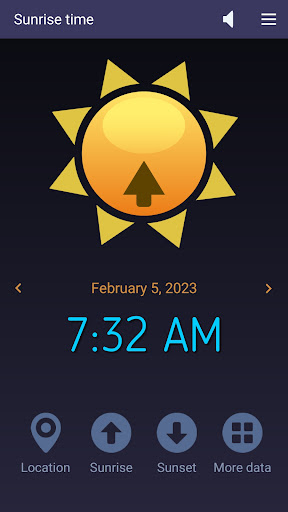


Informations sur l'application Solaris- sunrise, sunset times
Sources de téléchargement
Device Configuration
Guide d'installation des APKs divisées (Split APKs)
Certaines applications sont distribuées sous forme d'APKs divisées (plusieurs fichiers .apk groupés) pour optimiser les ressources. Les installateurs Android standard ne peuvent pas les ouvrir.
Nouveautés de Solaris- sunrise, sunset times
- Code optimization
- AM/PM option added
- Text to speech (English)
À propos de Solaris- sunrise, sunset times
This easy-to-use app accurately computes the sunrise and sunset times based on your current location and current day of the year. Also, it can show those solar times for yesterday and tomorrow if you tap the left or, respectively, right arrow buttons. Solaris works on tablets and smartphones connected to the Internet. At first, it gets the local coordinates (latitude and longitude) from your device's GPS and then retrieves the solar data from an Internet server. In addition to the time values we already mentioned, our app also reads the First and Last Light times, Dawn and Dusk moments, Solar Noon, Golden Hour, and Day Length and shows them when you tap the four-dots button.
What do these solar data indicate?
Sunrise and Sunset times are determined by the position of the sun relative to the observer on the Earth's surface. Latitude affects sunrise and sunset times because it determines the observer's position north or south of the equator, which affects the angle at which the sun's rays reach the surface. The closer a location is to the equator, the more directly overhead the sun will be at solar noon, leading to faster sunrise and sunset times. Longitude affects sunrise and sunset times because it determines the observer's position east or west of the Prime Meridian, which affects the observer's local time. A location that is further west will have an earlier sunrise and a later sunset compared to a location that is further east.
First light is the first appearance of natural light in the morning, before sunrise. It signals the beginning of a new day.
Dawn is the period of time between first light and sunrise, characterized by a gradual brightening of the sky.
Dusk is the period of time between sunset and nightfall, also characterized by a gradual darkening of the sky.
Solar noon is the time when the sun is at its highest point in the sky, and is directly overhead at the observer's location. It occurs at different times for different longitudes and occurs twice a year for a location on the equator.
The Golden Hour mostly refers to the last hour of sunlight in the day, when the sun is low on the horizon and the light is soft and warm. Photographers often prefer to take photos during the golden hour because of the quality of the light.
How it works
When it starts, Solaris shows the sunrise time in the universal 24-hour format (tap this label once for the AM/PM format).
- To find the sunset time, tap the Sunset button.
- Tap the Four-dots button for more solar data.
- Tap the Speaker button to toggle the text-to-speech feature on and off.
- Tap the Location button to refresh your GPS position (if it has changed since your last run).
Features
-- accurate sunrise and sunset times
-- short measurement interval
-- simple, intuitive commands
-- AM/PM option
-- Text-to-speech capability
-- free app - no ads, no limitations
Comment télécharger l'APK de Solaris- sunrise, sunset times
- Entrez le nom du paquet
com.microsys.Solarissur APK Downloader. - Sélectionnez l'architecture de votre appareil (ARM64 recommandé pour les appareils récents).
- Cliquez sur Télécharger pour obtenir le fichier APK fusionné.
- Transférez et installez l'APK sur votre appareil Android.
- Restez à jour: Visitez régulièrement APKDER.COM pour rechercher et télécharger les dernières versions sécurisées de vos applications préférées.
Foire aux questions
Oui ! Chaque téléchargement d'APK fourni par APKDER est soumis à une vérification de sécurité rigoureuse. Nous vérifions que la signature cryptographique du fichier APK correspond à la signature officielle du développeur, garantissant ainsi que l'APK est original, intact et exempt de toute modification.
Pour l'installer, vous devez d'abord activer les "Sources inconnues" dans les paramètres de sécurité de votre appareil Android. Après avoir téléchargé le fichier APK depuis APKDER, appuyez dessus pour lancer l'installation et suivez les instructions.
Oui ! Dès que le développeur publie une nouvelle version de Solaris- sunrise, sunset times, nous mettons à jour l'APK sur APKDER. Vous pouvez simplement télécharger et installer le nouvel APK par-dessus l'ancien sans perdre vos données.
Oui. APKDER vous permet de contourner les restrictions géographiques et de télécharger directement les fichiers APK officiels, même si l'application ou le jeu n'est pas officiellement disponible dans le store de votre pays.
Un APK standard est un paquet d'installation unique. Un XAPK ou un APK divisé (Split APK) contient plusieurs fichiers de ressources (comme les extensions OBB ou des fichiers de mise en page spécifiques) packagés ensemble. Pour les installer, vous pouvez les télécharger individuellement ou utiliser des outils comme Split APKs Installer (SAI).
Sécurité et Vérification de Signature
Ce téléchargement APK est 100% sûr. Nous vérifions que la signature cryptographique du fichier correspond aux informations d'identification officielles du développeur. Aucune modification ni adware n'est injecté.


