
Sources de téléchargement
Device Configuration
Guide d'installation des APKs divisées (Split APKs)
Certaines applications sont distribuées sous forme d'APKs divisées (plusieurs fichiers .apk groupés) pour optimiser les ressources. Les installateurs Android standard ne peuvent pas les ouvrir.
Applications Connexes


Nouveautés
- Added 590+ new Icons.
- Total icons 28 000+.
- Search Widget: added theme and feature settings.
- Redesigned some Icons.
- Fixed non apply icons.
À propos de cette application
Experience the next level of Android customization with PixChroma!
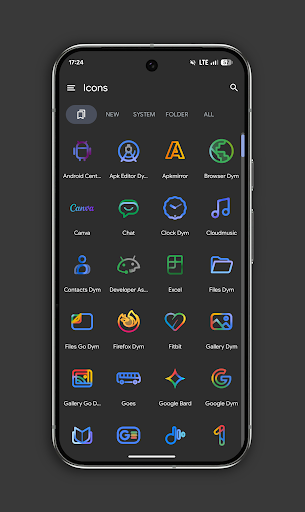
Inspired by the latest design language of Google services, this pack combines the elegance of minimalist linear design with the energy of vibrant chroma gradients. Each icon is a masterpiece, handcrafted to bring a clean, premium, and futuristic look to your home screen.
Why PixChroma? ✨
• Massive Library: Over 27,500+ high-quality icons. We’ve got almost every app covered! 📱
• Unique Chroma Gradients: Carefully selected palettes with a soft glowing effect. 🎨
• Widgets (BETA): Includes a stylish clock and a Gemini-style search bar to complete the look. 🔍
• Frequent Updates: The pack is constantly growing with new icons and widgets added regularly. 🚀
What’s included right now? 📦
• 27,500+ Icons (and counting!)
• Exclusive Wallpapers designed to match the Chroma style.
• Easy Icon Request: Can't find your favorite app? Send us a request!
• Launcher Support: Works with Nova, Lawnchair, Smart Launcher, Niagara, Hyperion, Samsung(with Theme Park), OnePlus, and more.
Widgets in Beta Stage for Android 12+ 🛠️
Currently, the app features essential widgets to get you started:
1. Chroma Clock – Sleek analog and digital timepieces. 🕒
2. Search Bar – A futuristic search interface inspired by the latest AI designs.
We are actively developing new widgets for weather, calendar, and system info to be released in upcoming updates!
How to set up? ⚙️
1. Install a supported launcher.
2. Open PixChroma and go to the Apply section.
3. Select your launcher.
4. Enjoy the transformation! ✨
Have questions or feedback? Contact us in "technical support" in telegram:
https://t.me/devPashapuma
Comment télécharger l'APK de PixChroma Icons and Widgets
- Entrez le nom du paquet
com.pashapuma.pix.chroma.iconssur la page d'accueil d'APK Downloader. - Sélectionnez l'architecture de votre appareil (ARM64 recommandé pour les appareils récents).
- Cliquez sur Télécharger pour obtenir le fichier APK fusionné.
- Transférez et installez l'APK sur votre appareil Android.
- Restez à jour: Visitez régulièrement APK Downloader pour rechercher et télécharger les dernières versions sécurisées de vos applications préférées.
Sécurité et Vérification de Signature
Ce téléchargement APK est 100% sûr. Nous vérifions que la signature cryptographique du fichier correspond aux informations d'identification officielles du développeur. Aucune modification ni adware n'est injecté.