



Sources de téléchargement
Device Configuration
Guide d'installation des APKs divisées (Split APKs)
Certaines applications sont distribuées sous forme d'APKs divisées (plusieurs fichiers .apk groupés) pour optimiser les ressources. Les installateurs Android standard ne peuvent pas les ouvrir.
Nouveautés
Improvements and bug fixes.
À propos de cette application
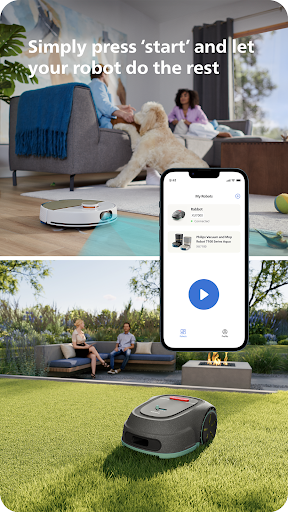
Unlock the full potential of your Philips HomeRun robot. Tell it exactly how and when to clean each room and mow your lawn. Then, relax.
With the Philips HomeRun Robot app you can:
● Start, pause or stop cleaning and mowing remotely
● Make a precise map of your home to clean each room in no time
● Control where your robot cleans and mows
● Choose a cleaning mode per room and mowing mode per lawn
● Set up once, enjoy spotless floors and lawns daily
● Custom clean and mow for specific situations
● Get step-by-step guidance to set up easily
● Receive progress updates on each clean and mow
● Keep your data secure
Start, pause or stop your robot remotely
Come home to clean floors and a perfect-looking garden every day by using your Philips HomeRun vacuum, mop, and lawn mowing robot in combination with the app. Set it up once—to clean each room and mow your lawn just the way you like it—touch ‘Start’, anytime, anywhere, and let your robot do the rest.
On its first run, your robot will map your floor plan and garden. Now you have an interactive map of your home that you can use to tell your robot how and when to clean each room or to monitor how your lawn is mowed. The robot vacuum cleaner can store up to five maps.
Control where your robot vacuum cleaner cleans
Only want your robot to clean the kitchen, bathroom, living room? With the app, you can tell your robot which rooms you want cleaned, and in what order. If there are areas or things you’d like it to avoid—like precious items or a rug in an area you want to mop—you can tell it where not to go, or not to mop, as well.
Choose a cleaning mode for each room and mowing mode for each lawn
Give each room unique attention with one of the cleaning modes and mowing modes for your lawn. Use Dry mode to vacuum the bedroom and Wet & Dry mode to vacuum and mop hard floors. Put your robot on Quiet mode if, say, you have a meeting, or give the kitchen an extra thorough clean by using Intensive mode. Choose a mowing mode for your lawn to get the perfect looking garden.
Set up once. Enjoy spotless floors and lawns every day
Once you’ve created a cleaning and mowing plan, clean floors and perfectly mowed lawns are always a tap away. Tap ‘Start’ when you want your robot to begin - every day if you like, and at a time that suits your schedule.
Custom clean for specific situations
Had friends over and need an extra thorough clean? Or maybe the dog left paw prints in your hallway. Again. Schedule a custom clean and mow that targets specific rooms, areas.
Get step-by-step guidance to setup easily
From connecting to Wi-Fi to the first clean and mow, we’ll guide you through every step of getting started. You’ll find easy-to-follow instructions and how-to-videos as well.
Always have support at your fingertips
Have extra questions about the HomeRun app and robot? You’ll find a user manual in the app, answers to FAQs and easy access to Customer Care if need be.
Receive progress updates
As your robot cleans and mows, you’ll receive in-app updates. See where your robot currently is in your home and what the robot mowing progress is in your garden. Check on its battery levels and, most importantly, get notified as soon as the cleaning run or mowing is done
Maintain high performance
Get the best performance from your robot by replacing parts on time. Our app lets you know when it’s time to replace parts like filters, mops, and blades, and makes it easy to order them.
Keep your data secure
Philips adheres to a strict privacy policy. We recommend creating an account to ensure you can save your preferences. If you prefer, you can use the app as a guest.
WiFi
Philips HomeRun robot vacuum cleaners have dual band Wi-Fi so they are easy to connect to your home Wi-Fi, whether it's to 2.4 or 5.0GHz. Robot lawn mowers only connect to your 2.4GHz home Wi-Fi.
Need help?
Visit www.Philips.com to find answers to our most frequently asked questions, or get in touch with our Consumer Care team.
Avis des utilisateurs

Le robot me fait régulièrement une nouvelle carte ! Et là la dernière qu'il m'a faite, on dirait l'ancienne, mais il a décalé les couleurs des pièces, et donc il nettoie "décalé". J'ai voulu prendre une ancienne carte que j'avais enregistré, mais le robot ne se voit pas à sa position !! alors que je n'ai jamais bougé la position du robot !

Je trouvais jusque maintenant l'application plutôt simple et le robot très astucieux. Mais depuis quelque temps, au lieu de faire des lignes de nettoyage bien parallèles comme avant, il s'embrouille à faire des zigzags dans des pièces très simples, demande de retirer des obstacles alors qu'il n'y en a pas, se perd pour retrouver sa base, etc. C'est assez incompréhensible.

Application simple au départ mais qui se dégrade avec le temps. Le robot ne fait plus des parcours logique, il cherche a refaire des cartes, il doit éteint et rallumé systématiquement etc ....... Aucune mise a jour de cette application pour corriger les bugs. Très en dessous de ce qu'on attend d'une marque comme Philips.

l'application fonctionne bien, seul bémol : le robot ne se vide jamais de son eau sale. il est censé le faire automatiquement et le bouton sur l'application permettant en principe de l'activer manuellement ne fonctionne pas non plus. a ce prix c'est dommage de vider la trappe a la main
Comment télécharger l'APK de Philips HomeRun Robot App
- Entrez le nom du paquet
com.philips.da.philipsrobotsur APK Downloader. - Sélectionnez l'architecture de votre appareil (ARM64 recommandé pour les appareils récents).
- Cliquez sur Télécharger pour obtenir le fichier APK fusionné.
- Transférez et installez l'APK sur votre appareil Android.
- Restez à jour: Visitez régulièrement APKDER.COM pour rechercher et télécharger les dernières versions sécurisées de vos applications préférées.
Foire aux questions
Oui ! Chaque fichier hébergé sur APKDER est soumis à une vérification rigoureuse. Nous vérifions que la signature cryptographique correspond à la signature officielle du développeur, garantissant que l'application n'a pas été modifiée ou altérée.
Pour l'installer, vous devez d'abord activer les "Sources inconnues" dans les paramètres de sécurité de votre appareil Android. Après avoir téléchargé le fichier APK depuis APKDER, appuyez dessus pour lancer l'installation et suivez les instructions.
Oui ! Dès que le développeur publie une nouvelle version de Philips HomeRun Robot App, nous mettons à jour l'APK sur APKDER. Vous pouvez simplement télécharger et installer le nouvel APK par-dessus l'ancien sans perdre vos données.
Sécurité et Vérification de Signature
Ce téléchargement APK est 100% sûr. Nous vérifions que la signature cryptographique du fichier correspond aux informations d'identification officielles du développeur. Aucune modification ni adware n'est injecté.


