
Sources de téléchargement
Device Configuration
Guide d'installation des APKs divisées (Split APKs)
Certaines applications sont distribuées sous forme d'APKs divisées (plusieurs fichiers .apk groupés) pour optimiser les ressources. Les installateurs Android standard ne peuvent pas les ouvrir.
Applications Connexes





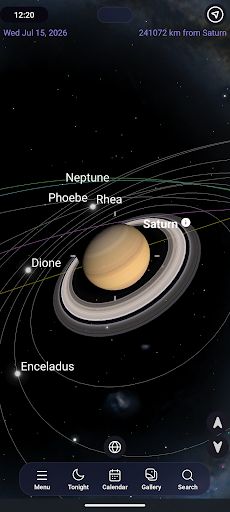

Nouveautés
Features:
- Custom Panorama
- Off-Earth Observing
- SkyPortal Enhancements
Improvements:
- Moon age and lunar magnitude.
- Planetary photometry
- Added additional non-Earth observing
- Improved support for Origin mosaics
Fixes:
- AstroBin imports to download the final image revision
- SmartEye settings launch behavior
- SmartEye date/time formatting issues.
- Night vision fixes
- Fixed drift warning issues.
- SmartEye control
À propos de cette application
SkySafari is a powerful planetarium that fits in your pocket, puts the universe at your fingertips, and is incredibly easy to use!
Simply hold your device to the sky and quickly locate comets, planets, constellations, satellites, and millions of stars and deep sky objects. Whether you are a beginner or a longtime astronomy enthusiast, SkySafari is your perfect stargazing companion, packed with interactive information, rich graphics, and a beautifully refined interface.
What’s New in Version 8
+ New Theme - A new look of the app with a fresh visual palette.
+ Image Gallery - Explore the universe through astrophotography. Import images directly from AstroBin.
+ Sky Tonight - Jump to the new Tonight section to see what’s visible in your sky right now. Expanded information has been designed to help plan your night and includes Moon & Sun info, calendar curations, and the best positioned deep sky and solar system objects.
If you're new to SkySafari, here’s what you can do:
+ Point & Identify - Hold your device to the sky and instantly identify stars, constellations, planets, satellites, and more. The chart updates automatically with your movements.
+ OneSky - See what other users are observing in real-time. This feature highlights objects in the sky chart and indicates how many users are looking at them.
+ Orbit Mode - Lift off from Earth and travel to the planets, moons, and stars.
+ Guided Audio Tours - Listen to more than four hours of audio narration to learn the history, mythology, and science of the heavens.
+ Pronunciation Guide - Learn how to correctly pronounce the names of hundreds of celestial objects, from stars to constellations and planets.
+ Simulate the Sky - See an eclipse in the past or future! Simulate the night sky from anywhere on Earth many years backward or forward in time.
+ Night Vision - Preserve your eyesight after dark.
SkySafari Premium Subscription Unlock amazing features with the optional Premium Subscription, including:
+ Massive Database - Access a massive deep sky database.
+ Custom Image Import - Upload and manage your own astrophotography images in the Image Gallery and show them in the sky chart.
+ Enhanced Tools - Access curated news, events, connected stargazing features, a light pollution map, and more.
For telescope control and even more advanced features, check out SkySafari 8 Plus and SkySafari 8 Pro!
https://play.google.com/about/play-terms/
Privacy Policy: https://www.livesky.com/privacy.html
Comment télécharger l'APK de SkySafari Astronomy
- Entrez le nom du paquet
com.simulationcurriculum.skysafari7sur la page d'accueil d'APK Downloader. - Sélectionnez l'architecture de votre appareil (ARM64 recommandé pour les appareils récents).
- Cliquez sur Télécharger pour obtenir le fichier APK fusionné.
- Transférez et installez l'APK sur votre appareil Android.
- Restez à jour: Visitez régulièrement APK Downloader pour rechercher et télécharger les dernières versions sécurisées de vos applications préférées.
Sécurité et Vérification de Signature
Ce téléchargement APK est 100% sûr. Nous vérifions que la signature cryptographique du fichier correspond aux informations d'identification officielles du développeur. Aucune modification ni adware n'est injecté.