
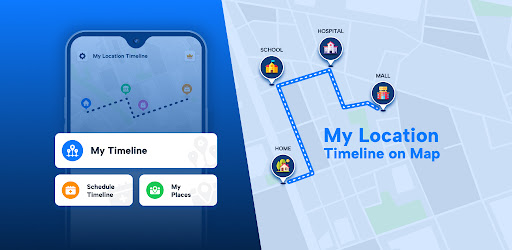
Captures d'écran de l'APK de My Location Timeline on Map


Informations sur l'application My Location Timeline on Map
Sources de téléchargement
Device Configuration
Guide d'installation des APKs divisées (Split APKs)
Certaines applications sont distribuées sous forme d'APKs divisées (plusieurs fichiers .apk groupés) pour optimiser les ressources. Les installateurs Android standard ne peuvent pas les ouvrir.
À propos de My Location Timeline on Map
Do want to know all details of your visited locations ??? Yes ?
In today's world, we all travel long routes & visit so many places in a day...& sometimes you might forget what was the place that you visited on so & so date and time. Use this app to save your travel timeline with all locations and time details. Get your visited places timeline - day by day or date by date.
App features :
- Get a timeline of all locations that you visited with details like location, time & duration.
- Track your all location details with timings.
- Check location history with pin code, city, state, country, from date to date & even you can share these all details with anyone.
- Get the current location marker with the full location address.
- Schedule your own Timeline & get reminders.
# Key Points:
1) My Timeline: In this feature, User will see full timeline of your visited places for any particular date from there & even calendar view is also available so user can pickup any date easily & see their timeline. If some of your location were not track by any situation & user remembered so user can use "Add new place below" feature & can add new places between locations.
-Location History: Get the full location address with pin code, city, state, country, from date to date & time details with map view of your location.
-Location Route: You will see the Full route of your noted timeline on Map view.
-Insights: User can see how many minutes they are walking , Running, Bicycling or Driving date by date & also access calendar view to see it.
2) My Places: User will get detail of a particular location by visits & by Time.
- By Visits: Get the list of a particular location by visits like 1 visit, 2 or more visits selecting from date to date.
- By Time: Get the list of a particular location based on Time like 2mins, 4mins etc. selecting from date to date.
3) Schedule Timeline : Users can schedule places by adding details like title, location, time, voice notes, reminders, photos, and text notes.
for an example if user entered Supermarket location with some of notes for 10:30 am then This app will give notification reminder at 10:20 am like you will supposed to be at Super Market at 10:30 am & also notify there notes if user entered so it's easy to get something with exact time right on the screen.
by this feature user can see their attend location & missed location by schedule.
They can set different themes for each location, create a full-day schedule, export it as a PDF, and share it with others. Shared schedules show the route on a map, and users can view their schedule timeline by date, including past entries and details.
Location permission: We Required this permission to allow you to get location and see location history with a timeline.
Physical Activity : We required this permission to allow you to see user activity on Map timeline how user move to one destination to other destination ex : by Walk, by running, by cycle, etc.
Audio Permission: We need this permission to allow you to use or add voice notes feature by scheduling your timeline.
Avis des utilisateurs

J'aime ce à ce genre d'application sauf que la là.. Ça pas grand chose à voir avec la description pour celle-ci...!! 🥺 Beaucoup de bugs et côté pubs ben c assez l'enfer disons!! 🤪 Il y a aucun moyen de corriger, modifier ou supprimer quoi que se soit et aucune précision GPS. Dsl mais je désinstalle!!

J'ai acheté la version complète, mais l'application bugge complètement ! Impossible d'enregistrer quoi que ce soit ! J'espère qu'une mise à jour va résoudre les problèmes !?

Changer la langue de cette application en français

pub sans cesse
Comment télécharger l'APK de My Location Timeline on Map
- Entrez le nom du paquet
com.sm.maptimelinesur APK Downloader. - Sélectionnez l'architecture de votre appareil (ARM64 recommandé pour les appareils récents).
- Cliquez sur Télécharger pour obtenir le fichier APK fusionné.
- Transférez et installez l'APK sur votre appareil Android.
- Restez à jour: Visitez régulièrement APKDER.COM pour rechercher et télécharger les dernières versions sécurisées de vos applications préférées.
Foire aux questions
Oui ! Chaque téléchargement d'APK fourni par APKDER est soumis à une vérification de sécurité rigoureuse. Nous vérifions que la signature cryptographique du fichier APK correspond à la signature officielle du développeur, garantissant ainsi que l'APK est original, intact et exempt de toute modification.
Pour l'installer, vous devez d'abord activer les "Sources inconnues" dans les paramètres de sécurité de votre appareil Android. Après avoir téléchargé le fichier APK depuis APKDER, appuyez dessus pour lancer l'installation et suivez les instructions.
Oui ! Dès que le développeur publie une nouvelle version de My Location Timeline on Map, nous mettons à jour l'APK sur APKDER. Vous pouvez simplement télécharger et installer le nouvel APK par-dessus l'ancien sans perdre vos données.
Oui. APKDER vous permet de contourner les restrictions géographiques et de télécharger directement les fichiers APK officiels, même si l'application ou le jeu n'est pas officiellement disponible dans le store de votre pays.
Un APK standard est un paquet d'installation unique. Un XAPK ou un APK divisé (Split APK) contient plusieurs fichiers de ressources (comme les extensions OBB ou des fichiers de mise en page spécifiques) packagés ensemble. Pour les installer, vous pouvez les télécharger individuellement ou utiliser des outils comme Split APKs Installer (SAI).
Sécurité et Vérification de Signature
Ce téléchargement APK est 100% sûr. Nous vérifions que la signature cryptographique du fichier correspond aux informations d'identification officielles du développeur. Aucune modification ni adware n'est injecté.


