
Sources de téléchargement
Device Configuration
Guide d'installation des APKs divisées (Split APKs)
Certaines applications sont distribuées sous forme d'APKs divisées (plusieurs fichiers .apk groupés) pour optimiser les ressources. Les installateurs Android standard ne peuvent pas les ouvrir.
Applications Connexes


Nouveautés
Thanks for using The Metronome by Soundbrenner! We update our app regularly with new features, bug fixes and performance improvements. For more information about the latest update, go to "Settings" inside the app and check "What's new".
À propos de cette application
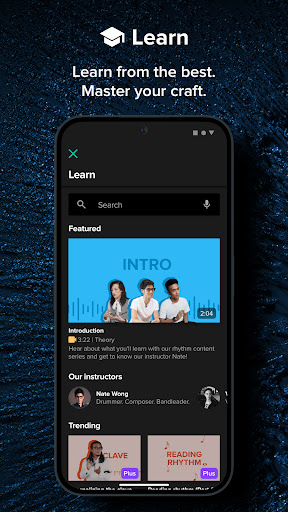
The Metronome by Soundbrenner is the world’s leading metronome app and practice tracker, trusted by over 10 million musicians. Featured in NAMM, Rolling Stone, MusicRadar, and more, it’s an essential tool for every musician.
Unlock the full benefits of metronome practice to enhance your tempo and achieve rock-solid precision. Whether you play guitar, drums, piano, or any other instrument, The Metronome by Soundbrenner helps you stay motivated by tracking your practice hours. Perfect for daily practice, live performances, and recording sessions, The Metronome by Soundbrenner is your ultimate companion on the journey to musical mastery.
FREE FEATURES:
METRONOME - An easy-to-use metronome interface, packed with all the features you need to upgrade your tempo and track your progress.
SUPPORTS ALL RHYTHMS - Customize the metronome’s time signature, subdivision, and beat accents to suit any rhythm.
CLOCK - Ultra-precise metronome clock, ensuring absolute accuracy during your most demanding practice sessions.
TAP TEMPO - Instantly set the metronome’s tempo by tapping along to the beat, perfect for quickly matching your rhythm.
SETLIST MANAGEMENT - Save your presets and load them into the metronome anytime you need them.
SOUNDS - Choose from 20+ metronome sounds and practice to the beat of your favorite sound.
VISUAL EFFECTS - Practice with customizable visual effects that help you stay perfectly in sync with the metronome.
COUNT-IN - Set a customizable count-in to ensure you’re perfectly prepared when the metronome kicks in.
PRO-LEVEL COMPATIBILITY - Connect the metronome effortlessly to your digital and hardware gear with advanced features like USB MIDI, Bluetooth MIDI, and Ableton Link.
THEMES - Tailor the look of your metronome with dark and light themes to suit any practice setting.
PRACTICE TRACKER - Track your progress, fuel your motivation, and reach your musical goals with detailed practice tracking.
TRACK INSTRUMENTS - Monitor your practice hours separately for each instrument you play.
STREAKS - Set your goals, track your practice, maintain your streak, and keep the momentum going in your routine.
PRACTICE REMINDERS - Set one-time or recurring reminders to stay on track and continue improving.
HIGHSCORES - Challenge yourself by tracking your top practice sessions and striving to surpass your personal bests.
SOUNDBRENNER PLUS FEATURES:
INCREMENTAL TEMPO CHANGE - Push your limits with metronome tempos that gradually increase, testing your precision and timing.
MUTED BEATS TRAINER - Train your inner clock by periodically muting the metronome.
LIBRARY CLOUD SYNC - Your songs and setlists are automatically backed up and synced across all your devices, so you can play them in the metronome anytime.
WHAT EXPERTS ARE SAYING:
• “I install The Metronome by Soundbrenner first on every new phone” ― Android Central
• “Best in Show” ― The NAMM Show
• “One of the best drum innovations” ― MusicRadar
• “The best metronome app” ― WIRED
“It’s sleek and easily understood in seconds. And the controls are great. Fast and intuitive. The Metronome by Soundbrenner is what all musicians need to practice their tempo.” ― Pete Korpela (Drummer, Grammy-nominated, played with Robbie Williams, Disturbed, Hans Zimmer, and many more)
ABOUT SOUNDBRENNER:
Visit https://www.soundbrenner.com to explore our metronomes and other innovative music tools that remove the hassle from your practice.
FOLLOW US:
• Instagram: https://www.instagram.com/soundbrenner
• Facebook: https://www.facebook.com/soundbrenner
• YouTube: https://www.youtube.com/soundbrenner
• X: https://www.x.com/soundbrenner
Comment télécharger l'APK de The Metronome by Soundbrenner
- Entrez le nom du paquet
com.soundbrenner.pulsesur la page d'accueil d'APK Downloader. - Sélectionnez l'architecture de votre appareil (ARM64 recommandé pour les appareils récents).
- Cliquez sur Télécharger pour obtenir le fichier APK fusionné.
- Transférez et installez l'APK sur votre appareil Android.
- Restez à jour: Visitez régulièrement APK Downloader pour rechercher et télécharger les dernières versions sécurisées de vos applications préférées.
Sécurité et Vérification de Signature
Ce téléchargement APK est 100% sûr. Nous vérifions que la signature cryptographique du fichier correspond aux informations d'identification officielles du développeur. Aucune modification ni adware n'est injecté.