
Sources de téléchargement
Device Configuration
Guide d'installation des APKs divisées (Split APKs)
Certaines applications sont distribuées sous forme d'APKs divisées (plusieurs fichiers .apk groupés) pour optimiser les ressources. Les installateurs Android standard ne peuvent pas les ouvrir.
Applications Connexes




Nouveautés
New Pro feature: 149 Live Assistant - Create events with your voice!
À propos de cette application
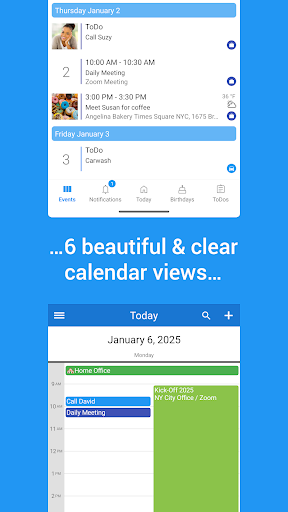
149 Live Calendar is an all-in-one calendar app, planner, task manager, family calendar, and shared calendar designed for individuals, families, and teams. Sync Google Calendar, Outlook, Office 365, Exchange, and other calendars into one beautiful, ad-free calendar app and manage your schedule, appointments, reminders, events, and tasks from a single place.
Whether you need a personal planner, a family calendar to coordinate family schedules, a shared calendar for collaboration, or a business calendar for appointment scheduling, 149 Live Calendar helps you stay organized and productive every day.
CALENDAR APP & PLANNER
• Sync Google Calendar, Outlook, Office 365, Exchange, and more
• View all your calendars in one place
• Day, week, month, year, agenda, and map views
• Color-code events and appointments with more than 40 colors
• Add photos, notes, locations, and categories to events
• Reliable reminders and notifications
• Automatic birthday reminders for your contacts
• Beautiful home screen widgets
FAMILY CALENDAR & SHARED CALENDAR
Coordinate busy schedules effortlessly with a family calendar and shared calendar designed for modern families.
• Share calendars with your partner, children, relatives, or friends
• Create a dedicated family calendar for appointments, birthdays, school events, vacations, and activities
• Share shopping lists and to-do lists
• Keep private and family events separate
• Stay always up-to-date with change notifications
• Track any modifications with change history
TASKS, TO-DO LISTS & REMINDERS
• Manage to-do lists, shopping lists, and reminders
• Sync with Google Tasks
• View tasks directly in your calendar
• Organize tasks with categories, priorities, and colors
• Stay on top of recurring tasks and important deadlines
• Access tasks and reminders through widgets and calendar views
TEAM CALENDAR & COLLABORATION
Use 149 Live Calendar as a team calendar for projects, departments, clubs, organizations, and businesses.
• Share calendars and task lists with colleagues
• Create calendars for individual teams or projects
• Track changes with detailed history
• Manage permissions and access rights
• Receive updates when events or tasks change
BUSINESS CALENDAR & APPOINTMENT SCHEDULING
Whether you are a freelancer, consultant, service provider, or growing business, 149 Live Calendar helps streamline appointment scheduling and team coordination.
• Create booking pages that allow clients to book appointments directly
• Manage calendars and task lists for multiple teams
• Invite colleagues, customers, and partners to meetings
• Communicate easily with event participants and guests
• Export calendar data to CSV for use in other applications
SMART LOCATION & TRAVEL FEATURES
• View all destinations of day or week directly on one map
• Get local weather forecasts for event locations
• Discover nearby places around your destinations
SYNC, BACKUP & DATA MANAGEMENT
• Synchronize data across multiple devices
• Transfer calendars and tasks to a new device
• Create backups of important information
• Export calendar data whenever needed
UPGRADE TO PRO
Unlock more than 50 additional features designed for even more productivity.
• Add events using voice input and the AI-powered 149 Live Assistant
• Customize colors, fonts, layouts, and calendar views
• Instantly filter calendars with quick filters
• Print calendars in day, week, month, or list format
• Generate PDF versions of your calendar
• Add attachments to events and tasks
149 Live Calendar combines calendar management, family scheduling, shared calendars, team calendars, task management, reminders, appointment scheduling, and collaboration tools in a single powerful app. Whether you are organizing your personal schedule, coordinating family activities, managing projects, or running a business, 149 Live Calendar helps you stay organized and productive.
Comment télécharger l'APK de 149 Live Calendar & To-Do List
- Entrez le nom du paquet
com.tech149.android.apps.livesur la page d'accueil d'APK Downloader. - Sélectionnez l'architecture de votre appareil (ARM64 recommandé pour les appareils récents).
- Cliquez sur Télécharger pour obtenir le fichier APK fusionné.
- Transférez et installez l'APK sur votre appareil Android.
- Restez à jour: Visitez régulièrement APK Downloader pour rechercher et télécharger les dernières versions sécurisées de vos applications préférées.
Sécurité et Vérification de Signature
Ce téléchargement APK est 100% sûr. Nous vérifions que la signature cryptographique du fichier correspond aux informations d'identification officielles du développeur. Aucune modification ni adware n'est injecté.