
Sources de téléchargement
Device Configuration
Guide d'installation des APKs divisées (Split APKs)
Certaines applications sont distribuées sous forme d'APKs divisées (plusieurs fichiers .apk groupés) pour optimiser les ressources. Les installateurs Android standard ne peuvent pas les ouvrir.
Applications Connexes


Nouveautés
INTRODUCING PAYMENT LINKS:
- We now support Payment Links. Create, share, and track payment links directly from the app, making it easier than ever to collect payments and keep your business moving.
Do show us some love by leaving a review in the Play Store if you find the app useful. You can also share your feedback and suggestions by sending an email to [email protected]
À propos de cette application
"Bigin by Zoho CRM is a solid pipeline-based CRM solution for small business that is equally effective on PCs and on mobile devices." - PCMag
Bigin is the #1 choice for small business owners looking for a CRM that can be set up in under 30 minutes, seamlessly integrate with your favourite apps, help you manage your customer relationships, and ultimately grow your business faster.
Plug and play simplicity
Easy to use, with almost no learning curve.
Ready-made templates for any business type. No customisation needed, and definitely no tedious setup!
Straightforward layout and design
Simple and predictable navigation
Data migration is a breeze
Seamless integration with Google Workspace, Microsoft Office 365, Mailchimp, Zoho CRM, Zoom, and other top business apps.
Features tailored to the needs of small businesses
Create and manage individual deal pipelines for each of the different processes in your day-to-day sales cycle.
Look up deal and contact data instantly
Add notes and update records with ease
Schedule events, tasks and calls, and set reminders from your app
Capture leads from your website through customisable webforms
Make every call more personal and productive with the built-in telephony feature
Pick a template for your business and get started right away
Set up or schedule workflows and let Bigin handle your daily routine automatically
A dashboard that gives you a visual overview of business performance using analytics charts, KPIs, and other critical metrics.
Business on the go
Continue working away from your desk with dedicated mobile and tablet apps.
Access to important information on the move, such as customer interactions and contact history
Keep your business-critical information available at a glance with widgets
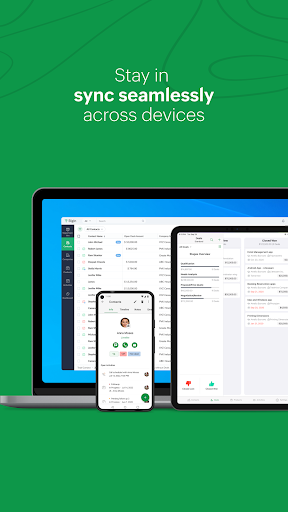
Enjoy the pipeline view on the device of your choice
Get push notifications on all customer and user activity
Customer support round the clock
Assistance from our customer-focused staff of technical engineers
A handy knowledge base that includes resources such as FAQs and Help Docs.
The Bigin community is always ready to provide a helping hand.
Get to know which contact calls you via the caller ID functionality.
Comment télécharger l'APK de Bigin by Zoho CRM
- Entrez le nom du paquet
com.zoho.biginsur APK Downloader. - Sélectionnez l'architecture de votre appareil (ARM64 recommandé pour les appareils récents).
- Cliquez sur Télécharger pour obtenir le fichier APK fusionné.
- Transférez et installez l'APK sur votre appareil Android.
- Restez à jour: Visitez régulièrement APKDER.COM pour rechercher et télécharger les dernières versions sécurisées de vos applications préférées.
Sécurité et Vérification de Signature
Ce téléchargement APK est 100% sûr. Nous vérifions que la signature cryptographique du fichier correspond aux informations d'identification officielles du développeur. Aucune modification ni adware n'est injecté.