




Sources de téléchargement
Device Configuration
Guide d'installation des APKs divisées (Split APKs)
Certaines applications sont distribuées sous forme d'APKs divisées (plusieurs fichiers .apk groupés) pour optimiser les ressources. Les installateurs Android standard ne peuvent pas les ouvrir.
Nouveautés
🩺 Performed a general stability sweep, addressing various user-reported issues
🧠 Resolved several rare “App Not Responding” scenarios to keep the experience smooth
📱 Improved compatibility with the latest Android version
🧰 Updated internal libraries and dependencies
À propos de cette application
Ultimate Video Editor - the easiest way to Cut, Crop, Blur and Trim Videos. Edit Videos like a PRO with Video Cutter and Video Trimmer features!
The easiest way to Cut, Crop, and Trim Videos!
Video Cutter & Trimmer helps you trim and crop video, removing unwanted portions. You can blur video as well, or avoid cropping and enhance video colors easily like in Photoshop. Simple video editor for all your needs!
Edit Videos like a PRO
Simple to use drag and scale part of the video that you want to crop, blur or select the trim interval. You can crop, trim, blur video, and enhance colors for the social networks. Create a masterpiece and share it with friends on social media with ease. All video editing tools that you need in one place!
Cool Features of Trim & Crop Video Editor:
Crop video - Use the video resizer feature to resize the video to the size that meets your needs. There are various options available, where you can choose from predefined sizes to any custom size!
Trim and cut video - The video trimmer feature enables you to set the video's interval that you want to trim. When you set it, tap the button and get it done!
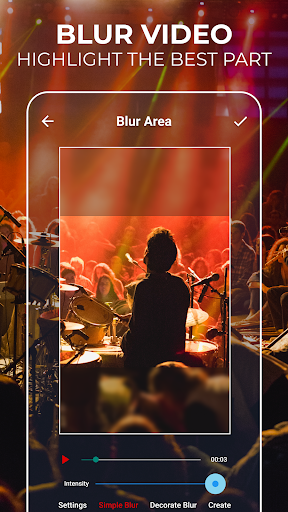
Blur video - Do you want to blur video parts, some faces, or any other area of the video? Just use the blur video feature, and the problem is solved!
No crop video - Use the video's full size and make it fit without cropping. No crop video feature offers you more predefined and most often used aspect ratios, but you can also set a custom one.
Enhance video color - Select specific parts of your video and adjust colors. Change the saturation and make it more vibrant!
No watermark - You can edit videos without any watermark!
Social networks - Post your creative usage of our app on social networks, get followers or views, and you can get featured in our app! Crop and Cut Video for your social media!
Share videos - Share your video editing creations with your friends or with your community and let them know about your creative work.
Unique Video Cutter & Trimmer
If you need a quick and easy way to cut videos - you found it! Video Cutter with all the editing tools you need. Most importantly, it's easy to use! Edit videos easily with the best video editing tool. Cut & Crop Video instantly!
Blur Video Easily
Yes, we have this great feature as well! Blur video parts easily and create unique content.
Video Trimmer
Set the video's interval that you want to trim, and it's done!
Video crop, cut & trim - How to edit videos?
✔ Select the video
✔ Set trim or blur position with width and height or select the interval to cut videos
✔ Click on the crop, trim, enhance colors or blur video
✔ Preview and share
✔ Easy video cutter, cropper, trimmer, or enhancer
For any suggestions, contact us at [email protected]
The only video cutter and trimmer you'll ever need!
Edit Video like a PRO and share it with your friends on Instagram and TikTok easily!
Start using a video editor app with amazing features and make your video more engaging! Blur video parts, enhance colors, trim, crop video, or use the no crop video feature - Show your video editing skills!
Disclaimer
All product names, logos, brands, trademarks and registered trademarks, which are not owned by us, are property of their respective owners.
All company, product and service names used in this app are for identification purposes only. Use of these names, trademarks and brands does not imply endorsement.
The Crop, Cut & Trim Video Editor app is owned by us. We are not affiliated, associated, authorized, endorsed by, or in any way officially connected with any 3rd party apps or companies.
Avis des utilisateurs

Plutôt satisfait 😁 Il y a effectivement des pubs, mais j'utilise la version gratuite (qui pourtant est très performante), donc je comprends celà. Vu le fait que l'application est très complète et rapide, les pubs sont normales, il y a beaucoup de travail sur cette appli, il est normal de rémunérer d'une façon ou une autre ceux qui l'ont créé. Merci à vous !

Parfait pour recadrer,. Très bon pour retaillez même si ça manque un peu de précision, par exemple pour découpez en segment de 15 sec, ou 1mn ... ;) Le tout sans watermark ! Un peu de pub mais c'est normal et bien dosé. Du coup je vous mets dans mes crédit à chaque fois. Je n'ai pas encore eu besoin des autres fonctionnalités, je mettrai à jour mon avis quand ça sera le cas. Merci.
Je ne donne jamais mon avis mais la sa en vaut la peine. Une application au top, j'ai voulu rogner une vidéo qui ne rentrait pas et par tour les moyens j'ai essayé, jusqu'à perdre espoir... Mais j'ai quand même décider de regarder sur internet et un site ma conseillé votre application. Et je la valide, j'étais vraiment heureuse de pouvoir la garder ! D'apres les commentaires que j'ai lu, l'application a énormément progresser en 3 mois, bravo, continuez !! (merci beaucoup 😉)

Un véritable plaisir d'avoir une application aussi simple ! Oui le design est peut-être à revoir, il est vrai, mais est ce important ? Je cherchais une application pour recadrer ma vidéo, voilà le travail est fait ! 3 clics et j'ai finis, aucun symbole sur ma vidéo, juste une pub une fois le montage finis ce qui n'est absolument pas dérangeant. Je recommande
Comment télécharger l'APK de Crop, Cut & Trim Video Editor
- Entrez le nom du paquet
fnzstudios.com.videocropsur APK Downloader. - Sélectionnez l'architecture de votre appareil (ARM64 recommandé pour les appareils récents).
- Cliquez sur Télécharger pour obtenir le fichier APK fusionné.
- Transférez et installez l'APK sur votre appareil Android.
- Restez à jour: Visitez régulièrement APKDER.COM pour rechercher et télécharger les dernières versions sécurisées de vos applications préférées.
Sécurité et Vérification de Signature
Ce téléchargement APK est 100% sûr. Nous vérifions que la signature cryptographique du fichier correspond aux informations d'identification officielles du développeur. Aucune modification ni adware n'est injecté.


