
Sources de téléchargement
Device Configuration
Guide d'installation des APKs divisées (Split APKs)
Certaines applications sont distribuées sous forme d'APKs divisées (plusieurs fichiers .apk groupés) pour optimiser les ressources. Les installateurs Android standard ne peuvent pas les ouvrir.
Applications Connexes




Nouveautés
* Reorganized the information screens on top of the Home page to improve visibility of the button to open sightings list.
* Replaced "today" and "tomorrow" phrases with actual dates in notifications and sightings list to avoid confusion.
* Optimized the dynamic sizing of the 3D globe view on Home and Tracker pages.
* Enabled pinch-to-zoom functionality on the 3D view of the Tracker and Home pages.
* Other bug fixes and third-party software maintenance updates.
À propos de cette application
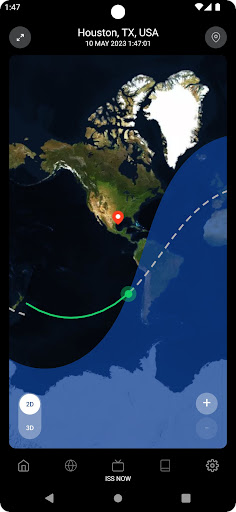
For anyone who has ever gazed up at the night sky and wondered about the mysteries of the universe, witnessing the ISS pass overhead can be an awe-inspiring moment. The Spot the Station mobile app is designed to notify users when the International Space Station (ISS) is visible overhead from their location. It aims to broaden access and awareness of the ISS and NASA globally, by providing users with an opportunity to experience the wonder of the ISS firsthand. The realization that there are human beings living and working in that tiny dot, orbiting the Earth at a mind-boggling speed of 17,500 miles per hour, is breathtaking. The app includes several helpful features including: 1. 2D & 3D real-time location views of the ISS 2. Upcoming Sighting Lists with visibility data 3. Augmented Reality (AR) view with compass and trajectory lines embedded into the camera view 4. Up-to-date NASA ISS Resources & Blog 5. Privacy Settings 6. Push Notifications when the ISS is approaching your location
Comment télécharger l'APK de Spot the Station
- Entrez le nom du paquet
gov.nasa.hq.SpotTheStationsur la page d'accueil d'APK Downloader. - Sélectionnez l'architecture de votre appareil (ARM64 recommandé pour les appareils récents).
- Cliquez sur Télécharger pour obtenir le fichier APK fusionné.
- Transférez et installez l'APK sur votre appareil Android.
- Restez à jour: Visitez régulièrement APK Downloader pour rechercher et télécharger les dernières versions sécurisées de vos applications préférées.
Sécurité et Vérification de Signature
Ce téléchargement APK est 100% sûr. Nous vérifions que la signature cryptographique du fichier correspond aux informations d'identification officielles du développeur. Aucune modification ni adware n'est injecté.