
Sources de téléchargement
Device Configuration
Guide d'installation des APKs divisées (Split APKs)
Certaines applications sont distribuées sous forme d'APKs divisées (plusieurs fichiers .apk groupés) pour optimiser les ressources. Les installateurs Android standard ne peuvent pas les ouvrir.
Applications Connexes




Nouveautés
Security upgrades to the app
À propos de cette application
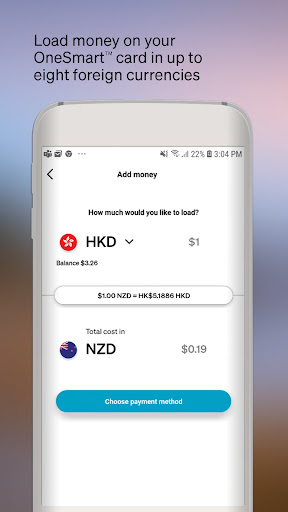
The OneSmart™ app, brought to you by Air New Zealand, is the perfect companion to your OneSmart account allowing you to manage your money on the go. To access the OneSmart app you will first need an activated OneSmart account.
With this app, you can:
• Load money into your OneSmart account
• Check the balances of each currency in your OneSmart account
• Easily transfer funds between currencies
• Review your transaction history
• Change your password
• View your Airpoints Dollar™ balance
• Block and unblock your card
• Set up spend alerts
Get smarter now:
• Simply install this app and login using the last four digits of your OneSmart card, email address and password.
Find out more about the OneSmart app at airnzonesmart.co.nz/
Air New Zealand Airpoints Programme Terms and Conditions apply.
EML Payment Solutions Limited (8079483) is the issuer of the OneSmart Account. Terms and Conditions and fees apply see https://www.airnzonesmart.co.nz/
Comment télécharger l'APK de Air New Zealand OneSmart
- Entrez le nom du paquet
nz.co.airnz.onesmartsur la page d'accueil d'APK Downloader. - Sélectionnez l'architecture de votre appareil (ARM64 recommandé pour les appareils récents).
- Cliquez sur Télécharger pour obtenir le fichier APK fusionné.
- Transférez et installez l'APK sur votre appareil Android.
- Restez à jour: Visitez régulièrement APK Downloader pour rechercher et télécharger les dernières versions sécurisées de vos applications préférées.
Sécurité et Vérification de Signature
Ce téléchargement APK est 100% sûr. Nous vérifions que la signature cryptographique du fichier correspond aux informations d'identification officielles du développeur. Aucune modification ni adware n'est injecté.