
PrinterShare Mobile Print APK स्क्रीनशॉट


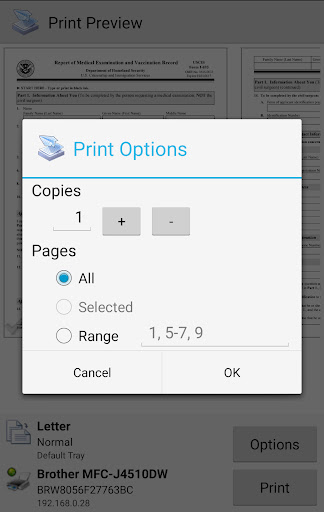

PrinterShare Mobile Print ऐप की जानकारी
डाउनलोड स्रोत
Device Configuration
PrinterShare Mobile Print के पुराने संस्करण
| Version | Size | Min OS | Architecture | Release Date | Action |
|---|---|---|---|---|---|
| v11.24.0 | 1.7 MB | Android 16+ | Jun 29, 2026 | Download |
स्प्लिट एपीके (Split APK) स्थापना गाइड
कुछ ऐप्स स्प्लिट एपीके (एक साथ पैक की गई कई .apk फाइलें) के रूप में वितरित किए जाते हैं। मानक एंड्रॉइड इंस्टॉलर उन्हें खोल नहीं सकते हैं।
PrinterShare Mobile Print में नया क्या है
bug fixes
PrinterShare Mobile Print के बारे में
Print directly from Android phone or tablet to almost any printer! Print photos, emails, documents (including PDF, Microsoft® Word, Excel®, PowerPoint®, and other files), bills, invoices, messages, web pages, and more. PrinterShare makes printing easy and convenient whether your printer is right next to you or across the world!
IMPORTANT: Some of the features are NOT FREE! To unlock these features, you would need to make a purchase to unlock the Premium Features of the free app. We highly recommend printing the test page to ensure compatibility with your printer prior to making a purchase.
NOTE: Due to the update to the Permissions policy on Google Play, we had to remove the SMS and Call log printing features from our app.
With PrinterShare you can easily print images and photos (JPG, PNG, GIF), emails (from Gmail) and attachments (PDF, DOC, XLS, PPT, TXT), contacts, agenda, web pages (HTML), and other digital content from device memory, cloud storage providers such as Google Drive, One Drive, Box, Dropbox and other applications using Share action. You even can print text messages for trial or legal matters!
Print UPS shipping labels directly from a browser on your device to supported thermal printers by logging into the UPS website.
Also, you can configure many printing options such as paper size, page orientation, copies, page range, one- or two-sided printing (duplex mode), print quality (resolution), color or monochrome, media tray, and more.
With the free version of the app, you can:
* Print with certain restrictions on nearby wireless (WiFi, Bluetooth) and direct USB OTG connected printers;
* Print on Windows shared (SMB/CIFS) or Mac shared printers;
Premium Features include:
* Unlimited Nearby direct printing (PDFs, documents, photos, and more) via Wi-Fi or Bluetooth without a computer;
* Complimentary 100 pages for Remote Printing under the same account
PrinterShare supports a wide variety of HP, Canon, Brother, Kodak, Samsung, Dell, Ricoh, Lexmark, Kyocera, OKI, and other printers including legacy networkable. A full list of supported printers available at http://printershare.com/help-mobile-supported.sdf. You can also print to unsupported and legacy printers with our free computer software for Mac and Windows available at http://printershare.com.
Here is the list of printers supported by the PrinterShare app:
http://www.printershare.com/help-mobile-supported.sdf
Make sure that your printer is supported.
Please note:
1) Requested permissions are needed to print content and are not used to collect your personal data. For a more detailed explanation please see our FAQ at http://www.printershare.com/help-mobile-faq.sdf
2) If something isn't working as expected, please send us an email to [email protected]
Have a good print!
P.S. For direct nearby printing to selected printer models PrinterShare downloads and uses drivers provided by HPLIP (http://hplipopensource.com) and GutenPrint (http://gimp-print.sourceforge.net). These drivers are distributed under GNU General Public License, version 2.
उपयोगकर्ता समीक्षाएं

क्या तारीफ करू शब्द नहीं मुझ गरीब के पास

इस अॅप ने पहले तो अच्छा काम किया मगर बाद में प्रिंट निकलने में बहुत समय लगने लगा।बकवास अॅप। अपने आप को ठगा हुआ महसूस कर रहा हूं। कोई संपर्क नंबर भी नहीं है।
पहले यह एप्स बहुत अच्छा काम कर रही थी मगर अब नया अपडेट करने के बाद बिल्कुल अच्छा काम नहीं कर रही है और इसमें पैसे भी लगने लगे हैं

बहुत शानदार ऐप है। आसानी से मोबाइल से कोई भी डाक्यूमेंट्स ,फोटो प्रिंट कर सकते हैं। थोड़ी प्रिंट की स्पीड कम है बाकी सब ठीक है।
PrinterShare Mobile Print एपीके कैसे डाउनलोड करें
- APK Downloader पर पैकेज नाम
com.dynamixsoftware.printershareदर्ज करें। - अपने डिवाइस आर्किटेक्चर का चयन करें (आधुनिक उपकरणों के लिए ARM64 अनुशंसित है)।
- मर्ज की गई एपीके फ़ाइल प्राप्त करने के लिए डाउनलोड पर क्लिक करें।
- एपीके को अपने एंड्रॉइड डिवाइस पर ट्रांसफर और इंस्टॉल करें।
- अपडेट रहें: अपने पसंदीदा ऐप्स के नवीनतम सुरक्षित संस्करणों को खोजने और डाउनलोड करने के लिए नियमित रूप से APKDER.COM पर जाएं।
अक्सर पूछे जाने वाले प्रश्न
हाँ! APKDER द्वारा प्रदान किया गया प्रत्येक एपीके (APK) डाउनलोड कठोर सुरक्षा सत्यापन से गुजरता है। हम सत्यापित करते हैं कि एपीके फ़ाइल का क्रिप्टोग्राफ़िक हस्ताक्षर डेवलपर के आधिकारिक हस्ताक्षर से मेल खाता है, जिससे यह सुनिश्चित होता है कि एपीके मूल, अछूता और किसी भी संशोधन से मुक्त है।
इसे इंस्टॉल करने के लिए, आपको सबसे पहले अपने Android डिवाइस की सुरक्षा सेटिंग्स में "अज्ञात स्रोत" को सक्षम करना होगा। APKDER से APK फ़ाइल डाउनलोड करने के बाद, इंस्टॉल करना शुरू करने के लिए उस पर टैप करें और स्क्रीन पर दिए गए निर्देशों का पालन करें।
हाँ! जैसे ही डेवलपर PrinterShare Mobile Print का नया संस्करण जारी करता है, हम अपडेट किए गए APK को APKDER पर पोस्ट कर देंगे। आप अपने ऐप डेटा को खोए बिना मौजूदा इंस्टॉलेशन पर नया APK डाउनलोड और इंस्टॉल कर सकते हैं।
हाँ। APKDER आपको भौगोलिक प्रतिबंधों को दरकिनार करने और सीधे आधिकारिक एपीके फाइलें डाउनलोड करने की अनुमति देता है, भले ही ऐप या गेम आपके देश के स्टोर में आधिकारिक रूप से उपलब्ध न हो।
एक मानक एपीके एक एकल इंस्टॉलेशन पैकेज है। एक XAPK या स्प्लिट एपीके में कई संसाधन फाइलें एक साथ पैक की जाती हैं। उन्हें इंस्टॉल करने के लिए, आप अलग-अलग स्प्लिट्स डाउनलोड कर सकते हैं या स्प्लिट एपीके इंस्टॉलर (SAI) जैसे टूल्स का उपयोग कर सकते हैं।
सुरक्षा और हस्ताक्षर सत्यापन
यह APK डाउनलोड 100% सुरक्षित है। हम सत्यापित करते हैं कि फ़ाइल का क्रिप्टोग्राफ़िक हस्ताक्षर आधिकारिक डेवलपर क्रेडेंशियल से मेल खाता है। कोई संशोधन या एडवेयर नहीं हैं।


