
डाउनलोड स्रोत
Device Configuration
स्प्लिट एपीके (Split APK) स्थापना गाइड
कुछ ऐप्स स्प्लिट एपीके (एक साथ पैक की गई कई .apk फाइलें) के रूप में वितरित किए जाते हैं। मानक एंड्रॉइड इंस्टॉलर उन्हें खोल नहीं सकते हैं।
सम्बन्धित ऐप्स


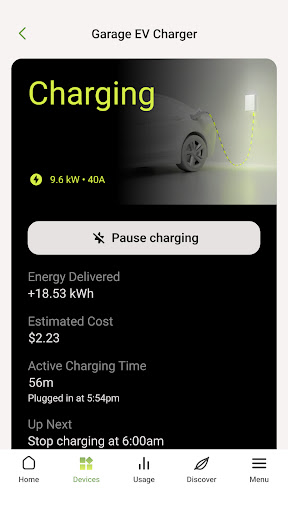


नया क्या है
New
* Discover Emporia electricity plans in the Discover tab, including a new EV charging plan for Texas EV owners
Fixes
* Forgot Password can be restarted if you exit partway through
* Fixed the recommendations list getting cut off with many items
* Minor bug fixes and stability improvements
इस ऐप के बारे में
The Emporia app provides clear, meaningful energy use analysis and actionable recommendations that help homeowners save money, conserve energy, and reduce carbon. We analyze your usage patterns and then provide insights into your energy use, along with powerful opportunities to make your home more energy efficient.
Emporia Energy provides these valuable features:
- Real-time monitoring of your energy use
- Historical energy use and savings
- Options to show use, savings and environmental impact in meaningful measurements
- Comparisons minute-to-minute, hour-to-hour, day-to-day, week-to-week, month-to-month, and year-to-year
- Clear savings calculations based on the recommended actions you perform
For more information, visit emporiaenergy.com
Customer Support
[email protected]
Emporia Energy एपीके कैसे डाउनलोड करें
- APK Downloader होमपेज पर पैकेज नाम
com.emporiaenergy.emporos.v2दर्ज करें। - अपने डिवाइस आर्किटेक्चर का चयन करें (आधुनिक उपकरणों के लिए ARM64 अनुशंसित है)।
- मर्ज की गई एपीके फ़ाइल प्राप्त करने के लिए डाउनलोड पर क्लिक करें।
- एपीके को अपने एंड्रॉइड डिवाइस पर ट्रांसफर और इंस्टॉल करें।
- अपडेट रहें: अपने पसंदीदा ऐप्स के नवीनतम सुरक्षित संस्करणों को खोजने और डाउनलोड करने के लिए नियमित रूप से APK Downloader पर जाएं।
सुरक्षा और हस्ताक्षर सत्यापन
यह APK डाउनलोड 100% सुरक्षित है। हम सत्यापित करते हैं कि फ़ाइल का क्रिप्टोग्राफ़िक हस्ताक्षर आधिकारिक डेवलपर क्रेडेंशियल से मेल खाता है। कोई संशोधन या एडवेयर नहीं हैं।