

ChromaFusion Launcher - Themes APK स्क्रीनशॉट


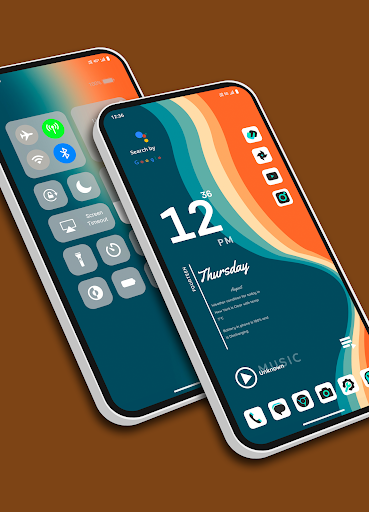


ChromaFusion Launcher - Themes ऐप की जानकारी
डाउनलोड स्रोत
Device Configuration
स्प्लिट एपीके (Split APK) स्थापना गाइड
कुछ ऐप्स स्प्लिट एपीके (एक साथ पैक की गई कई .apk फाइलें) के रूप में वितरित किए जाते हैं। मानक एंड्रॉइड इंस्टॉलर उन्हें खोल नहीं सकते हैं।
ChromaFusion Launcher - Themes में नया क्या है
Bug fixed.
ChromaFusion Launcher - Themes के बारे में
Transform your Android device's home screen with the Chroma Fusion Launcher and experience the allure of the chroma fusion theme like never before! Dive into a world of unique and customizable widgets that will elevate your smartphone experience to a whole new level.
🌌 Key Features 🌌
1. **Stunning Wallpapers**: Choose from wallpapers within the launcher. Plus, you have the freedom to apply wallpapers from your gallery to create a unique look.
2. **Unique Themes and Widgets**: Explore 18 meticulously crafted themes, each designed with focused frame and unique wallpapers and widgets that perfectly complement your style.
3. **Icon Pack Variety**: Tailor your device's look with ease by switching between 43 unique icon packs. Customize the color and padding of select packs for a truly personalized touch.
4. **Personalized Home Screen**: Arrange your icons and widgets to create a home screen that truly reflects your personality and preferences.
5. **Effortless Folder Creation**: Create folders easily by dragging and dropping apps, customize them with a long press, and choose between large or small grid layouts for folder.
6. **Intuitive Drag and Drop**: Bring more apps to your home screen by intuitively dragging and dropping them for quick access.
7. **Versatile App List**: Enjoy the convenience of two app list formats—grid and list view—both featuring alphabetized index search and regular search options.
8. **Instant Notification Counts**: Stay on top of your notifications with a quick glance at the app icons, which display the notification count for a faster response.
9. **Versatile Widgets**: Choose from a variety of widgets, including calendar, clock, digital clock, weather, greetings, and more, with 15+ options to enhance your home screen. You can resize each and every widget, you can also apply system widgets.
10. **Customizable Weather Forecast**: Select your preferred city for weather forecasts and stay informed about the conditions that matter to you.
18. **Flexible Font Sizes**: Customize your text by choosing from three font sizes—small, medium, or large—to suit your visual preferences.
12. **App Privacy**: Maintain your privacy by hiding specific apps from the app list. Easily access hidden apps in the settings under the "Hidden Apps" section.
13. **App Lock Feature**: Keep your sensitive apps secure with our built-in app locking feature. Set up a password to safeguard your apps from unauthorized access.
14. **Control Center**: Access Control Center by swiping down on the main screen. Easily control music playback and quickly toggle various settings.
Download the Chroma Fusion Launcher now and embark on a journey of unparalleled customization, aesthetics, and functionality for your Android device. Upgrade your home screen and unlock a world of possibilities today!
उपयोगकर्ता समीक्षाएं

बहुत अच्छा है
ChromaFusion Launcher - Themes एपीके कैसे डाउनलोड करें
- APK Downloader पर पैकेज नाम
com.lwsipl.chromafusion.launcherदर्ज करें। - अपने डिवाइस आर्किटेक्चर का चयन करें (आधुनिक उपकरणों के लिए ARM64 अनुशंसित है)।
- मर्ज की गई एपीके फ़ाइल प्राप्त करने के लिए डाउनलोड पर क्लिक करें।
- एपीके को अपने एंड्रॉइड डिवाइस पर ट्रांसफर और इंस्टॉल करें।
- अपडेट रहें: अपने पसंदीदा ऐप्स के नवीनतम सुरक्षित संस्करणों को खोजने और डाउनलोड करने के लिए नियमित रूप से APKDER.COM पर जाएं।
अक्सर पूछे जाने वाले प्रश्न
हाँ! APKDER द्वारा प्रदान किया गया प्रत्येक एपीके (APK) डाउनलोड कठोर सुरक्षा सत्यापन से गुजरता है। हम सत्यापित करते हैं कि एपीके फ़ाइल का क्रिप्टोग्राफ़िक हस्ताक्षर डेवलपर के आधिकारिक हस्ताक्षर से मेल खाता है, जिससे यह सुनिश्चित होता है कि एपीके मूल, अछूता और किसी भी संशोधन से मुक्त है।
इसे इंस्टॉल करने के लिए, आपको सबसे पहले अपने Android डिवाइस की सुरक्षा सेटिंग्स में "अज्ञात स्रोत" को सक्षम करना होगा। APKDER से APK फ़ाइल डाउनलोड करने के बाद, इंस्टॉल करना शुरू करने के लिए उस पर टैप करें और स्क्रीन पर दिए गए निर्देशों का पालन करें।
हाँ! जैसे ही डेवलपर ChromaFusion Launcher - Themes का नया संस्करण जारी करता है, हम अपडेट किए गए APK को APKDER पर पोस्ट कर देंगे। आप अपने ऐप डेटा को खोए बिना मौजूदा इंस्टॉलेशन पर नया APK डाउनलोड और इंस्टॉल कर सकते हैं।
हाँ। APKDER आपको भौगोलिक प्रतिबंधों को दरकिनार करने और सीधे आधिकारिक एपीके फाइलें डाउनलोड करने की अनुमति देता है, भले ही ऐप या गेम आपके देश के स्टोर में आधिकारिक रूप से उपलब्ध न हो।
एक मानक एपीके एक एकल इंस्टॉलेशन पैकेज है। एक XAPK या स्प्लिट एपीके में कई संसाधन फाइलें एक साथ पैक की जाती हैं। उन्हें इंस्टॉल करने के लिए, आप अलग-अलग स्प्लिट्स डाउनलोड कर सकते हैं या स्प्लिट एपीके इंस्टॉलर (SAI) जैसे टूल्स का उपयोग कर सकते हैं।
सुरक्षा और हस्ताक्षर सत्यापन
यह APK डाउनलोड 100% सुरक्षित है। हम सत्यापित करते हैं कि फ़ाइल का क्रिप्टोग्राफ़िक हस्ताक्षर आधिकारिक डेवलपर क्रेडेंशियल से मेल खाता है। कोई संशोधन या एडवेयर नहीं हैं।


