
डाउनलोड स्रोत
Device Configuration
स्प्लिट एपीके (Split APK) स्थापना गाइड
कुछ ऐप्स स्प्लिट एपीके (एक साथ पैक की गई कई .apk फाइलें) के रूप में वितरित किए जाते हैं। मानक एंड्रॉइड इंस्टॉलर उन्हें खोल नहीं सकते हैं।
सम्बन्धित ऐप्स




नया क्या है
Bug fixes and usage optimisation
इस ऐप के बारे में
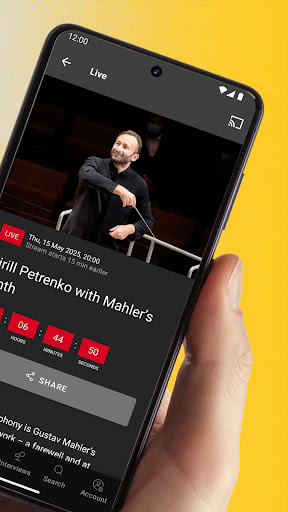
Treat yourself to a guest performance by the Berliner Philharmoniker - live and on demand
Closer to the music: In the Digital Concert Hall, you always have the best seat in the house! Each season, over 40 concerts are broadcast live and then offered in the on-demand archive. There are already hundreds of concert videos featuring all the stars of classical music, plus interviews, films and playlists.
Register now and test the Digital Concert Hall for 7 days - free of charge and without obligation!
The Digital Concert Hall at a glance:
• Over 40 live broadcasts per season with all the stars of classical music
• Hundreds of archive concerts from six decades on demand
• Free interviews and concert introductions
• Fascinating documentaries, portraits and playlists
• Free educational concerts for the whole family
• Highest Quality: 4K UHD Video, Hi-Res Audio, Immersive Audio (Dolby Atmos)
Terms of use: https://www.digitalconcerthall.com/terms
Berliner Philharmoniker एपीके कैसे डाउनलोड करें
- APK Downloader होमपेज पर पैकेज नाम
com.novoda.dchदर्ज करें। - अपने डिवाइस आर्किटेक्चर का चयन करें (आधुनिक उपकरणों के लिए ARM64 अनुशंसित है)।
- मर्ज की गई एपीके फ़ाइल प्राप्त करने के लिए डाउनलोड पर क्लिक करें।
- एपीके को अपने एंड्रॉइड डिवाइस पर ट्रांसफर और इंस्टॉल करें।
- अपडेट रहें: अपने पसंदीदा ऐप्स के नवीनतम सुरक्षित संस्करणों को खोजने और डाउनलोड करने के लिए नियमित रूप से APK Downloader पर जाएं।
सुरक्षा और हस्ताक्षर सत्यापन
यह APK डाउनलोड 100% सुरक्षित है। हम सत्यापित करते हैं कि फ़ाइल का क्रिप्टोग्राफ़िक हस्ताक्षर आधिकारिक डेवलपर क्रेडेंशियल से मेल खाता है। कोई संशोधन या एडवेयर नहीं हैं।