


डाउनलोड स्रोत
Device Configuration
स्प्लिट एपीके (Split APK) स्थापना गाइड
कुछ ऐप्स स्प्लिट एपीके (एक साथ पैक की गई कई .apk फाइलें) के रूप में वितरित किए जाते हैं। मानक एंड्रॉइड इंस्टॉलर उन्हें खोल नहीं सकते हैं।
नया क्या है
Try our new, optional geofencing feature to create automations that run when you arrive and depart from home
इस ऐप के बारे में
Welcome to SmartRent!
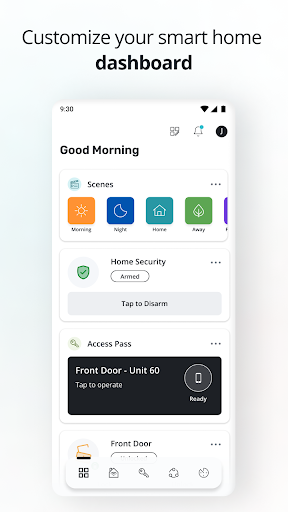
The SmartRent App, designed with your experience in mind, puts comfort, control, and convenience in the palm of your hand. With custom controls, settings and more, it makes “there’s no place like home” ring even truer.
You’ll love the ability to:
- Lock and unlock your door or adjust your thermostat from anywhere
- Create custom schedules for your thermostat to save money and energy
- Grant unique, time-bound access codes to family, friends, and service providers
- Set up automations to simplify daily routines
- Issue voice commands with Amazon Alexa and Google Assistant
- Be alerted immediately of possible leaks in your home
- Review your lock activity to see when guests or maintenance visited
- Link your Ring account for one less app to manage
- And more!
Download the SmartRent App and start customizing your smart home!
SmartRent एपीके कैसे डाउनलोड करें
- APK Downloader पर पैकेज नाम
com.smartrent.residentदर्ज करें। - अपने डिवाइस आर्किटेक्चर का चयन करें (आधुनिक उपकरणों के लिए ARM64 अनुशंसित है)।
- मर्ज की गई एपीके फ़ाइल प्राप्त करने के लिए डाउनलोड पर क्लिक करें।
- एपीके को अपने एंड्रॉइड डिवाइस पर ट्रांसफर और इंस्टॉल करें।
- अपडेट रहें: अपने पसंदीदा ऐप्स के नवीनतम सुरक्षित संस्करणों को खोजने और डाउनलोड करने के लिए नियमित रूप से APKDER.COM पर जाएं।
सुरक्षा और हस्ताक्षर सत्यापन
यह APK डाउनलोड 100% सुरक्षित है। हम सत्यापित करते हैं कि फ़ाइल का क्रिप्टोग्राफ़िक हस्ताक्षर आधिकारिक डेवलपर क्रेडेंशियल से मेल खाता है। कोई संशोधन या एडवेयर नहीं हैं।


