
डाउनलोड स्रोत
Device Configuration
स्प्लिट एपीके (Split APK) स्थापना गाइड
कुछ ऐप्स स्प्लिट एपीके (एक साथ पैक की गई कई .apk फाइलें) के रूप में वितरित किए जाते हैं। मानक एंड्रॉइड इंस्टॉलर उन्हें खोल नहीं सकते हैं।


नया क्या है
- Updated to use the modern Steam Guard login flow. With this update the app will ask you to login again.
- Added better support for Game Recording content shared in chat
- Added adaptive icons
- Updated most internal dependencies to bring in bug fixes and improvements
इस ऐप के बारे में
Take your Steam friends, groups, and conversations with you wherever you go.
The Steam Chat app includes many key features of the desktop Steam client chat, including:
Friends List – See who’s in game or online at a glance. You'll see your custom categories and favorites bar just like you can on your PC.
Rich Chat – Your chats get even better with higher fidelity links, videos, tweets, GIFs, Giphy, Steam emoticons, and more.
Invite Links – Add new friends on Steam with a link. Generate an invite link you can text or email.
Customizable Notifications – Mobile notifications mean you'll never miss a message or game invite. You can customize your notifications per friend, group chat, and chat channel.
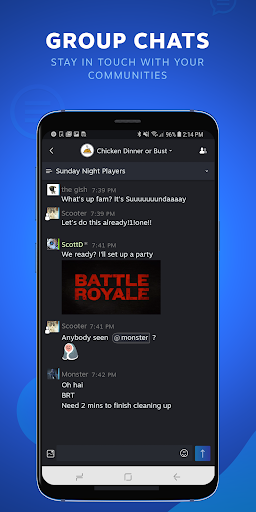
Group Chats - Get everyone on the same page. Groups make it easier to do things like stay in touch with your communities and organize game night with your best friends.
Steam Chat एपीके कैसे डाउनलोड करें
- APK Downloader होमपेज पर पैकेज नाम
com.valvesoftware.android.steam.friendsuiदर्ज करें। - अपने डिवाइस आर्किटेक्चर का चयन करें (आधुनिक उपकरणों के लिए ARM64 अनुशंसित है)।
- मर्ज की गई एपीके फ़ाइल प्राप्त करने के लिए डाउनलोड पर क्लिक करें।
- एपीके को अपने एंड्रॉइड डिवाइस पर ट्रांसफर और इंस्टॉल करें।
- अपडेट रहें: अपने पसंदीदा ऐप्स के नवीनतम सुरक्षित संस्करणों को खोजने और डाउनलोड करने के लिए नियमित रूप से APK Downloader पर जाएं।
सुरक्षा और हस्ताक्षर सत्यापन
यह APK डाउनलोड 100% सुरक्षित है। हम सत्यापित करते हैं कि फ़ाइल का क्रिप्टोग्राफ़िक हस्ताक्षर आधिकारिक डेवलपर क्रेडेंशियल से मेल खाता है। कोई संशोधन या एडवेयर नहीं हैं।