
Fontes de download
Device Configuration
Guia de Instalação de Split APKs
Alguns aplicativos são distribuídos como Split APKs (vários arquivos .apk empacotados juntos) para otimizar os recursos. Os instaladores padrão do Android não podem abri-los.
Aplicativos Relacionados




Novidades
- add CalDAV account to access your CalDAV calendar and tasks
- popular CalDAV providers like Nextcloud, Mailbox.org, iCloud and more are supported
- add categories from CalDAV to your events and tasks
- some minor improvements
- bug fixes
Sobre este aplicativo
Business Calendar 2 has everything you need in a calendar app: It provides an excellent overview of your appointments, it’s easy to use and it gives you powerful tools for planning your events and tasks.
🎯 Calendar Planner and Task Organizer
▪ manage your appointments and tasks with just one app
▪ focus on work, family or private events by quickly hiding the other ones
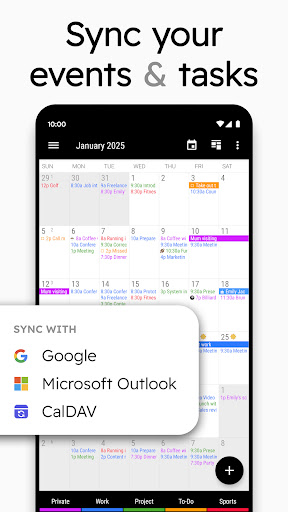
▪ sync with Google Calendar, Outlook Calendar, Exchange, CalDAV etc.
▪ use unique tools to swiftly update your work calendar as well as your private appointments
▪ share your schedule with colleagues, friends and family
▪ easily add birthdays and public holidays to your agenda
🚀 Your Quick Schedule Planner
▪ create events faster with smart suggestions for title, location and attendees
▪ add appointments to your schedule with only 2 taps by using templates
▪ simply speak your events details with our powerful voice input feature
▪ link contacts to your appointments
▪ attach files & photos
▪ add repeating events with flexible recurrence rules
▪ create up to 5 reminders based on your needs
🔧 Update Your Agenda Swiftly
▪ quickly move one or multiple appointments to another day or time
▪ postpone tasks with just one tap
▪ use drag & drop to move or copy events in our weekly & daily planner
▪ copy an entry to multiple days at once, e.g. to place your work shifts in no time
💺 Work Calendar, Business Planner & Family Calendar
▪ get an excellent overview of your schedule in our monthly planner
▪ adjust weekly planner with simple swipe to show anything between 1 and 14 days
▪ find free time slots with heat map in yearly planner
▪ easily check & adapt your upcoming schedule in our daily planner
▪ invite guests to your events and answer meeting invitations
▪ search your schedule in all views
▪ share your agenda easily
😃 Colorize Your Schedule
▪ categorize agenda items with individual colors
▪ enrich your schedule with more than 600 emoticons
🔔 Don’t Miss Anything
▪ get configurable notifications for reminders
▪ snooze reminders, show map, write email to attendees or check tasks directly from notification
▪ set repeating alarms and individual ringtones
🎨 Your Beautiful Calendar Widget
▪ choose one of 7 professional calendar widgets (month, week, day, agenda widget etc.)
▪ select your preferred widget theme
▪ adapt each calendar widget to suit your personal needs
🌏 Synchronized or Local
▪ sync with Google Calendar using Android calendar synchronization
▪ connect your tasks with Google Tasks
▪ integrates with CalDAV, Outlook Calendar & Microsoft To Do
▪ or use the app as a fully local schedule planner
⌚ Wear OS app
▪ keep track of your events and tasks on your smartwatch (Wear OS 2.23+)
▪ includes watch app, tiles and complications for your watch face
🌟 More unique premium features
▪ see weather reports for the next 7 days in daily planner, monthly planner and agenda
▪ mark events as canceled and reschedule them later on in monthly planner
▪ use recurring tasks, subtasks and priorities
▪ choose between 22 beautiful themes for the app (e.g. dark theme)
▪ print your schedule to PDF
▪ set font sizes individually for different components of the app
▪ import and export calendar data (.ical, .ics)
Download Business Calendar 2 for free now and enjoy the great overview and many powerful features that are already included in the free version of our schedule planner. Unlock all our unique pro features later on.
💖 Developed with Energy and Passion
Business Calendar is developed by a small, dedicated team in Berlin. We’re completely self-sustained and only funded by the revenue of our calendar app. By upgrading our schedule planner to the pro version you will get a lot of professional premium features and also greatly support the continuous development of the app.
😃 Follow us
Read our tip of the week on Facebook:
www.facebook.com/BusinessCalendar2
Como baixar o APK do Business Calendar 2 Planner
- Insira o nome do pacote
com.appgenix.bizcalna página inicial do APK Downloader. - Selecione a arquitetura do seu dispositivo (ARM64 recomendado para dispositivos modernos).
- Clique em Baixar para obter o arquivo APK mesclado.
- Transfira e instale o APK no seu dispositivo Android.
- Mantenha-se atualizado: Visite o APK Downloader regularmente para pesquisar e baixar as versões seguras mais recentes de seus aplicativos favoritos.
Segurança e Verificação de Assinatura
Este download de APK é 100% seguro. Verificamos se a assinatura criptográfica do arquivo corresponde às credenciais oficiais do desenvolvedor. Sem modificações ou adware injetados.