
Capturas de tela do APK de Philips HomeRun Robot App


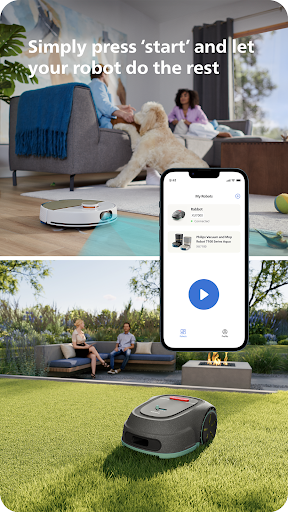

Informações do aplicativo Philips HomeRun Robot App
Fontes de download
Device Configuration
Guia de Instalação de Split APKs
Alguns aplicativos são distribuídos como Split APKs (vários arquivos .apk empacotados juntos) para otimizar os recursos. Os instaladores padrão do Android não podem abri-los.
Novidades no Philips HomeRun Robot App
Improvements and bug fixes.
Sobre Philips HomeRun Robot App
Unlock the full potential of your Philips HomeRun robot. Tell it exactly how and when to clean each room and mow your lawn. Then, relax.
With the Philips HomeRun Robot app you can:
● Start, pause or stop cleaning and mowing remotely
● Make a precise map of your home to clean each room in no time
● Control where your robot cleans and mows
● Choose a cleaning mode per room and mowing mode per lawn
● Set up once, enjoy spotless floors and lawns daily
● Custom clean and mow for specific situations
● Get step-by-step guidance to set up easily
● Receive progress updates on each clean and mow
● Keep your data secure
Start, pause or stop your robot remotely
Come home to clean floors and a perfect-looking garden every day by using your Philips HomeRun vacuum, mop, and lawn mowing robot in combination with the app. Set it up once—to clean each room and mow your lawn just the way you like it—touch ‘Start’, anytime, anywhere, and let your robot do the rest.
On its first run, your robot will map your floor plan and garden. Now you have an interactive map of your home that you can use to tell your robot how and when to clean each room or to monitor how your lawn is mowed. The robot vacuum cleaner can store up to five maps.
Control where your robot vacuum cleaner cleans
Only want your robot to clean the kitchen, bathroom, living room? With the app, you can tell your robot which rooms you want cleaned, and in what order. If there are areas or things you’d like it to avoid—like precious items or a rug in an area you want to mop—you can tell it where not to go, or not to mop, as well.
Choose a cleaning mode for each room and mowing mode for each lawn
Give each room unique attention with one of the cleaning modes and mowing modes for your lawn. Use Dry mode to vacuum the bedroom and Wet & Dry mode to vacuum and mop hard floors. Put your robot on Quiet mode if, say, you have a meeting, or give the kitchen an extra thorough clean by using Intensive mode. Choose a mowing mode for your lawn to get the perfect looking garden.
Set up once. Enjoy spotless floors and lawns every day
Once you’ve created a cleaning and mowing plan, clean floors and perfectly mowed lawns are always a tap away. Tap ‘Start’ when you want your robot to begin - every day if you like, and at a time that suits your schedule.
Custom clean for specific situations
Had friends over and need an extra thorough clean? Or maybe the dog left paw prints in your hallway. Again. Schedule a custom clean and mow that targets specific rooms, areas.
Get step-by-step guidance to setup easily
From connecting to Wi-Fi to the first clean and mow, we’ll guide you through every step of getting started. You’ll find easy-to-follow instructions and how-to-videos as well.
Always have support at your fingertips
Have extra questions about the HomeRun app and robot? You’ll find a user manual in the app, answers to FAQs and easy access to Customer Care if need be.
Receive progress updates
As your robot cleans and mows, you’ll receive in-app updates. See where your robot currently is in your home and what the robot mowing progress is in your garden. Check on its battery levels and, most importantly, get notified as soon as the cleaning run or mowing is done
Maintain high performance
Get the best performance from your robot by replacing parts on time. Our app lets you know when it’s time to replace parts like filters, mops, and blades, and makes it easy to order them.
Keep your data secure
Philips adheres to a strict privacy policy. We recommend creating an account to ensure you can save your preferences. If you prefer, you can use the app as a guest.
WiFi
Philips HomeRun robot vacuum cleaners have dual band Wi-Fi so they are easy to connect to your home Wi-Fi, whether it's to 2.4 or 5.0GHz. Robot lawn mowers only connect to your 2.4GHz home Wi-Fi.
Need help?
Visit www.Philips.com to find answers to our most frequently asked questions, or get in touch with our Consumer Care team.
Avaliações de usuários

O app atende ao meu uso do robô mas tem muita instabilidade e faltam algumas correções. Por exemplo: se você está com uma limpeza personalizada em andamento e ocorrer de ter que pausar o robô por algum motivo, ao retomar a limpeza, por várias vezes o app iniciou uma nova limpeza mas no modo padrão, ignorando a limpeza personalizada que você tinha programado anteriormente. Além disso, precisa de melhorias no desempenho.

Robô Aspirador 3000 Séries. Estou com tanta raiva desse aplicativo que poderia dar nota 0 se fosse possível. Meu idioma está configurado para português, mas as perguntas frequentes estão em inglês! Absurdo isso! O agendamento de limpeza não é personalizável para todos os cômodos, só é possível personalizar um deles ou deixar no automático que não inclui passar pano e faz do jeito dele (não mostra o que será feito). O aplicativo é terrível e não permite aproveitar tudo que o Robô tem a oferecer.

o robô é sensacional, mas o app é muito problemático. tem que ficar atualizando constantemente pra saber aonde o robô está porque a tela do app congela e vc perde o controle de em qual parta da limpeza o robô está. só não dei nota máxima porque o app não tem a mesma qualidade do robô.

Este é, sem dúvida, o melhor aspirador que já tive. É maravilhoso retornar ao lar e encontrar tudo limpo.
Como baixar o APK do Philips HomeRun Robot App
- Insira o nome do pacote
com.philips.da.philipsrobotna APK Downloader. - Selecione a arquitetura do seu dispositivo (ARM64 recomendado para dispositivos modernos).
- Clique em Baixar para obter o arquivo APK mesclado.
- Transfira e instale o APK no seu dispositivo Android.
- Mantenha-se atualizado: Visite o APKDER.COM regularmente para pesquisar e baixar as versões seguras mais recentes de seus aplicativos favoritos.
Perguntas frequentes
Sim! Cada download de APK fornecido pelo APKDER passa por uma rigorosa verificação de segurança. Verificamos se a assinatura criptográfica do arquivo APK corresponde à assinatura oficial do desenvolvedor, garantindo que o APK seja original, intacto e livre de quaisquer modificações.
Para instalá-lo, você precisa ativar "Fontes Desconhecidas" nas configurações de segurança do seu dispositivo Android. Depois de baixar o arquivo APK do APKDER, toque nele para iniciar a instalação e siga as instruções na tela.
Sim! Assim que o desenvolvedor lançar uma nova versão de Philips HomeRun Robot App, atualizaremos o APK no APKDER. Você pode simplesmente baixar e instalar o novo APK por cima do existente sem perder os dados do seu aplicativo.
Sim. O APKDER permite contornar as restrições geográficas e baixar arquivos APK oficiais diretamente, mesmo que o aplicativo ou jogo não esteja disponível oficialmente na loja do seu país.
Um APK padrão é um único pacote de instalação. Um XAPK ou Split APK contém múltiplos arquivos de recursos agrupados. Para instalá-los, você pode baixar as divisões individualmente ou usar ferramentas auxiliares como o Split APKs Installer (SAI).
Segurança e Verificação de Assinatura
Este download de APK é 100% seguro. Verificamos se a assinatura criptográfica do arquivo corresponde às credenciais oficiais do desenvolvedor. Sem modificações ou adware embutidos.


