Fontes de download
Device Configuration
Guia de Instalação de Split APKs
Alguns aplicativos são distribuídos como Split APKs (vários arquivos .apk empacotados juntos) para otimizar os recursos. Os instaladores padrão do Android não podem abri-los.
Novidades
Bug fixes
Sobre este aplicativo
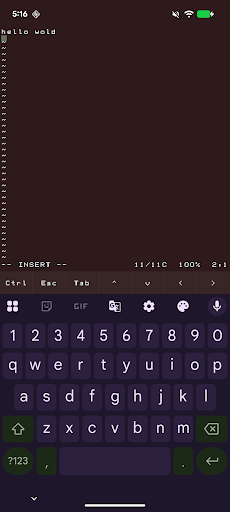
abash is a native Android terminal emulator written in C. It gives you a real interactive bash shell on your phone, complete with a VT100 terminal, scrollback, command history, tab completion, and a soft-key toolbar for Ctrl, Esc, Tab, and arrow keys.
It also ships with a practical Unix toolset, including vim, git, curl, grep, sed, awk, find, tar, less, and a large set of GNU command-line tools. You can edit text files, inspect and transform data, work with repositories, and run shell workflows directly on-device.
abash also includes Android-aware commands for things like the clipboard, share sheet, notifications, camera, sensors, and selected device information when you grant permission. It is designed to feel like a real shell while still fitting naturally into Android.
When you choose abash from Android’s Open with menu, text files can open directly in vim. Other shared items can open a shell that is already navigated to the item’s parent folder, so you can start working immediately. As a fallback, if it cannot access the file's source directory, abash will copy the file into its home directory.
Important limitations
abash still runs inside Android’s app sandbox. It is not root, not a Linux VM, and not a way around Android security. It cannot read other apps’ private data, modify protected system areas, or access files that you have not explicitly shared or granted permission to.
Some parts of the system are also restricted by Android and SELinux. That means certain directories may not be fully discoverable, and some convenience features such as command or path discovery can be more limited than on a desktop Linux system.
For files opened through Android document providers, abash may need to make a private working copy so terminal tools can access it. In those cases, saving changes updates the copy inside abash rather than automatically writing back to the original source file.
Como baixar o APK do abash
- Insira o nome do pacote
dev.paonessa.abashna APK Downloader. - Selecione a arquitetura do seu dispositivo (ARM64 recomendado para dispositivos modernos).
- Clique em Baixar para obter o arquivo APK mesclado.
- Transfira e instale o APK no seu dispositivo Android.
- Mantenha-se atualizado: Visite o APKDER.COM regularmente para pesquisar e baixar as versões seguras mais recentes de seus aplicativos favoritos.
Segurança e Verificação de Assinatura
Este download de APK é 100% seguro. Verificamos se a assinatura criptográfica do arquivo corresponde às credenciais oficiais do desenvolvedor. Sem modificações ou adware embutidos.