
Fontes de download
Device Configuration
Guia de Instalação de Split APKs
Alguns aplicativos são distribuídos como Split APKs (vários arquivos .apk empacotados juntos) para otimizar os recursos. Os instaladores padrão do Android não podem abri-los.
Aplicativos Relacionados




Sobre este aplicativo
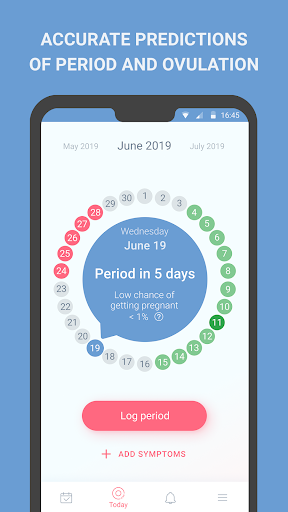
Period tracker, calendar, ovulation, cycle is a convenient, easy and user-friendly app for control over menstrual cycles
Main features:
● Accurate predictions of period and ovulation,
● Fertile (with high chance of pregnancy) and safe days calculator,
● Convenient calendar with symptoms and period predictions,
● Easy switching between cycle tracking and pregnancy planning modes based on your current needs,
● Pregnancy planning mode with percentage probabilities of pregnancy,
● Illustrative statistics for past period cycles,
● Period, ovulation reminders,
● Reminders for different types of birth control,
● Pregnancy mode,
● Helpful information and answers to frequently asked questions (FAQ),
● Choice of theme colors,
● Password personal data protection,
● Data recovery on new device
Period tracker will help you track your menstrual cycle, calculate ovulation days and will highlight fertile and safe days in the calendar.
Period predictions are automatically updating based on data you enter providing high accuracy of period predictions even for women with irregular cycles.
Intuitive and uncluttered interface lets you enter necessary data quickly and easily adjust the app as you see fit.
All you have to do is answer a few short questions, and Period tracker will take care of the rest: it will make accurate predictions of period, calculate days of ovulation, highlight fertile and safe days with different colors in the calendar.
It has never been easier to log periods and add symptoms: just a few clicks, and all the information on your condition is saved in Period tracker.
You can easily switch between cycle tracking and pregnancy planning modes to get the most relevant information.
If you get pregnant you will find our Pregnancy mode very useful: the application will estimate your due date (EDD), will number weeks of pregnancy and will keep all the important information for you and your obstetrician-gynecologist.
Period tracker will also remind you of menstruation start and end, ovulation days as well as will notify you in case your period is late.
You can set reminders for chosen type of birth control and won’t have to worry about forgetting or getting confused: the app will automatically take into account necessary contraceptive pill-free periods, will remind you about vaginal ring, etc.
You can use a convenient calendar with menstrual period days highlighted in different colors depending on the phase of cycle to plan your vacations and trips faster.
To make control over cycles even easier Period tracker graphically shows cycles statistics, representing cycle length and period length for each month in charts.
Period tracker has a neutral icon for home screen, provides you an opportunity to password protect your personal data to make sure that only you have full access to the app.
And to make sure you do not lose any data after changing your device Period tracker has a data recovery option for registered users.
Como baixar o APK do Period tracker Cycle calendar
- Insira o nome do pacote
period.tracker.calendar.ovulation.women.fertility.cyclena página inicial do APK Downloader. - Selecione a arquitetura do seu dispositivo (ARM64 recomendado para dispositivos modernos).
- Clique em Baixar para obter o arquivo APK mesclado.
- Transfira e instale o APK no seu dispositivo Android.
- Mantenha-se atualizado: Visite o APK Downloader regularmente para pesquisar e baixar as versões seguras mais recentes de seus aplicativos favoritos.
Segurança e Verificação de Assinatura
Este download de APK é 100% seguro. Verificamos se a assinatura criptográfica do arquivo corresponde às credenciais oficiais do desenvolvedor. Sem modificações ou adware injetados.