
Источники загрузки
Device Configuration
Руководство по установке Split APK
Некоторые приложения распространяются в виде Split APK (несколько упакованных вместе файлов .apk) для оптимизации ресурсов. Стандартные установщики Android не могут их открыть.
Похожие Приложения


Что нового
Fix bugs
О приложении
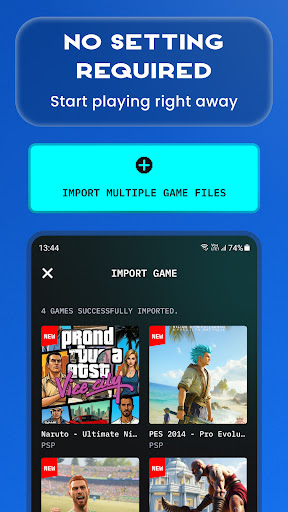
Turn your Android device into a powerful all-in-one emulator hub for PSP, PS1, PS2, NES, GB, GBA, DS, N64 and more.
Easily import your own game files, scan your device storage, and enjoy classic console gaming anytime, anywhere. The app is designed to make game importing simple, gameplay smooth, and mobile controls easy to use.
🎮 How to Play
- Prepare your own supported game files.
- Save your game files in your device storage, such as the Downloads folder.
- Open the emulator app and tap Import.
- Scan and load your games.
- Start playing on mobile.
🌟 Key Features
- All-in-one emulator for multiple classic game systems.
- Supports popular ROM formats, including ISO, CSO, PBP, ZIP, RAR and 7Z.
- Play compressed files without unzipping.
- Fast ROM scanning and easy game import.
- Auto save and restore game progress.
- Save and load game states instantly with multiple slots.
- Optimized touch controls for mobile gameplay.
- Multiple controller skins to personalize your experience.
- No BIOS file required.
Whether you love handheld classics, retro console games, or PlayStation-style gameplay, this emulator gives you one place to manage, import and play your own game collection.
Please note: This app does not include any games. Users must provide their own legally owned game files. We also provide a simple guide to help you import and manage your games inside the app.
Download now and enjoy classic console gaming on Android.
Privacy Policy: http://metaverselabs.ai/privacy-policy/
Terms of Use: http://metaverselabs.ai/terms-of-use/
Contact: [email protected]
We are continuously improving the emulator app to bring you a better gaming experience. Your feedback and suggestions are always welcome.
Как скачать APK Gamuroid: Retro Game Emulator
- Введите имя пакета
ai.metaverselabs.psp.ps2.gameemulatorна главной странице APK Downloader. - Выберите архитектуру вашего устройства (для современных устройств рекомендуется ARM64).
- Нажмите Скачать, чтобы получить объединенный файл APK.
- Перенесите и установите APK на свое устройство Android.
- Следите за обновлениями: Регулярно посещайте APK Downloader, чтобы искать и скачивать последние безопасные версии ваших любимых приложений.
Безопасность и проверка подписи
Эта загрузка APK на 100% безопасна. Мы проверяем соответствие цифровой подписи файла официальным ключам разработчика. Изменения и реклама отсутствуют.