
Источники загрузки
Device Configuration
Руководство по установке Split APK
Некоторые приложения распространяются в виде Split APK (несколько упакованных вместе файлов .apk) для оптимизации ресурсов. Стандартные установщики Android не могут их открыть.
Похожие Приложения


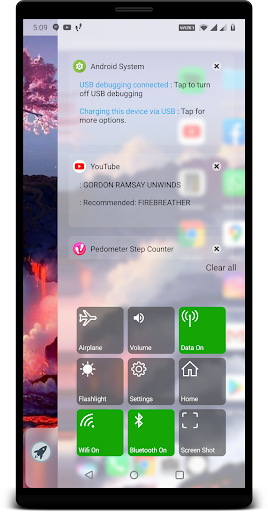


О приложении
Original oS X Style Computer Launcher with 30+ functionalities which will save your 5x time and effort , install now and you won't resist to use all time.
Get os Style Launcher on your Android , Why to have old fashioned launcher when you can have m os launcher in your hand , Check out the new computer launcher for your Android smart phones
Your friends will be jealous with this new look style m os 14 Launcher.
Make your android phone look like .m os 14
This Launcher will exactly give you feel of Desktop launcher for m os 14 with Custom Desktop Computer customizations
Desktop m os Launcher
Get m os style File Manager where you can search and explore all your apps , contacts , google search , google maps and more
Top Features:
- Start Menu like oS x
- Window 10 tile look
- Create shortcuts on oS x
- Create contacts on oS x
- Place apps on oS x
- Drag and Drop
- Most used apps list
- 18 app categories with 2million apps data
- Easy access and search to the Apps
- Get details of all of your drives, SD Card, Storage, audio and video files and pictures in oS x
style
- Computer Launcher Taskbar exact look
- Get notify when a notification comes by using Computer Launcher Notifyer with number counter
- Place Widgets on desktop , resize , drag drop
- Add home page
- Drag and drop for all actions
- Clock Widget on desktop and taskbar
- Weather Widget
- News Widgets
- Rename desktop folders
- Live Premium Wallpapers and Themes
- Weather, Calendar and Photos tiles Added
- Unlimited Themes
- Lock Screen Feature
- Hide App Feature
- Multi Color Support for Desktop,Start Menu and Task bar
- Themes and Icon Pack
- Change applications in Taskbar (Drag Drop)
Accessibility API Requirement : Enable Accessibility Service to perform global actions like going back, opening notifications taking screen shot, double tap to lock screen. Please be assured that XOS Launcher will not collect any personal information
Как скачать APK oS X 14 Launcher Prime
- Введите имя пакета
apptech.os.launcher.primeна главной странице APK Downloader. - Выберите архитектуру вашего устройства (для современных устройств рекомендуется ARM64).
- Нажмите Скачать, чтобы получить объединенный файл APK.
- Перенесите и установите APK на свое устройство Android.
- Следите за обновлениями: Регулярно посещайте APK Downloader, чтобы искать и скачивать последние безопасные версии ваших любимых приложений.
Безопасность и проверка подписи
Эта загрузка APK на 100% безопасна. Мы проверяем соответствие цифровой подписи файла официальным ключам разработчика. Изменения и реклама отсутствуют.