

Источники загрузки
Device Configuration
Руководство по установке Split APK
Некоторые приложения распространяются в виде Split APK (несколько упакованных вместе файлов .apk) для оптимизации ресурсов. Стандартные установщики Android не могут их открыть.
Что нового
13 (1.12)
О приложении
📱 Screen Recorder Pro - Capture Your Screen with Ease
Record your Android screen in stunning quality with our powerful, easy-to-use screen recorder. Whether you're creating tutorials, capturing gameplay, recording video calls, or documenting app issues, Screen Recorder Pro has everything you need.
🎬 PROFESSIONAL RECORDING FEATURES
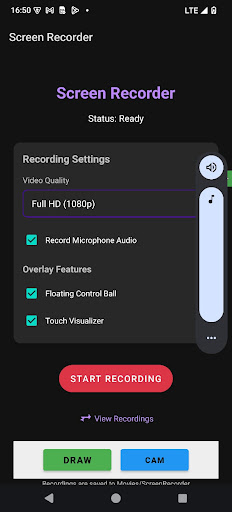
• Multiple Quality Options - Choose from HD (720p), Full HD (1080p), or Ultra HD (4K) recording to match your needs
• Audio Recording - Capture microphone audio alongside your screen recording for voiceovers and commentary
• Flexible Controls - Start, pause, resume, and stop recordings with intuitive on-screen controls
• No Time Limits - Record as long as you need without arbitrary restrictions
• No Watermarks - Your recordings are clean and professional
🎨 POWERFUL OVERLAY FEATURES
• Floating Control Ball - Access recording controls from anywhere on screen with our draggable floating button. Easily pause, resume, or stop recording without returning to the app
• Touch Visualizer - Show touch interactions on screen, perfect for tutorials and demonstrations
• Screen Drawing - Draw and annotate directly on your screen while recording to highlight important areas
• Facecam Overlay - Add a front camera overlay to your recordings for reaction videos, commentary, or personal touch
✂️ BUILT-IN VIDEO EDITOR
• Trim & Cut - Remove unwanted parts from the beginning or end of your recordings
• Preview Changes - See your edits before saving
• Quick Export - Save edited videos in seconds
📁 ORGANIZED GALLERY
• Built-in Gallery - Browse all your recordings in one place without leaving the app
• Video Playback - Watch your recordings with our integrated video player featuring seek controls
• Easy Sharing - Share recordings directly to social media, messaging apps, or cloud storage
• Quick Delete - Remove unwanted recordings with a single tap
⚡ OPTIMIZED PERFORMANCE
• Minimal Battery Impact - Efficient recording engine designed to preserve battery life
• Low Memory Usage - Optimized to run smoothly even on older devices
• Background Recording - Continue recording while using other apps
• Auto-Save - Recordings are automatically saved to your Movies folder
🔒 PRIVACY FOCUSED
• No Account Required - Start recording immediately without sign-up
• Offline Operation - Works completely offline, no internet connection needed
• Local Storage Only - All recordings stay on your device
• No Data Collection - We don't collect or share any personal data
📋 PERFECT FOR:
✓ Creating tutorials and how-to videos
✓ Recording mobile gameplay and walkthroughs
✓ Capturing video calls and meetings
✓ Documenting bugs and app issues
✓ Making product demos and presentations
✓ Creating content for social media
✓ Recording online classes and webinars
✓ Saving streaming content for offline viewing
🛠️ EASY TO USE
Open the app and adjust your settings
Tap "Start Recording" and grant screen capture permission
Record your screen - use the floating controls for quick access
Stop recording when finished
View, edit, and share from the built-in gallery
📱 DEVICE COMPATIBILITY
Works on Android 7.0 (Nougat) and above. Optimized for the latest Android versions including Android 14 and Android 15 with full edge-to-edge display support.
💡 TIPS FOR BEST RESULTS
• Close unnecessary apps before recording to ensure smooth performance
• Use headphones when recording audio to avoid echo
• Enable Do Not Disturb mode to prevent notification interruptions
• Choose lower resolution for longer recordings to save storage space
Download Screen Recorder Pro today and start creating amazing screen recordings!
Как скачать APK screenrecorder
- Введите имя пакета
biz.exdata.screenrecorderна APK Downloader. - Выберите архитектуру вашего устройства (для современных устройств рекомендуется ARM64).
- Нажмите Скачать, чтобы получить объединенный файл APK.
- Перенесите и установите APK на свое устройство Android.
- Следите за обновлениями: Регулярно посещайте APKDER.COM, чтобы искать и скачивать последние безопасные версии ваших любимых приложений.
Безопасность и проверка подписи
Эта загрузка APK на 100% безопасна. Мы проверяем соответствие цифровой подписи файла официальным ключам разработчика. Изменения и реклама отсутствуют.


