Скриншоты APK Barcode/QR Scanner & Generator



Информация о приложении Barcode/QR Scanner & Generator
Источники загрузки
Device Configuration
Руководство по установке Split APK
Некоторые приложения распространяются в виде Split APK (несколько упакованных вместе файлов .apk) для оптимизации ресурсов. Стандартные установщики Android не могут их открыть.
Что нового в Barcode/QR Scanner & Generator
Update the Barcode & QR Code Scanner and Generator app!
– Create barcodes faster with ready-to-use templates.
О приложении Barcode/QR Scanner & Generator
Our QR Code Scanner and QR Code Generator are free app for android designed to help you effortlessly scan QR Codes. It can generate QR codes for different kinds of content. Additionally, our app offers a Barcode Generator to create barcode and a Barcode Scanner to easily scan barcodes of any type within seconds. This scanner app uses smart technology to accurately scan, decode, and generate QR codes and barcodes.
Our Barcode & QR code scanner/generator free app can serve as a versatile, all-in-one solution for users. It can generate and scan QR codes as well as barcodes of different types, including:
1 - Plan Texts (like Messages)
2 - URLs of websites (Social Media links)
3 - Contact Details (Full Name, Phone, Emails, Company Name, Job Title, Address
4 - Phone Numbers
5 - Emails
6 - Wifi codes
7 - Location
How to Use the QR Code & Barcode Generator & Scanner App?
Download and Install the QR Code Scanner/Generator. Then, follow the steps to Generate and Scan QR code.
QR Code/Barcode Scanner Option
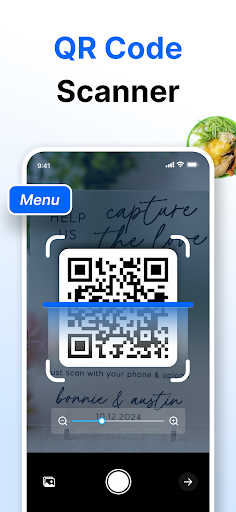
👉 Point the App’s integrated Camera at the QR code or barcode.
👉 It will automatically scan your barcode or QR codes and decode information.
👉 Now, you can Save, Share, or Copy the extracted results.
QR Code/barcode Generator Option
👉 Select the type of QR code/barcode you want to generate, including Text, URL, SMS, Email, etc.
👉 Input your details in the designated areas and click the “Generate” button.
👉 Our QR code generator will swiftly generate a QR code or barcode as per your selection, which you can share or download.
Key Features of Our Barcode/QR Code Scanner & Generator App?
📱 Simple UI
Our QR Code and Barcode reader app offers a sleek interface for maximum user convenience. Its navigation is crystal clear and requires a few clicks.
🤖 Dual Functionality
This app offers both barcodes & QR code scanning and generating options. This dual functionality of the scanner app makes it a versatile option for both personal and professional users.
𝄃𝄂𝄂𝄀𝄁𝄃𝄂𝄂𝄃 Different Types of Barcodes
It can generate & scan different types of barcodes, including General, EAN-13, UPC-A, UPC-E, Code 39, and Code 128.
📷 Integrated Camera
Another key feature that makes our QR code scanner a worthy app is the integrated camera. You can use it to directly scan QR codes and barcodes from images, documents, shops, products, etc.
🎯 Accuracy
The QR code scanner app is equipped with advanced technology to accurately generate all types of QR codes.
🚀 Fast
Our QR/barcode reader is efficient in swiftly reading and generating. Its perfect blend of speed that saves users’ time.
🏾 Versatile Scanner
Whether you need to generate or scan QR code for a URL, Message, Email, Address, Contact Number, or location, our QR code reader app can help you. It can handle a wide range of QR codes.
Additional Features
● This QR/barcode scanner app is free to use.
● It allows users to save and share results.
● Our barcode scanner app offers Dark and Light Theme options.
● It saves a history of your scanned data and generates.
● You can add the results to the Favorite list.
● For better scanning, it offers Zoom IN and OUT slide.
● The QR code scanning app ensures 100% protection of user privacy.
Use Cases
➤ You can scan barcodes & QR code on products or ads for quick details.
➤ Event managers can send QR-coded tickets.
➤ Social media users can create QR codes or scan barcode.
➤ Business professionals can effortlessly share their contact details via QR codes.
➤ Users can redeem discounts with scannable QR codes.
Our innovative Barcode & QR code generator/scanner is the perfect app to decode or generate a wide range of barcodes & QR codes. Download and install it now to enjoy seamless QR code/barcode scanning and quick barcode/QR code generation.
Как скачать APK Barcode/QR Scanner & Generator
- Введите имя пакета
com.imagetotext.qrcodescannerна APK Downloader. - Выберите архитектуру вашего устройства (для современных устройств рекомендуется ARM64).
- Нажмите Скачать, чтобы получить объединенный файл APK.
- Перенесите и установите APK на свое устройство Android.
- Следите за обновлениями: Регулярно посещайте APKDER.COM, чтобы искать и скачивать последние безопасные версии ваших любимых приложений.
Часто задаваемые вопросы
Да! Каждая загрузка APK, предоставляемая APKDER, проходит строгую проверку безопасности. Мы проверяем соответствие криптографической подписи APK-файла официальной подписи разработчика, гарантируя, что APK является оригинальным, нетронутым и не подвергался изменениям.
Чтобы установить его, сначала необходимо включить «Неизвестные источники» в настройках безопасности вашего Android-устройства. После загрузки APK-файла с APKDER нажмите на него, чтобы начать установку, и следуйте подсказкам на экране.
Да! Как только разработчик выпустит новую версию Barcode/QR Scanner & Generator, мы выложим обновленный APK на APKDER. Вы можете просто скачать и установить новый APK поверх существующего, не теряя данные приложения.
Да. APKDER позволяет обходить географические ограничения и скачивать официальные APK-файлы напрямую, даже если приложение или игра официально недоступны в магазине вашей страны.
Стандартный APK — это один установочный файл. XAPK или Split APK содержит несколько файлов ресурсов (например, OBB-файлы или специфические файлы интерфейса). Для их установки вы можете скачать отдельные файлы или использовать приложения вроде Split APKs Installer (SAI).
Безопасность и проверка подписи
Эта загрузка APK на 100% безопасна. Мы проверяем соответствие цифровой подписи файла официальным ключам разработчика. Изменения и реклама отсутствуют.