

Скриншоты APK Solaris- sunrise, sunset times
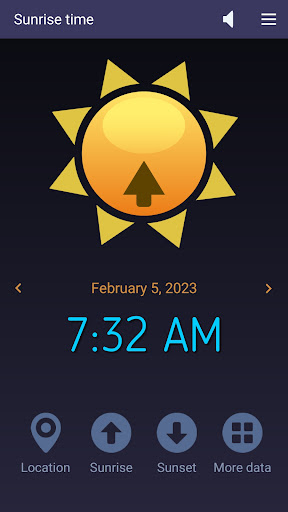


Информация о приложении Solaris- sunrise, sunset times
Источники загрузки
Device Configuration
Руководство по установке Split APK
Некоторые приложения распространяются в виде Split APK (несколько упакованных вместе файлов .apk) для оптимизации ресурсов. Стандартные установщики Android не могут их открыть.
Что нового в Solaris- sunrise, sunset times
- Code optimization
- AM/PM option added
- Text to speech (English)
О приложении Solaris- sunrise, sunset times
This easy-to-use app accurately computes the sunrise and sunset times based on your current location and current day of the year. Also, it can show those solar times for yesterday and tomorrow if you tap the left or, respectively, right arrow buttons. Solaris works on tablets and smartphones connected to the Internet. At first, it gets the local coordinates (latitude and longitude) from your device's GPS and then retrieves the solar data from an Internet server. In addition to the time values we already mentioned, our app also reads the First and Last Light times, Dawn and Dusk moments, Solar Noon, Golden Hour, and Day Length and shows them when you tap the four-dots button.
What do these solar data indicate?
Sunrise and Sunset times are determined by the position of the sun relative to the observer on the Earth's surface. Latitude affects sunrise and sunset times because it determines the observer's position north or south of the equator, which affects the angle at which the sun's rays reach the surface. The closer a location is to the equator, the more directly overhead the sun will be at solar noon, leading to faster sunrise and sunset times. Longitude affects sunrise and sunset times because it determines the observer's position east or west of the Prime Meridian, which affects the observer's local time. A location that is further west will have an earlier sunrise and a later sunset compared to a location that is further east.
First light is the first appearance of natural light in the morning, before sunrise. It signals the beginning of a new day.
Dawn is the period of time between first light and sunrise, characterized by a gradual brightening of the sky.
Dusk is the period of time between sunset and nightfall, also characterized by a gradual darkening of the sky.
Solar noon is the time when the sun is at its highest point in the sky, and is directly overhead at the observer's location. It occurs at different times for different longitudes and occurs twice a year for a location on the equator.
The Golden Hour mostly refers to the last hour of sunlight in the day, when the sun is low on the horizon and the light is soft and warm. Photographers often prefer to take photos during the golden hour because of the quality of the light.
How it works
When it starts, Solaris shows the sunrise time in the universal 24-hour format (tap this label once for the AM/PM format).
- To find the sunset time, tap the Sunset button.
- Tap the Four-dots button for more solar data.
- Tap the Speaker button to toggle the text-to-speech feature on and off.
- Tap the Location button to refresh your GPS position (if it has changed since your last run).
Features
-- accurate sunrise and sunset times
-- short measurement interval
-- simple, intuitive commands
-- AM/PM option
-- Text-to-speech capability
-- free app - no ads, no limitations
Отзывы пользователей

Отлично все работает 555 +++! Спасибо большое Вам за программу! Только нет почему то обновления?

Кайф
Как скачать APK Solaris- sunrise, sunset times
- Введите имя пакета
com.microsys.Solarisна APK Downloader. - Выберите архитектуру вашего устройства (для современных устройств рекомендуется ARM64).
- Нажмите Скачать, чтобы получить объединенный файл APK.
- Перенесите и установите APK на свое устройство Android.
- Следите за обновлениями: Регулярно посещайте APKDER.COM, чтобы искать и скачивать последние безопасные версии ваших любимых приложений.
Обзор APK Solaris- sunrise, sunset times
Скачать последнюю версию Solaris- sunrise, sunset times APK от Microsys Com Ltd. для Android бесплатно на APKDER. Загрузка официального Solaris- sunrise, sunset times (com.microsys.Solaris) APK происходит быстрее, проще и безопаснее для вашего устройства Android.
Часто задаваемые вопросы
Да! Каждая загрузка APK, предоставляемая APKDER, проходит строгую проверку безопасности. Мы проверяем соответствие криптографической подписи APK-файла официальной подписи разработчика, гарантируя, что APK является оригинальным, нетронутым и не подвергался изменениям.
Чтобы установить его, сначала необходимо включить «Неизвестные источники» в настройках безопасности вашего Android-устройства. После загрузки APK-файла с APKDER нажмите на него, чтобы начать установку, и следуйте подсказкам на экране.
Да! Как только разработчик выпустит новую версию Solaris- sunrise, sunset times, мы выложим обновленный APK на APKDER. Вы можете просто скачать и установить новый APK поверх существующего, не теряя данные приложения.
Да. APKDER позволяет обходить географические ограничения и скачивать официальные APK-файлы напрямую, даже если приложение или игра официально недоступны в магазине вашей страны.
Стандартный APK — это один установочный файл. XAPK или Split APK содержит несколько файлов ресурсов (например, OBB-файлы или специфические файлы интерфейса). Для их установки вы можете скачать отдельные файлы или использовать приложения вроде Split APKs Installer (SAI).
Безопасность и проверка подписи
Эта загрузка APK на 100% безопасна. Мы проверяем соответствие цифровой подписи файла официальным ключам разработчика. Изменения и реклама отсутствуют.


