



Источники загрузки
Device Configuration
Руководство по установке Split APK
Некоторые приложения распространяются в виде Split APK (несколько упакованных вместе файлов .apk) для оптимизации ресурсов. Стандартные установщики Android не могут их открыть.
Что нового
Improvements and bug fixes.
О приложении
Unlock the full potential of your Philips HomeRun robot. Tell it exactly how and when to clean each room and mow your lawn. Then, relax.
With the Philips HomeRun Robot app you can:
● Start, pause or stop cleaning and mowing remotely
● Make a precise map of your home to clean each room in no time
● Control where your robot cleans and mows
● Choose a cleaning mode per room and mowing mode per lawn
● Set up once, enjoy spotless floors and lawns daily
● Custom clean and mow for specific situations
● Get step-by-step guidance to set up easily
● Receive progress updates on each clean and mow
● Keep your data secure
Start, pause or stop your robot remotely
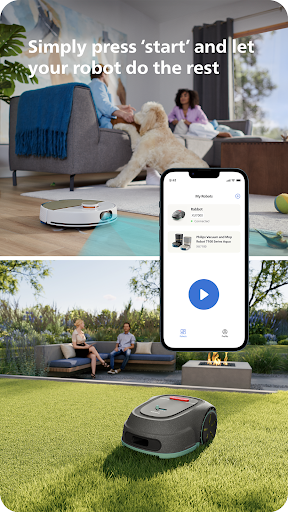
Come home to clean floors and a perfect-looking garden every day by using your Philips HomeRun vacuum, mop, and lawn mowing robot in combination with the app. Set it up once—to clean each room and mow your lawn just the way you like it—touch ‘Start’, anytime, anywhere, and let your robot do the rest.
On its first run, your robot will map your floor plan and garden. Now you have an interactive map of your home that you can use to tell your robot how and when to clean each room or to monitor how your lawn is mowed. The robot vacuum cleaner can store up to five maps.
Control where your robot vacuum cleaner cleans
Only want your robot to clean the kitchen, bathroom, living room? With the app, you can tell your robot which rooms you want cleaned, and in what order. If there are areas or things you’d like it to avoid—like precious items or a rug in an area you want to mop—you can tell it where not to go, or not to mop, as well.
Choose a cleaning mode for each room and mowing mode for each lawn
Give each room unique attention with one of the cleaning modes and mowing modes for your lawn. Use Dry mode to vacuum the bedroom and Wet & Dry mode to vacuum and mop hard floors. Put your robot on Quiet mode if, say, you have a meeting, or give the kitchen an extra thorough clean by using Intensive mode. Choose a mowing mode for your lawn to get the perfect looking garden.
Set up once. Enjoy spotless floors and lawns every day
Once you’ve created a cleaning and mowing plan, clean floors and perfectly mowed lawns are always a tap away. Tap ‘Start’ when you want your robot to begin - every day if you like, and at a time that suits your schedule.
Custom clean for specific situations
Had friends over and need an extra thorough clean? Or maybe the dog left paw prints in your hallway. Again. Schedule a custom clean and mow that targets specific rooms, areas.
Get step-by-step guidance to setup easily
From connecting to Wi-Fi to the first clean and mow, we’ll guide you through every step of getting started. You’ll find easy-to-follow instructions and how-to-videos as well.
Always have support at your fingertips
Have extra questions about the HomeRun app and robot? You’ll find a user manual in the app, answers to FAQs and easy access to Customer Care if need be.
Receive progress updates
As your robot cleans and mows, you’ll receive in-app updates. See where your robot currently is in your home and what the robot mowing progress is in your garden. Check on its battery levels and, most importantly, get notified as soon as the cleaning run or mowing is done
Maintain high performance
Get the best performance from your robot by replacing parts on time. Our app lets you know when it’s time to replace parts like filters, mops, and blades, and makes it easy to order them.
Keep your data secure
Philips adheres to a strict privacy policy. We recommend creating an account to ensure you can save your preferences. If you prefer, you can use the app as a guest.
WiFi
Philips HomeRun robot vacuum cleaners have dual band Wi-Fi so they are easy to connect to your home Wi-Fi, whether it's to 2.4 or 5.0GHz. Robot lawn mowers only connect to your 2.4GHz home Wi-Fi.
Need help?
Visit www.Philips.com to find answers to our most frequently asked questions, or get in touch with our Consumer Care team.
Отзывы пользователей

К сожалению, в приложении нет русского языка и нет озвучки робота на русском языке. Добавлено: Разработчик написал какую-то чушь. Я ему про отсутствие языка, а он про установку программы. Русскоязычные живут не только в России, а по всему миру.

отвратительное приложение, которое после обновления не видит робот и не хочет подключаться. короче зря потраченные деньги и время, китайские аналоги есть и дешевле и намного лучше. разработчикам большой минус. одна звезда и то много. пылесос даже после удаления из приложения и переподключения через qr код не подключается!

После 2 месяцев использования этого пылесоса робота начались проблемы с приложением: 1. Не открываются карты приходится открывать по 30 раз и может ещё и не открыть. 2. Часто начинает рисовать карты. Но в функционале робота всё устраивает по поводу уборки всё нормально. Но есть этому маленькое решение нужно выставить в регулярной уборке функции уборки и просто его запускать, а карта к концу уборке появится. Ребята приведите приложение в соответствующий функционал как должно быть, а не как есть.

Карта спустя две недели поплыла,в прямом смысле ,комнаты залазают друг на друга, при запуске зарядная станция на карте перемещается в другую комнату в которой пылесос отказывается вообще убирать, ибо там якобы станция... приложение очень убогое .Крик души.
Как скачать APK Philips HomeRun Robot App
- Введите имя пакета
com.philips.da.philipsrobotна APK Downloader. - Выберите архитектуру вашего устройства (для современных устройств рекомендуется ARM64).
- Нажмите Скачать, чтобы получить объединенный файл APK.
- Перенесите и установите APK на свое устройство Android.
- Следите за обновлениями: Регулярно посещайте APKDER.COM, чтобы искать и скачивать последние безопасные версии ваших любимых приложений.
Часто задаваемые вопросы
Да! Каждый файл на APKDER проходит строгую проверку безопасности. Мы проверяем, что криптографическая подпись совпадает с официальной подписью разработчика, гарантируя, что приложение не было изменено.
Чтобы установить его, сначала необходимо включить «Неизвестные источники» в настройках безопасности вашего Android-устройства. После загрузки APK-файла с APKDER нажмите на него, чтобы начать установку, и следуйте подсказкам на экране.
Да! Как только разработчик выпустит новую версию Philips HomeRun Robot App, мы выложим обновленный APK на APKDER. Вы можете просто скачать и установить новый APK поверх существующего, не теряя данные приложения.
Безопасность и проверка подписи
Эта загрузка APK на 100% безопасна. Мы проверяем соответствие цифровой подписи файла официальным ключам разработчика. Изменения и реклама отсутствуют.


