
Источники загрузки
Device Configuration
Руководство по установке Split APK
Некоторые приложения распространяются в виде Split APK (несколько упакованных вместе файлов .apk) для оптимизации ресурсов. Стандартные установщики Android не могут их открыть.
Похожие Приложения




Что нового
Handwritten notes can now by synced
Added a chromatic tuner
Added pining setlists to the top of the list
Added ability to replace the PDF file of a song
Multiple MIDI messages can be added to each song
Support for ChordPro Grid syntax
Added option to print set overviews in a compact table format
Added option to disable swipe gestures between songs in sets
Lots of other improvements and bug fixes
О приложении
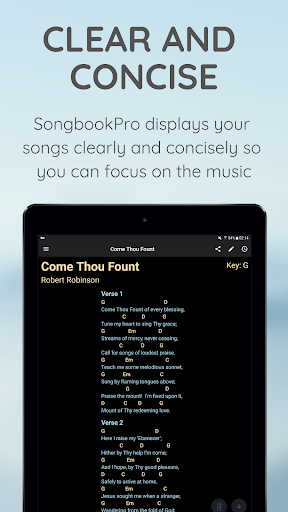
SongbookPro replaces all the hassle of carrying and organizing your chord charts, lyric sheets and songbooks with a simple app on your laptop or tablet.
A fantastic tool for guitarists, bassists, vocalists or anybody using chord charts, lyrics, sheet music or heavy songbooks, SongbookPro easily allows you to get rid of all that paper by displaying your music in a flexible, easy to read format.
Features include:
- All your songs together in one universal digital songbook
- Displays chords and lyrics clearly and concisely for easy playing
- Full pdf support for playing from sheet music
- Grouping songs into sets for easy switching between songs when playing live
- Quick and easy key and capo adjustments
- Import songs in ChordPro or onsong formats, as PDF documents or directly from UltimateGuitar.com and WorshipTogether.com
- Simple sharing of songs and sets between SongbookPro users
- Share and sync your songbook between platforms with apps for Android, iOS, Windows 10 and Amazon Fire.
Please note that SongbookPro is free to try out, however you will be limited to 12 songs in your library and online sync will is disabled until you choose to buy the full app through a small in-app purchase.
Как скачать APK SongbookPro
- Введите имя пакета
com.songbookpro.songbookproна главной странице APK Downloader. - Выберите архитектуру вашего устройства (для современных устройств рекомендуется ARM64).
- Нажмите Скачать, чтобы получить объединенный файл APK.
- Перенесите и установите APK на свое устройство Android.
- Следите за обновлениями: Регулярно посещайте APK Downloader, чтобы искать и скачивать последние безопасные версии ваших любимых приложений.
Безопасность и проверка подписи
Эта загрузка APK на 100% безопасна. Мы проверяем соответствие цифровой подписи файла официальным ключам разработчика. Изменения и реклама отсутствуют.