
Источники загрузки
Device Configuration
Руководство по установке Split APK
Некоторые приложения распространяются в виде Split APK (несколько упакованных вместе файлов .apk) для оптимизации ресурсов. Стандартные установщики Android не могут их открыть.
Похожие Приложения




Что нового
Upgraded functionality and fixed some issues.
О приложении
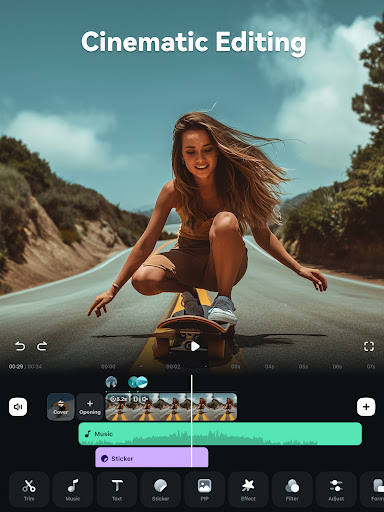
Shortcut to create a viral video? Filmora AI Video Editor (formerly FilmoraGo video editor) is an AI-based video editor & movie maker, featuring AI Auto Cut, AI Remover, Dynamic Captions, Text to Video, Text to Speech, etc! Best choice for creating videos, reels, vlogs and shorts!
🤖Powerful Brand New AI Features
🎞AI Auto Cut
· Seamlessly stitching highlight moments into cinematic tales!
🧽AI Remover
· Effortlessly erasing unwanted elements from videos.
📜Dynamic Captions
· Auto speech to text into dynamic word-by-word captions.
🎥Text to Video
· Generate videos with AI copywriting and subtitles, while maintaining visual quality and adherence to your prompt.
🗣AI Voice Cloning
· No more Voice-Over! Easily copy your voice and generate any speech you wish within customized emotions & in any language!
🎙️Text to Speech
· Transform text into professional voiceovers for your videos.
🎵AI Music & Sound Effects
· Generate royalty-free and professional-quality music and soundscapes for your videos!
✨AI Video Effects
· AI Show - Transform your photos into stunning, stylized photos or videos with just one click!
· Infinite Zoom - Dive into the world of endless visual possibilities.
✂️AI Smart Cutout
· You can remove background or chroma key and replace a sky in your videos.
· Customized Cutout - Swipe your finger, then intelligently identify the target area and cut anything out as you want!
· Cutout Plus - You can set strokes, overlay effects, and replace backgrounds for your keyed objects.
🥁Rhythm Master
· Automatic beat-matching can sync rhythm videos to the perfect beat for a seamless creation experience.
🎬User-friendly video editing for beginners
- Trim, split, duplicate, or merge video clips without losing quality.
- Add text, emoji, and exclusive stickers.
- Add music, sound effects & voice-overs. Royal-free built-in music library and sound effects.
- Extract music from the video and split audio to remove unwanted parts.
- Rotate or crop: Adjust the orientation or size.
- Adjust video ratios for Instagram/TikTok/Youtube posts.
- Adjust speed for fast or slow motion.
- Stunning templates help create videos in one click.
🏆Full-featured video editing for professional
- All-in-one Keyframe: More adjustment items support keyframes, combined with color and special effects, you can create more cool animations.
- Speed Curve: Speed control with customizable & pre-set curves for various themes.
- PIP (Picture in Picture): add multiple layers of video, images, stickers, special effects, text, etc.
- Masking: Cover and mix video clips, get different video effects.
- Smart tracking: Support stickers, text, and PIP intelligent tracking targets, whether you need to track faces, objects, or anything else.
🌟Filmora Pro Subscription
- With Filmora Pro video editor unlimited subscription, you can access all features and paid editing materials including stickers, filter packages, etc. Watermark and Logo Roll will be removed automatically.
- With“Android Pro”, you can access all Pro features and paid editing materials on Android.
- With“All Platform Pro”, you can access all Filmora Pro on Android, iOS, Mac, and Windows.
- You can turn off auto-renewal at any time through your Account Settings.
- Any unused portion of a free trial period, if offered, will be forfeited when the user purchases a subscription.
📧Contact Us
Service Email: [email protected]
YouTube: https://www.youtube.com/c/FilmoraWondershare
Facebook: https://www.facebook.com/filmoravideoeditor
Instagram: https://www.instagram.com/filmora_editor
Как скачать APK FilmoraHD - AI Video Creator
- Введите имя пакета
com.wondershare.filmoraна главной странице APK Downloader. - Выберите архитектуру вашего устройства (для современных устройств рекомендуется ARM64).
- Нажмите Скачать, чтобы получить объединенный файл APK.
- Перенесите и установите APK на свое устройство Android.
- Следите за обновлениями: Регулярно посещайте APK Downloader, чтобы искать и скачивать последние безопасные версии ваших любимых приложений.
Безопасность и проверка подписи
Эта загрузка APK на 100% безопасна. Мы проверяем соответствие цифровой подписи файла официальным ключам разработчика. Изменения и реклама отсутствуют.