
Источники загрузки
Device Configuration
Руководство по установке Split APK
Некоторые приложения распространяются в виде Split APK (несколько упакованных вместе файлов .apk) для оптимизации ресурсов. Стандартные установщики Android не могут их открыть.
Похожие Приложения




О приложении
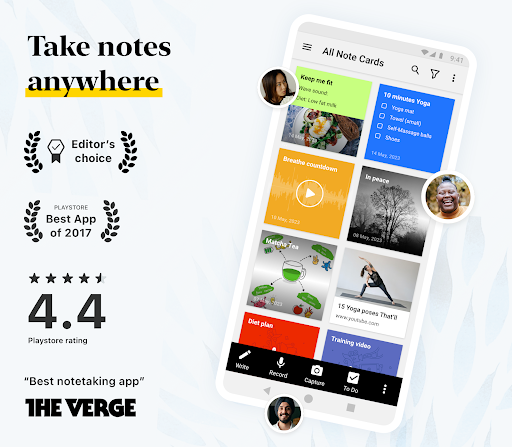
Zoho Notebook is a note‑taking app and digital notepad for capturing ideas, to‑do lists, tasks, meeting notes, journal entries and more. Organize everything with notebooks, tags and AI‑powered tools. Sync across mobile, desktop and web while staying private and ad‑free.
SMART NOTE‑TAKING
• Create rich text notes with checklists, tables, images and audio in one place.
• Build dedicated checklists and task lists to manage your day.
• Record voice notes or transcribe speech to text automatically.
• Scan documents, textbooks or handwritten notes into searchable PDFs.
• Save photos, web clips and documents using cards. Add reminders to stay on top of tasks.
NOTEBOOK AI – AI-powered note-taking assistant
• Generate summaries, outlines, or to-do lists from rough ideas using AI.
• Get accurate, real-time transcripts of meetings, lectures, or podcasts.
• Turn your notes into clear mind maps to visualize ideas.
• Polish your writing with grammar and tone suggestions.
• Translate notes into multiple languages and automatically refine hand-drawn shapes.
ORGANIZE & SECURE
• Group notes with nested notebooks and custom sorting options.
• Tag notes to connect ideas across notebooks and projects.
• Protect private information with a passcode, fingerprint or face lock.
• Find what you need quickly with full‑text search across all your notes.
CROSS‑DEVICE & SYNC
• Write anywhere and access your notes on Android, iOS, macOS and Web (
https://notebook.zoho.com/).
• Use the Web Clipper to save articles and research from your browser.
• Edit notes offline and sync when you're online.
PERSONALIZATION
• Choose covers, themes and note colours to suit your style.
• Sketch formulas or diagrams with the Sketch Card.
• Upload videos and add chapter markers.
• Pin sticky notes with picture‑in‑picture and view in grid or landscape mode.
SHARE & COLLABORATE
• Share notes securely: invite friends or colleagues to view or work on specific notes or lists, set access levels, or share as a public card.
• Publish notes with a shareable link that anyone can view, then copy and share the link anywhere or set an expiration date to control access.
• Export notes as PDF files and share them via email, messages, or other supported apps. Save notes in Zoho Notebook Markup Language (ZNML) format to import later.
BUILT FOR ANDROID
• Access notes from home‑screen widgets or pinned shortcuts.
• Use Quick Settings to open a new note instantly.
• Enjoy multi‑window, picture‑in‑picture, keyboard shortcuts and printing support.
EVERYDAY LIFE
• Plan your day with task lists and reminders.
• Organize grocery lists, travel plans or event agendas.
• Keep a secure diary or journal. Track goals, projects and habits.
• Stay productive at work, school or home.
Switching from Evernote, Google Keep or OneNote? Zoho Notebook includes free migration tools to import all your notes in minutes — nothing gets left behind.
Zoho Notebook gives you the freedom to capture ideas your way. It’s free, private, ad‑free and synced across devices. Whether you're a student, professional or creative thinker, Notebook helps you stay organized, remember more and work smarter.
Whether it's for class, work, or personal — it's the only note taking, diary, and checklist app you’ll ever need.
Как скачать APK Notebook – Notes, Tasks, AI
- Введите имя пакета
com.zoho.notebookна главной странице APK Downloader. - Выберите архитектуру вашего устройства (для современных устройств рекомендуется ARM64).
- Нажмите Скачать, чтобы получить объединенный файл APK.
- Перенесите и установите APK на свое устройство Android.
- Следите за обновлениями: Регулярно посещайте APK Downloader, чтобы искать и скачивать последние безопасные версии ваших любимых приложений.
Безопасность и проверка подписи
Эта загрузка APK на 100% безопасна. Мы проверяем соответствие цифровой подписи файла официальным ключам разработчика. Изменения и реклама отсутствуют.