Источники загрузки
Device Configuration
Руководство по установке Split APK
Некоторые приложения распространяются в виде Split APK (несколько упакованных вместе файлов .apk) для оптимизации ресурсов. Стандартные установщики Android не могут их открыть.
Что нового
Bug fixes
О приложении
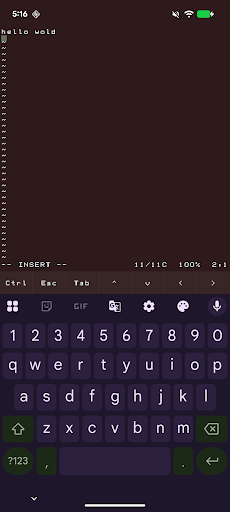
abash is a native Android terminal emulator written in C. It gives you a real interactive bash shell on your phone, complete with a VT100 terminal, scrollback, command history, tab completion, and a soft-key toolbar for Ctrl, Esc, Tab, and arrow keys.
It also ships with a practical Unix toolset, including vim, git, curl, grep, sed, awk, find, tar, less, and a large set of GNU command-line tools. You can edit text files, inspect and transform data, work with repositories, and run shell workflows directly on-device.
abash also includes Android-aware commands for things like the clipboard, share sheet, notifications, camera, sensors, and selected device information when you grant permission. It is designed to feel like a real shell while still fitting naturally into Android.
When you choose abash from Android’s Open with menu, text files can open directly in vim. Other shared items can open a shell that is already navigated to the item’s parent folder, so you can start working immediately. As a fallback, if it cannot access the file's source directory, abash will copy the file into its home directory.
Important limitations
abash still runs inside Android’s app sandbox. It is not root, not a Linux VM, and not a way around Android security. It cannot read other apps’ private data, modify protected system areas, or access files that you have not explicitly shared or granted permission to.
Some parts of the system are also restricted by Android and SELinux. That means certain directories may not be fully discoverable, and some convenience features such as command or path discovery can be more limited than on a desktop Linux system.
For files opened through Android document providers, abash may need to make a private working copy so terminal tools can access it. In those cases, saving changes updates the copy inside abash rather than automatically writing back to the original source file.
Как скачать APK abash
- Введите имя пакета
dev.paonessa.abashна APK Downloader. - Выберите архитектуру вашего устройства (для современных устройств рекомендуется ARM64).
- Нажмите Скачать, чтобы получить объединенный файл APK.
- Перенесите и установите APK на свое устройство Android.
- Следите за обновлениями: Регулярно посещайте APKDER.COM, чтобы искать и скачивать последние безопасные версии ваших любимых приложений.
Безопасность и проверка подписи
Эта загрузка APK на 100% безопасна. Мы проверяем соответствие цифровой подписи файла официальным ключам разработчика. Изменения и реклама отсутствуют.