
İndirme Kaynakları
Device Configuration
Split APK Kurulum Kılavuzu
Bazı uygulamalar, kaynakları optimize etmek için Split APK'ler (birlikte paketlenmiş birden fazla .apk dosyası) olarak dağıtılır. Standart Android yükleyicileri bunları açamaz.
İlişkili Uygulamalar




Yenilikler
Welcome to Fender Notion
Notion is now part of the Fender Studio family. Everything you know and love about Notion Mobile is still here, now just called ‘Fender Notion’. You can transfer notation and audio direct from Fender Notion to Fender Studio Pro 8, anywhere on the same network. And you can use your Fender Studio Pro+ membership to unlock Fender Notion’s Feature Bundle.
For the full 3.6.3 guide, check: https://shorturl.at/sAETQ
Bu uygulama hakkında
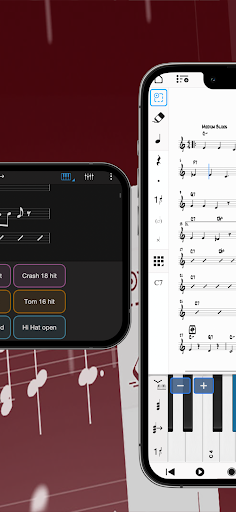
Fender Notion is a free, award-winning music composition app for Android on phones, tablets, Chromebooks, and more! You’ll effortlessly compose dynamic sheet music in traditional musical notation or guitar tablature with its intuitive touch-based interface and incredibly broad editing capabilities.
With a user-friendly interface and simple interactive piano keyboard, fretboard, drum pad, and even optional Handwriting Recognition, Fender Notion makes it easy to get started composing your music. You’ll hear your music performed with the most realistic playback possible, using real audio samples recorded by the London Symphony Orchestra at Abbey Road Studios.
Fender Notion is natively cross-platform, meaning you can write anywhere on any device without requiring a constant Internet connection. And when you’re back online, you’ll be able to sync your music notation across multiple devices — either through your preferred cloud provider, or through the optional wireless transfer between Fender applications on any device. Start your work on one device and finish it on another. Once you are happy with your creation you can share the Notion file, or export as MIDI, MusicXML, PDF or as an audio file.
Compose, edit, and play back your sheet music performed with real piano and orchestral samples recorded by the London Symphony Orchestra at Abbey Road Studios — along with outstanding sampled guitar, bass, drums and other popular instruments. And when you’re ready for more sounds, you’ll find the extensive library of Notion Add-on Soundsets to purchase as part of the Feature Bundle. To save space, the initial app download contains just piano — you can then manage which of the bundled Soundsets to have on your device or keep in the cloud, just tap on Sound Installation.
Notion has been featured in various worldwide campaigns and has won several awards, including a prestigious music industry NAMM TEC Award for Best Smartphone/Tablet App.
What you get:
Fender Notion includes unlimited staves, comprehensive editing features and core orchestral and rhythm section Soundsets — all for free. Register to get an additional free Welcome Pack which unlocks an additional Soundset (containing Solo Strings, Classical Saxophones, and Glockenspiel), and the multivoice function that allows writing in up to four voices per staff. Then for the full experience, either sign in with your Fender Studio Pro+ membership or purchase the Notion Feature Bundle. This unlocks Handwriting Recognition, all the Expansion Soundsets (including many auxiliary instruments and additional articulations and effects), additional audio export formats (m4a, OPUS, FLAC) and direct file transfer between applications running on the same network (including Fender Notion and Fender Studio Pro).
Free:
Unlimited staves
All editing features
Core Soundsets
Export as MIDI, PDF, wav, mp3
Register for free:
Reward Soundset including Solo Strings, Glockenspiel, Classical Saxophones
Additionally write for voices 3 and 4 in a single staff
Export as MusicXML, Compressed MusicXML
Feature Bundle:
Handwriting Recognition, powered by MyScript
Automatic pen vs. finger recognition to switch between handwriting and edit mode with supported styluses
Adjustable timer for Handwriting Recognition
Layout Control
All Expansion Soundsets
Additional audio export formats (m4a, OPUS, FLAC)
Direct file transfer between applications (including Fender Mobile and Fender Studio Pro)
Fender Notion: Music and Tab APK Nasıl İndirilir
- Paket adını
com.presonus.notionmobileAPK Downloader ana sayfasında girin. - Cihazınızın mimarisini seçin (modern cihazlar için ARM64 önerilir).
- Birleştirilmiş APK dosyasını almak için İndir'e tıklayın.
- APK'yı Android cihazınıza aktarın ve yükleyin.
- Güncel Kalın: En sevdiğiniz uygulamaların en son güvenli sürümlerini aramak ve indirmek için düzenli olarak APK Downloader'ı ziyaret edin.
Güvenlik ve İmza Doğrulaması
Bu APK indirmesi %100 güvenlidir. Dosyanın kriptografik imzasının resmi geliştirici sertifikasıyla eşleştiğini doğrularız. Herhangi bir değişiklik veya reklam barındırmaz.