
İndirme Kaynakları
Device Configuration
Split APK Kurulum Kılavuzu
Bazı uygulamalar, kaynakları optimize etmek için Split APK'ler (birlikte paketlenmiş birden fazla .apk dosyası) olarak dağıtılır. Standart Android yükleyicileri bunları açamaz.
İlişkili Uygulamalar




Yenilikler
Thanks for using the SimplePractice Client Portal app! Our app is updated regularly to ensure that you have the best experience.
Bu uygulama hakkında
If you’re receiving services for behavioral health, counseling, speech pathology, occupational therapy, physical therapy, or any other wellness service by a practitioner who uses SimplePractice, this app is for you! The SimplePractice Client Portal Android app empowers you to manage care for you or your loved ones from one secure place. Stay connected with your practitioner between appointments from the convenience of your phone. Your personal information is kept private, yet easily accessible for your convenience.
Simplify how you access care with features like:
• Passwordless login – Securely log into your Client Portal without the hassle of a username or password by setting up a passcode or turn on biometrics (if enabled on your Android device)
• Personalized notifications – Get push notifications sent right to your phone regarding any new messages, invoices, or documents that have been sent to you by your practitioner.
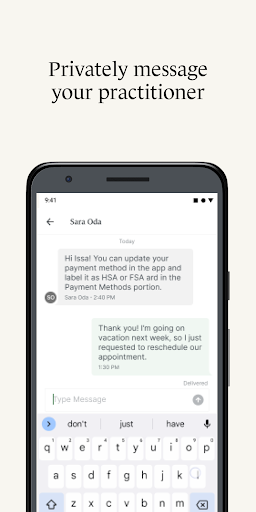
• Secure messaging – Message your practitioner directly from your phone knowing that all communication is secure and private.
• Upcoming appointments and requests – View all your upcoming appointments, and request a new appointment with your practitioner directly from the app.
• Digital payments – Add new payment methods to pay your bills including HSA and FSA cards. You can even pay directly from the app.
• Digital paperwork – Complete documents and questionnaires related to care on your own time.
• Telehealth – Join virtual appointments with your practitioner directly from the app, so you never have to find a link buried in your inbox again.
• Profile switching – Quickly toggle between any Client Portal you’re managing—whether you’re seeing different providers who use SimplePractice for practice management or are managing care for multiple individuals.
To access the SimplePractice Client Portal Android app, you must be invited to use the SimplePractice Client Portal by your practitioner. When you first log into the app, the email you provided to your practitioner will be used to authenticate your Client Portal access. After you’ve signed up, turn on biometrics or a four-digit passcode for hassle-free login. Please note: what you can see and do within the SimplePractice Client Portal app may vary, and is limited to the specific features your practitioner has enabled for your profile.
Are you currently looking for therapy services? To find a behavioral health therapist that uses SimplePractice near you, visit www.meetmonarch.com.
SimplePractice Client Portal APK Nasıl İndirilir
- Paket adını
com.simplepractice.clientsAPK Downloader ana sayfasında girin. - Cihazınızın mimarisini seçin (modern cihazlar için ARM64 önerilir).
- Birleştirilmiş APK dosyasını almak için İndir'e tıklayın.
- APK'yı Android cihazınıza aktarın ve yükleyin.
- Güncel Kalın: En sevdiğiniz uygulamaların en son güvenli sürümlerini aramak ve indirmek için düzenli olarak APK Downloader'ı ziyaret edin.
Güvenlik ve İmza Doğrulaması
Bu APK indirmesi %100 güvenlidir. Dosyanın kriptografik imzasının resmi geliştirici sertifikasıyla eşleştiğini doğrularız. Herhangi bir değişiklik veya reklam barındırmaz.