
下载来源
Device Configuration
Split APKs Installation Guide
某些应用以 Split APKs(打包在一起的多个 .apk 文件)形式分发以优化资源。标准的 Android 安装程序无法打开它们。
相关应用




关于此应用
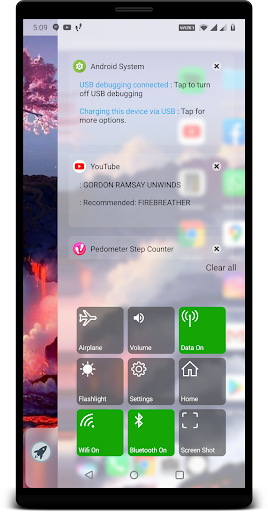
Original oS X Style Computer Launcher with 30+ functionalities which will save your 5x time and effort , install now and you won't resist to use all time.
Get os Style Launcher on your Android , Why to have old fashioned launcher when you can have m os launcher in your hand , Check out the new computer launcher for your Android smart phones
Your friends will be jealous with this new look style m os 14 Launcher.
Make your android phone look like .m os 14
This Launcher will exactly give you feel of Desktop launcher for m os 14 with Custom Desktop Computer customizations
Desktop m os Launcher
Get m os style File Manager where you can search and explore all your apps , contacts , google search , google maps and more
Top Features:
- Start Menu like oS x
- Window 10 tile look
- Create shortcuts on oS x
- Create contacts on oS x
- Place apps on oS x
- Drag and Drop
- Most used apps list
- 18 app categories with 2million apps data
- Easy access and search to the Apps
- Get details of all of your drives, SD Card, Storage, audio and video files and pictures in oS x
style
- Computer Launcher Taskbar exact look
- Get notify when a notification comes by using Computer Launcher Notifyer with number counter
- Place Widgets on desktop , resize , drag drop
- Add home page
- Drag and drop for all actions
- Clock Widget on desktop and taskbar
- Weather Widget
- News Widgets
- Rename desktop folders
- Live Premium Wallpapers and Themes
- Weather, Calendar and Photos tiles Added
- Unlimited Themes
- Lock Screen Feature
- Hide App Feature
- Multi Color Support for Desktop,Start Menu and Task bar
- Themes and Icon Pack
- Change applications in Taskbar (Drag Drop)
Accessibility API Requirement : Enable Accessibility Service to perform global actions like going back, opening notifications taking screen shot, double tap to lock screen. Please be assured that XOS Launcher will not collect any personal information
如何下载 oS X 14 Launcher Prime APK
- 在 APK Downloader 首页 输入应用包名
apptech.os.launcher.prime。 - 选择您的设备架构(现代设备推荐选择 ARM64)。
- 点击 下载 获取合并后的 APK 文件。
- 传输并安装 APK 到您的 Android 设备上。
- 保持更新: 定期访问 APK Downloader 以搜索并下载您最喜爱的应用的最新安全版本。
安全与签名验证
此 APK 下载 100% 安全。我们验证文件的加密签名与官方开发者的凭据相匹配。无任何修改或广告注入。