

下载来源
Device Configuration
Split APKs Installation Guide
某些应用以 Split APKs(打包在一起的多个 .apk 文件)形式分发以优化资源。标准的 Android 安装程序无法打开它们。
新版变化
Version 5.5.1: Online tactics
- Integrated tactics from 12chess.com (You can still use the old offline problems from the settings)
- Updated to Stockfish 16
- Added a new icon
- Due to new Android policies, the permission to write to external storage has been removed and not it uses the Storage Access Framework
- Consequently, the option to save all online played games to a PGN file had to be removed
- Upgraded libraries and SDKs
关于此应用
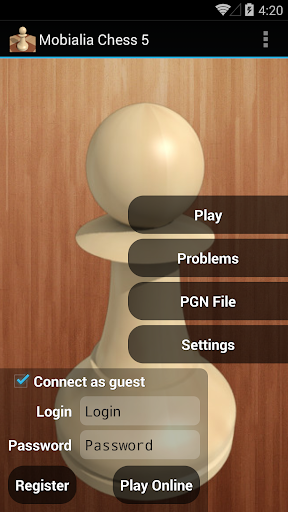
The best app for chess lovers: Play against AI or online at FICS or ICC
Play against AI
- Selectable ELO Levels to adjust playing strength, from 500 to 2100, on 50 ELO points steps
- Selectable time per move: changing the ELO and the time per move, lots of difficulty levels can be selected
- Opening book with more than 30.000 positions: ensures variated funny games
- Can undo/redo all moves
- Send PGN by email: This way, you can analyze later your games on your PC
- Graphical setup board, also can edit position’s FEN notation
- On closing, saves the current game and it is loaded when the application is restarted
Play online
- Play online at freechess.org (FICS) or chessclub.com (ICC)
- Play as guest or as a registered user
- Seek/offer match rated and unrated
- View seeks posted by other users. Can sort seek list by username, rating or game time
- Takeback, draw, abort, resign and rematch options while playing
- Play, Finger and Observe, can also observe LectureBot on FICS or play ProblemBot/TrainingBot on ICC
- Observe current played games in the chess server or follow highest rated games
- Messages: read and send messages to other users
- Game History: you can examine or send by email all your played games
- Console to see server output and to send commands, also for chatting with other users
- Timeseal (FICS) and Timestamp (ICC): avoids lag problems
- Premove option: You can introduce the next movement in your opponent’s turn
- Option to confirm the move before sending it to the server. Forward and Backward buttons are converted on Confirm/Cancel buttons
- Supports wild chess variants: Atomic, Losers, Suicide and Chess960
Chess problems
- 2900+ chess problems to solve looking for the best moves: problems collected by Uwe Auerswald, from Germany
- Selectable problem difficult (Easy, Medium and Hard Problems)
Chess database
- Chess database of ~3.1M games updated weekly from http://www.theweekinchess.com
- It allows to search for players, events and dates from the section Database in the main sidebar
- It can search specific positions from the board with ⋮-> Search position in DB
- Searching a board position shows stats including, for each move, the number of games where the move was played and the white victory/draw/black victory percentages as bars
- From the stats screen you can list all the games in the current position with ⋮-> Show games
PGN browser
- Simple PGN browser, allows you to open PGN files from SD card or from your email
Analysis
- Analyis mode in the board screens with ⋮-> Analysis
- It shows the position's ECO code
A great interface
- 2D/3D board
- Clean, simple and intuitive interface
- Move by dragging and dropping the piece with useful guide lines
- Also move by tapping the origin and the destiny squares or with the trackball
- Portrait and landscape mode
- Shows legal moves (as yellow translucent squares)
- Highlights last move (with a yellow arrow or a colored square, can be configured with a settings option), also move hints (as a green arrow) after a request in the menu
- Many piece sets and board styles
- Shows a dot in the side to move and can show board coordinates
- The material gauge indicates the material advantage using this piece values: Pawn=1 Knight=3 Bishop=3 Rook=5 Queen=9. Click on the gauge to show/hide the captured pieces difference
- Shows captured pieces advantage (as an example if black captured 3 pawns and whites 2, it shows an advantage of 1 white pawn for blacks)
- Speaks moves, checks and game results
- Different sounds for moves, captures and checks, also vibration
- Option to keep the screen on while playing
You can try the Free version with ads first
如何下载 Mobialia Chess APK
- 在 APK Downloader 输入应用包名
com.alonsoruibal.chessdroid。 - 选择您的设备架构(现代设备推荐选择 ARM64)。
- 点击 下载 获取合并后的 APK 文件。
- 传输并安装 APK 到您的 Android 设备上。
- 保持更新: 定期访问 APKDER.COM 以搜索并下载您最喜爱的应用的最新安全版本。
常见问题
是的!APKDER 上托管的每个文件都经过严格的安全验证。我们验证其加密签名是否与开发者的官方签名匹配,确保应用未被修改或篡改。
要安装它,您首先需要在 Android 设备的安全设置中启用“未知来源”。从 APKDER 下载 APK 文件后,点击它开始安装,并按照屏幕提示操作。
是的!一旦开发者发布 Mobialia Chess 的新版本,我们就会在 APKDER 上更新并发布。您只需下载并覆盖安装新的 APK,无需删除旧版本,也不会丢失应用数据。
安全与签名验证
此 APK 下载 100% 安全。我们验证文件的加密签名与官方开发者的凭据相匹配。无任何修改或广告注入。