
Crayon Icons Pack: Pastel Icon APK 截图


Crayon Icons Pack: Pastel Icon 应用信息
下载来源
Device Configuration
Split APKs Installation Guide
某些应用以 Split APKs(打包在一起的多个 .apk 文件)形式分发以优化资源。标准的 Android 安装程序无法打开它们。
Crayon Icons Pack: Pastel Icon 新版变化
Minor Bug Fixes
关于此应用 Crayon Icons Pack: Pastel Icon
Transform Your Home Screen with Crayon Icons!
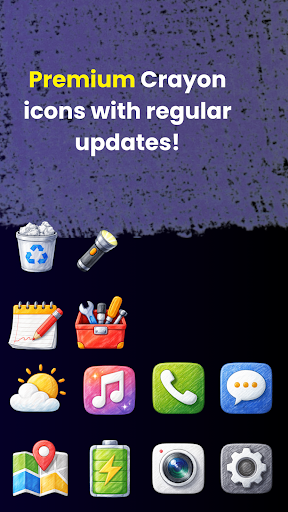
Give your Android device a unique, artistic makeover with the Crayon Icons Pack. Designed for fans of minimalist aesthetics and hand-drawn art, this icon pack brings a soft, colorful, and creative vibe to your phone.
Each icon is meticulously crafted to mimic a crayon and pastel style, ensuring your interface looks playful yet professional. Whether you are using a dark wallpaper or a vibrant background, these icons are designed to pop.
Key Features:
High-Quality Icons: A massive library of icons covering all your favorite apps.
Creative Pastel Palette: Soft, eye-pleasing colors that reduce eye strain and look beautiful.
Icon Masking: We provide masking for unthemed icons so your entire app drawer remains consistent.
Easy Icon Request: Missing an app? Use our built-in tool to request new icons directly.
Frequent Updates: We regularly add new icons based on user feedback.
Supported Launchers:
Crayon Icons Pack works seamlessly with most popular Android launchers, including:
Nova Launcher
Action Launcher
Apex Launcher
Lawnchair
Smart Launcher
Niagara Launcher
And many more!
How to Use:
Install a supported Third-Party Launcher (like Nova or Lawnchair).
Open Crayon Icons Pack.
Go to the "Apply" section and select your launcher.
Enjoy your new artistic home screen with Crayon Icons Pack: Pastel Icon!
(Note: This is an icon pack and requires a compatible launcher to work.)
如何下载 Crayon Icons Pack: Pastel Icon APK
- 在 APK Downloader 输入应用包名
com.crayoniconspack.iconspack。 - 选择您的设备架构(现代设备推荐选择 ARM64)。
- 点击 下载 获取合并后的 APK 文件。
- 传输并安装 APK 到您的 Android 设备上。
- 保持更新: 定期访问 APKDER.COM 以搜索并下载您最喜爱的应用的最新安全版本。
常见问题
是的!APKDER 提供的每次 APK 下载都经过严格的安全验证。我们验证 APK 文件的加密签名是否与开发者的官方签名匹配,确保 APK 是原始且未经修改的。
要安装它,您首先需要在 Android 设备的安全设置中启用“未知来源”。从 APKDER 下载 APK 文件后,点击它开始安装,并按照屏幕提示操作。
是的!一旦开发者发布 Crayon Icons Pack: Pastel Icon 的新版本,我们就会在 APKDER 上更新并发布。您只需下载并覆盖安装新的 APK,无需删除旧版本,也不会丢失应用数据。
是的。APKDER 允许您绕过地域限制并直接下载官方 APK 文件,即使该应用或游戏在您所在国家/地区物商店中未正式上架。
标准 APK 是单个安装包。而 XAPK 或 Split APK 则包含打包在一起 of 多个资源文件(如 OBB 扩展数据包或特定于设备的布局部件)。要安装它们,您可以单独下载拆分的包,或使用 Split APKs Installer (SAI) 等辅助工具。
安全与签名验证
此 APK 下载 100% 安全。我们验证文件的加密签名与官方开发者的凭据相匹配。无任何修改或广告注入。


