
下载来源
Device Configuration
Split APKs Installation Guide
某些应用以 Split APKs(打包在一起的多个 .apk 文件)形式分发以优化资源。标准的 Android 安装程序无法打开它们。
相关应用





新版变化
New in 6.2.2:
• Fix crash occurring when favorite app tiles are selected
New in 6.2.1:
• Maintenance release targeting the latest versions of Android
• Various bug fixes and crash fixes
• Updated German translation
关于此应用
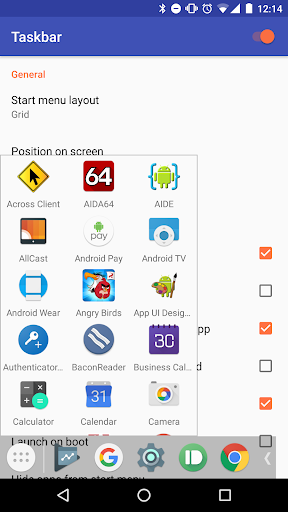
Taskbar puts a start menu and recent apps tray on top of your screen that's accessible at any time, increasing your productivity and turning your Android tablet (or phone) into a real multitasking machine!
Taskbar supports Android 10's Desktop Mode, allowing you to connect your compatible device to an external display and run apps in resizable windows, for a PC-like experience! On devices running Android 7.0+, Taskbar can also launch apps in freeform windows without an external display. No root required! (see below for instructions)
Taskbar is also supported on Android TV (sideloaded) and Chrome OS - use Taskbar as a secondary Android app launcher on your Chromebook, or turn your Nvidia Shield into an Android-powered PC!
If you find Taskbar useful, please consider upgrading to the Donate Version! Simply tap the "Donate" option at the bottom of the app (or, on the web, click here).
Features:
• Start menu - shows you all applications installed on the device, configurable as a list or as a grid
• Recent apps tray - shows your most recently used apps and lets you easily switch between them
• Collapsible and hideable - show it when you need it, hide it when you don't
• Many different configuration options - customize Taskbar however you want
• Pin favorite apps or block the ones you don't want to see
• Designed with keyboard and mouse in mind
• 100% free, open source, and no ads
Desktop mode (Android 10+, requires external display)
Taskbar supports Android 10's built-in desktop mode functionality. You can connect your compatible Android 10+ device to an external display and run apps in resizable windows, with Taskbar's interface running on your external display and your existing launcher still running on your phone.
Desktop mode requires a USB-to-HDMI adapter (or a lapdock), and a compatible device that supports video output. Additionally, certain settings require granting a special permission via adb.
To get started, open up the Taskbar app and click "Desktop mode". Then, just tick the checkbox and the app will guide you through the setup process. For more information, click the (?) icon in the upper-right hand corner of the screen.
Freeform window mode (Android 7.0+, no external display required)
Taskbar lets you launch apps in freeform floating windows on Android 7.0+ devices. No root access is required, although Android 8.0, 8.1, and 9 devices require an adb shell command to be run during initial setup.
Simply follow these steps to configure your device for launching apps in freeform mode:
1. Check the box for "Freeform window support" inside the Taskbar app
2. Follow the directions that appear in the pop-up to enable the proper settings on your device (one-time setup)
3. Go to your device's recent apps page and clear all recent apps
4. Start Taskbar, then select an app to launch it in a freeform window
For more information and detailed instructions, click "Help & instructions for freeform mode" inside the Taskbar app.
Accessibility service disclosure
Taskbar includes an optional accessibility service, which can be enabled in order to perform system button press actions such as back, home, recents, and power, as well as displaying the notification tray.
The accessibility service is used only to perform the above actions, and for no other purpose. Taskbar does not use accessibility services to perform any data collection whatsoever (in fact, Taskbar cannot access the Internet in any capacity as it does not declare the required Internet permission).
如何下载 Taskbar APK
- 在 APK Downloader 首页 输入应用包名
com.farmerbb.taskbar。 - 选择您的设备架构(现代设备推荐选择 ARM64)。
- 点击 下载 获取合并后的 APK 文件。
- 传输并安装 APK 到您的 Android 设备上。
- 保持更新: 定期访问 APK Downloader 以搜索并下载您最喜爱的应用的最新安全版本。
安全与签名验证
此 APK 下载 100% 安全。我们验证文件的加密签名与官方开发者的凭据相匹配。无任何修改或广告注入。