

Inventro Pocket APK 截图



Inventro Pocket 应用信息
下载来源
Device Configuration
Split APKs Installation Guide
某些应用以 Split APKs(打包在一起的多个 .apk 文件)形式分发以优化资源。标准的 Android 安装程序无法打开它们。
Inventro Pocket 新版变化
☑️ Live Dashboard: Track today's revenue, sales count, and total dues at a glance.
☑️ Inventory Tracking: View your product list, see what's selling fast, and monitor low stock items.
☑️ Accounts Overview: Keep track of customer dues and business cash flow in real-time.
☑️ Smart Notifications: Get instant push alerts on your phone for large sales, settled customer dues, and low stock warnings.
☑️ Quick Pairing: Easily link multiple store branches using a simple QR code scan from your desktop.
关于此应用 Inventro Pocket
Inventro Pocket lets you keep an eye on your store from your phone. It works with Inventro POS and shows your latest business data, so you can check what's happening without being at the counter.
Pair the app by scanning the QR code in Inventro POS, and your latest data is always available on your device. Even without an internet connection, you can continue viewing the most recently synced information.
Key Features
📊 Dashboard
View today's sales, revenue, profit, expenses, and pending purchase orders at a glance.
🧾 Sales
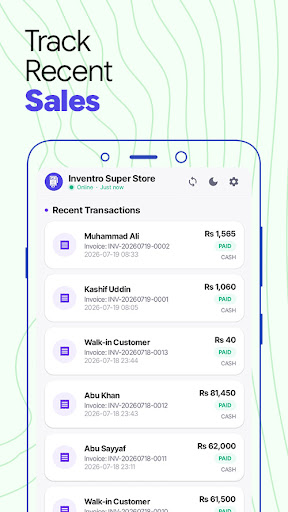
Browse your sales history, view sale details, payment status, and receipts.
📦 Inventory
Search your product catalog, check stock levels, and receive low stock alerts.
💼 Banking & Accounts
Monitor cash registers, bank balances, and business cash flow.
👥 Customer & Supplier Dues
Track customer dues, supplier payments, and view individual account ledgers.
📈 Reports
View business reports with charts and performance summaries.
📱 Offline Access
Your latest synced data is stored on your device, so you can view sales, inventory, accounts, and reports even when you're offline.
🔔 Notifications
Receive alerts for:
Low stock items
Customer dues
Large sales
🔒 Secure Pairing
Connect the app by scanning the QR code displayed in Inventro POS. Your data remains secure throughout the connection.
⚙️ Sync Options
Sync automatically every 30 seconds to 10 minutes, or switch to manual sync.
Note: Inventro Pocket is a companion app and requires Inventro POS (Desktop). It cannot be used on its own.
如何下载 Inventro Pocket APK
- 在 APK Downloader 输入应用包名
com.inventro.pocket。 - 选择您的设备架构(现代设备推荐选择 ARM64)。
- 点击 下载 获取合并后的 APK 文件。
- 传输并安装 APK 到您的 Android 设备上。
- 保持更新: 定期访问 APKDER.COM 以搜索并下载您最喜爱的应用的最新安全版本。
常见问题
是的!APKDER 提供的每次 APK 下载都经过严格的安全验证。我们验证 APK 文件的加密签名是否与开发者的官方签名匹配,确保 APK 是原始且未经修改的。
要安装它,您首先需要在 Android 设备的安全设置中启用“未知来源”。从 APKDER 下载 APK 文件后,点击它开始安装,并按照屏幕提示操作。
是的!一旦开发者发布 Inventro Pocket 的新版本,我们就会在 APKDER 上更新并发布。您只需下载并覆盖安装新的 APK,无需删除旧版本,也不会丢失应用数据。
是的。APKDER 允许您绕过地域限制并直接下载官方 APK 文件,即使该应用或游戏在您所在国家/地区物商店中未正式上架。
标准 APK 是单个安装包。而 XAPK 或 Split APK 则包含打包在一起 of 多个资源文件(如 OBB 扩展数据包或特定于设备的布局部件)。要安装它们,您可以单独下载拆分的包,或使用 Split APKs Installer (SAI) 等辅助工具。
安全与签名验证
此 APK 下载 100% 安全。我们验证文件的加密签名与官方开发者的凭据相匹配。无任何修改或广告注入。



