
Notta-Transcribe Audio to Text APK 截图


Notta-Transcribe Audio to Text 应用信息
下载来源
Device Configuration
Split APKs Installation Guide
某些应用以 Split APKs(打包在一起的多个 .apk 文件)形式分发以优化资源。标准的 Android 安装程序无法打开它们。
Notta-Transcribe Audio to Text 新版变化
改进: - 引用更清晰:AI 回答现在会显示临时文件和第三方文件的引用,帮助你更快核对来源,更安心地信任回答。 修复: - 我们还修复了一些问题,让 App 运行更流畅。
关于此应用 Notta-Transcribe Audio to Text
Notta: Your AI-Powered Notetaker for Smarter Workflows
Notta is an intelligent AI notetaking assistant that seamlessly transforms speech into text with outstanding precision and speed. Say goodbye to manual transcription—Notta simplifies the process, helping you effortlessly capture meeting minutes, interview insights, and important AI notes in real time.
Focus on the Conversation, Not the Notes—Let Notta Handle the Rest!
Key Features
- 98.86% transcription accuracy
- AI-powered summarization feature for instant insight
- Supports transcription in 58 languages
- Translate text into 42 languages
- Compatible with various file formats
- AI removes noise and delivers clear, high-quality audio
- Auto-sync across multiple devices
Who is Notta for?
- Salespeople and consultants managing frequent meetings or negotiations
- Remote workers, telecommuters, and those working from home
- Media professionals like journalists, writers, interviewers, and bloggers
- Multilingual speakers or students learning new languages
-Security Certifications
Notta obtained the SOC 2 Type II certification, and received ISO/IEC 27001:2013 certification for its information security management system, reinforcing the reliability and security of our services.
-Real-Time Transcription and Summarization
Start transcription with a single click on your PC, smartphone, or tablet. Notta converts spoken words into text in real-time, letting you focus on the conversation instead of taking notes. The AI summarization feature quickly extracts key points from meetings, lectures, and interviews.
- Integration with Hardware
By pairing with devices like Notta Memo or Zenchord, you can save and summarize audio recordings from various scenarios such as business meetings, interviews, and lectures directly to Notta. Notta Memo can also record audio independently, and once connected to the Notta app later, the recordings are automatically transferred.
-Multiple Transcription Options
Notta supports both live transcription and automatic transcription of pre-recorded files. Import audio or video files, and get a one-hour recording transcribed in about five minutes.
-Streamlined Editing Experience
Add bookmarks during transcription to mark important statements, making post-meeting edits faster and more efficient. Searching through recordings is effortless—simply enter keywords to locate specific segments.
-Easily Share Transcription Data
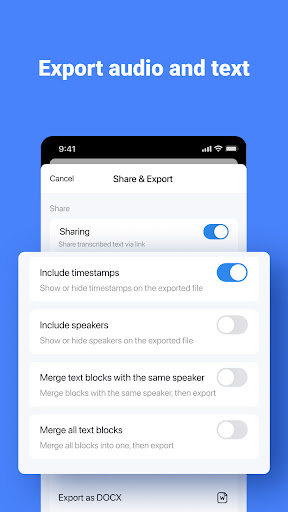
Save transcribed text in formats such as txt, docx, excel, pdf, or srt (subtitles). Export transcriptions with recorded timestamps and timelines, or share them via a link with colleagues and friends.
-Automatic Translation for Global Meetings
Notta supports 58 languages for transcription and can translate text into 42 languages instantly. This feature is ideal for international meetings, helping users understand unfamiliar terms and even improve language skills.
Plans and Pricing
Free Plan
- Real-time transcription: 3 minutes per recording
- Auto-transcription of web meetings (Zoom, Microsoft Teams, Google Meet, Webex): 3 minutes per session
- Import audio files and view the first 3 minutes of transcription for free
- Dictionary: Add up to 3 custom terms
Premium Plan
- 1,800 minutes of transcription per month
- Real-time transcription
- Import audio and video files
- Auto-transcription for web meetings (Zoom, Microsoft Teams, Google Meet, Webex)
- Export transcription data
- Dictionary: Add up to 200 custom terms
- Translate transcription into 42 languages
- Auto-proofreading
- Hide time markers
- Speed up audio playback
- Edit speaker names
- Unlock advanced features and enjoy extensive transcription capabilities.
With Notta, streamline your workflow and elevate your productivity!
Notta Terms of Service:https://www.notta.ai/en/terms
Privacy Policy: https://www.notta.ai/en/privacy
If you have any questions, please feel free to contact us at [email protected].
用户评论

刚开始使用的时候可以,但是后面根本无法正常使用,无法上传任何音频每次都是上传失败,只能上传一分钟以下的,不管使用任何方法都无法解决,根本就像当于使用不了这个软件,没有解决方法,官方能回复我吗?

呃,不太明白,我想试试实时转录当前正在播放的音频,我一点开始转录,他就自动把我正在播放的音频暂停了,我一播放音频,转录就暂停了。转录和音频播放只能有一个在运行,不能同时进行,这怎么实时转录呢。我试过另一个irecord,人家没问题

这个工具最吸引我的是它能够整理我以往录音的音频,将他们都转成文稿,然后再转成我需要的文本格式,能够节约很多很多的时间

账号没法删除,app按键无效,网页上没有帮助中所说的取消订阅,到期了不停的发续费邮件骚扰非常烦人
如何下载 Notta-Transcribe Audio to Text APK
- 在 APK Downloader 输入应用包名
com.langogo.transcribe。 - 选择您的设备架构(现代设备推荐选择 ARM64)。
- 点击 下载 获取合并后的 APK 文件。
- 传输并安装 APK 到您的 Android 设备上。
- 保持更新: 定期访问 APKDER.COM 以搜索并下载您最喜爱的应用的最新安全版本。
常见问题
是的!APKDER 提供的每次 APK 下载都经过严格的安全验证。我们验证 APK 文件的加密签名是否与开发者的官方签名匹配,确保 APK 是原始且未经修改的。
要安装它,您首先需要在 Android 设备的安全设置中启用“未知来源”。从 APKDER 下载 APK 文件后,点击它开始安装,并按照屏幕提示操作。
是的!一旦开发者发布 Notta-Transcribe Audio to Text 的新版本,我们就会在 APKDER 上更新并发布。您只需下载并覆盖安装新的 APK,无需删除旧版本,也不会丢失应用数据。
是的。APKDER 允许您绕过地域限制并直接下载官方 APK 文件,即使该应用或游戏在您所在国家/地区物商店中未正式上架。
标准 APK 是单个安装包。而 XAPK 或 Split APK 则包含打包在一起 of 多个资源文件(如 OBB 扩展数据包或特定于设备的布局部件)。要安装它们,您可以单独下载拆分的包,或使用 Split APKs Installer (SAI) 等辅助工具。
安全与签名验证
此 APK 下载 100% 安全。我们验证文件的加密签名与官方开发者的凭据相匹配。无任何修改或广告注入。
