

Contacts APK 截图



Contacts 应用信息
下载来源
Device Configuration
Split APKs Installation Guide
某些应用以 Split APKs(打包在一起的多个 .apk 文件)形式分发以优化资源。标准的 Android 安装程序无法打开它们。
关于此应用 Contacts
My Contacts: Address Book - Your Smartest Way to Call Faster!My Contacts: Address Book is the ultimate contacts manager you will find. It is an incredible experience working with the Contacts app on Android, that has Caller ID and Spam Protection. It offers quick clean dialing, advanced app organization, and responsive control to keep your communication secure.
📄 Features of My Contacts Address Book:📄
📞 Real-time Caller ID to identify unknown numbers before you pick up;
📞 Spam Detection that automatically flags telemarketers and potential scams;
📞 Spam Blocking to stop unwanted callers from reaching you again;
📞 Fast Call Dialer to help you make calls with quick ease;
📞 Phone Dialer with clean design;
📞 Advanced Smart Search feature for the My Contacts Address Book app;
📞 Overview of recent calls through the Easy Dialer App;
📞 My Contacts Address Book: Phone Contacts App For Android provides tools for history management and contact syncing;
📞 Simple batch import and export to and from your contacts;
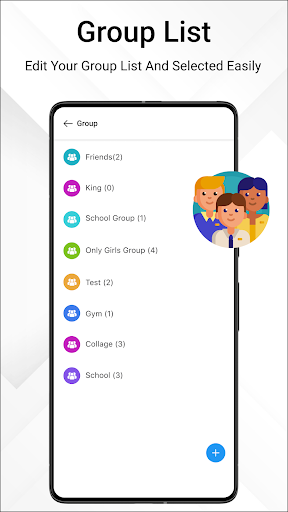
📞 Easy group creation and organization with a single click;
📞 Backup and recovery support for your contacts for safety and security.
Your Complete Android Calling Experience!This app integrates all your details keeping you up to date and one name search away. With Spam Detection working in the background, your Android Contacts experience becomes safer and easier. Fast synced details and Easy Dialer accessibility work with your daily calls to keep your Phone Dialer experience seamless and protected.
Smart Contact Tools:📱
Easily store, protect, and organize your contact list as you want with this amazing software. With Caller ID functionality, you’ll never have to wonder who is calling again. Favorites and Groups stay synced to your Phone Contacts App For Android and Easy Dialer to streamline one-handed navigation through your recent calls.
Backup & Restore Made Easy:🔄
My Contacts: Address Book has your back with VCF file backup and imports like magic. When switching to a new phone or retrieving lost details, the Phone Contacts App For Android handles everything with fast ease.
Organizing Into Groups:⭐
My Contacts: Address Book allows quick grouping for easier texting and calling. Managing your favorites is made easy with the layout of Phone Contacts App For Android and Call Dialer shortcuts. With the Easy Dialer you can switch groups with no issue.
Instant Action Call Screen:📞
With My Contacts: Address Book and its Spam Blocking features, you can silence nuisance callers directly from the call screen. With every function of the Call Dialer you will be guaranteed quick call backs and uninterrupted transitions in your call log.
Tools for your Contacts:⚙️
Remove duplicates, structure your entries, and transfer contacts with precision. Phone Contacts App For Android makes syncing your contacts easy and My Contacts: Address Book allows you to text or vCard transfer with ease.
Start Using My Contacts: Address Book and Upgrade Your Calling Today!With Caller ID, Spam Detection, and Blocking, My Contacts: Address Book gives neat and easy-to-access complete control over everyday communication. Phone Dialer, Easy Dialer, and any Call Dialer feature, you will be able to do complete control over everyday communication. My Contacts: Address Book gives you the complete Phone Contacts App For Android and the experience is organized, secure, and easy to navigate.
Why We Request Certain PermissionsTo ensure the app works as intended and provides its core functionalities (delete, backup, and restore call logs), we require the following permissions:
READ_CALL_LOG permission to take backups & restore call logs and also fetch users recent call log history.
WRITE_CALL_LOG: Enables the app to restore and manage call history by writing logs back to your device.
Please note: **we do not collect or share any personal data**. All access stays on your device.
如何下载 Contacts APK
- 在 APK Downloader 输入应用包名
com.musicplayer.indianmusicplayer。 - 选择您的设备架构(现代设备推荐选择 ARM64)。
- 点击 下载 获取合并后的 APK 文件。
- 传输并安装 APK 到您的 Android 设备上。
- 保持更新: 定期访问 APKDER.COM 以搜索并下载您最喜爱的应用的最新安全版本。
Contacts APK 概览
在 APKDER 免费下载由 DOSA Apps 开发的 Android 版 Contacts 最新官方 APK 安装包。下载官方 Contacts (com.musicplayer.indianmusicplayer) APK 更快速、更简单且对您的 Android 设备更安全。
常见问题
是的!APKDER 提供的每次 APK 下载都经过严格的安全验证。我们验证 APK 文件的加密签名是否与开发者的官方签名匹配,确保 APK 是原始且未经修改的。
要安装它,您首先需要在 Android 设备的安全设置中启用“未知来源”。从 APKDER 下载 APK 文件后,点击它开始安装,并按照屏幕提示操作。
是的!一旦开发者发布 Contacts 的新版本,我们就会在 APKDER 上更新并发布。您只需下载并覆盖安装新的 APK,无需删除旧版本,也不会丢失应用数据。
是的。APKDER 允许您绕过地域限制并直接下载官方 APK 文件,即使该应用或游戏在您所在国家/地区物商店中未正式上架。
标准 APK 是单个安装包。而 XAPK 或 Split APK 则包含打包在一起 of 多个资源文件(如 OBB 扩展数据包或特定于设备的布局部件)。要安装它们,您可以单独下载拆分的包,或使用 Split APKs Installer (SAI) 等辅助工具。
安全与签名验证
此 APK 下载 100% 安全。我们验证文件的加密签名与官方开发者的凭据相匹配。无任何修改或广告注入。


