


下载来源
Device Configuration
Split APKs Installation Guide
某些应用以 Split APKs(打包在一起的多个 .apk 文件)形式分发以优化资源。标准的 Android 安装程序无法打开它们。
新版变化
We’re constantly making this app better. Find new features and enhancements in this release, along with a few fixes.
关于此应用
Screen Recorder: Facecam - Record, Capture, and Share Your Screen and Emotions!
Introducing Screen Recorder: Facecam, the all-in-one screen capture solution for anyone looking to effortlessly capture and share content, apps, gaming action, and even their reactions in real-time! With a powerful array of features and a user-friendly interface, this camera recorder app revolutionizes recording, making it faster and easier than ever! 📽️
📸 Record Screen - Facetime Recorder! 📸
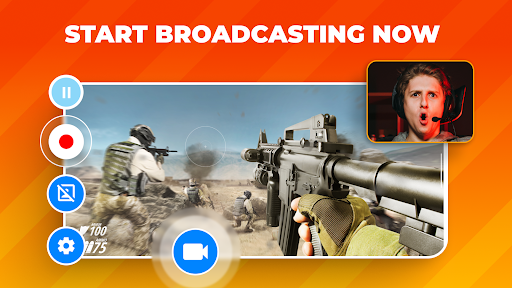
Screen Recorder: Facetime Recorder lets you capture what you are playing and yourself using the camera recorder in real-time. With the Facetime recorder option, your face, emotions, and reactions can be recorded in a customizable overlay window, which you can resize and reposition to your liking.
Video Capture Key Features:
✅ Simultaneous Facecam and screen recording;
✅ Camera Recorder - UHD, HD, and SD screen recording options;
✅ Choose between the device microphone or internal audio;
✅ Video Capture - Customizable Facecam overlay;
✅ Record games in unlimited recording length;
✅ Video Recorder with quick and easy sharing options!
🖥️ Flexible Screen Recording Options! 🖥️
We offer multiple screen recording quality options, including UHD, HD, and SD. Whether you need top-notch quality for professional presentations or just capturing some casual gameplay, this video recorder has got you covered. You can decide whether to record audio from your device's microphone or utilize internal audio, giving you complete control over your content.
🎮 Record Game and App Play! 🎮
Gamers, this one's for you! Screen Recorder: This Camera Recorder is the perfect video recorder and screen capture tool to record game sessions and share your epic wins, strategies, and reactions. Record screen and showcase your gaming prowess and easily build your online presence.
📢 Unlimited Video Capture Length! 📢
Are you worried about time constraints? With our video capture app, you won't have to be! Enjoy unlimited recording length with this Video Recorder, ensuring you can screen capture every moment, whether a short tutorial or an extended gaming session.
🔗 Record Screen And Easily Share! 🔗
Once you've finished screen recording, the Video Recorder - Record Screen app simplifies the sharing process. Share your video capture content with friends, family, or your online audience.
Enjoy The Wonders Of Screen Recording!
Screen Recorder: Facetime Recorder is the ultimate screen capture and video recorder tool, whether creating instructional videos, sharing gameplay, or capturing Facetime moments. Capture, create, and share like never before with Screen Recorder: Facecam. Download the Screen Recorder app today and start recording your apps, games, and Facetime moments confidently and easily. It's time to take your content to the next level! 🌟
用户评论

支持1080P以上分辨率,这个在谷歌商店极为罕见。但是不支持更改保存路径,不支持屏幕方向,打游戏最后给我搞成竖屏的,确实是个人才。订阅费还贼贵,更确定是个人才了

以前是免费的很好用也一直用了很久,现在居然收费了。。。什么都限制了有点失望

没有晃动停止录制功能,非16:9屏幕的手机分辨率不适配,会强制输出16:9比例的视频,导致视频上下出现黑边。

录屏录不到后面 直接卡死
如何下载 Screen Recorder: Facecam Audio APK
- 在 APK Downloader 输入应用包名
com.rec.screen。 - 选择您的设备架构(现代设备推荐选择 ARM64)。
- 点击 下载 获取合并后的 APK 文件。
- 传输并安装 APK 到您的 Android 设备上。
- 保持更新: 定期访问 APKDER.COM 以搜索并下载您最喜爱的应用的最新安全版本。
安全与签名验证
此 APK 下载 100% 安全。我们验证文件的加密签名与官方开发者的凭据相匹配。无任何修改或广告注入。


