



下载来源
Device Configuration
Split APKs Installation Guide
某些应用以 Split APKs(打包在一起的多个 .apk 文件)形式分发以优化资源。标准的 Android 安装程序无法打开它们。
新版变化
◆ Improvements and bug fixes
If you have questions, suggestions or problems, please contact [email protected].
关于此应用
SafeInCloud Password Manager allows you to keep your logins, passwords, and other private info safe and secure in an encrypted database. You can synchronize your data with another phone, tablet, Mac or PC via your own cloud account.
KEY FEATURES
◆ Easy to Use
◆ Material Design
◆ Black Theme
◆ Strong Encryption (256-bit Advanced Encryption Standard)
◆ Cloud Synchronization (Google Drive, Dropbox, Microsoft OneDrive, NAS, WebDAV)
◆ Login with Fingerprint, Face, Retina
◆ Autofill in Apps
◆ Autofill in Chrome
◆ Browser Integration
◆ Wear OS App
◆ Password Strength Analysis
◆ Password Generator
◆ Free Desktop App (Windows, Mac)
◆ Automatic Data Import
◆ Cross-Platform
EASY TO USE
Try it yourself and enjoy an easy-to-use yet powerful user interface.
MATERIAL DESIGN
SafeInCloud was completely redesigned to match new Material Design user interface language by Google. In addition to the standard Light theme SafeInCloud also has a Dark theme option to help you saving a significant amount of battery life.
STRONG ENCRYPTION
Your data is always encrypted on a device and in a cloud with a strong 256-bit Advanced Encryption Standard (AES). This algorithm is used by the U.S. Government for protection of a top secret information. AES is also widely adopted worldwide and became the de facto encryption standard.
CLOUD SYNCHRONIZATION
Your database is automatically synchronized with your own cloud account. Thus you can easily restore your entire database from a cloud to a new phone or computer (in case of a loss or an upgrade). Your phone, tablet and computer are also automatically synchronized between each other via a cloud.
LOGIN WITH FINGERPRINT
You can instantly unlock SafeInCloud with a fingerprint on devices with a fingerprint sensor. This feature is available on all Samsung devices. Devices from other manufacturers should have Android 6.0 or higher.
AUTOFILL IN APPS
You can autofill login and password fields into any app on your phone directly from SafeInCloud. You don't need to copy and paste them manually.
AUTOFILL IN CHROME
You can autofill logins and passwords on webpages in Chrome. For that you should enable SafeInCloud Autofill service in the phone's Accessibility settings.
WEAR OS APP
You can put some selected cards on your wrist to easily access them on the run. These could be your credit card PINs, door and locker codes.
PASSWORD STRENGTH ANALYSIS
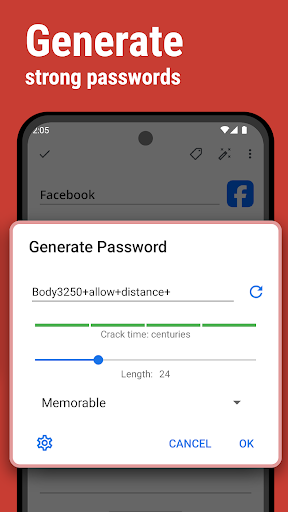
SafeInCloud analyses your password strengths and shows a strength indicator next to each password. The strength indicator displays an estimated crack time for a password. All cards with weak passwords are marked with a red sign.
PASSWORD GENERATOR
The password generator helps you generating random and secure passwords. There is also an option to generate memorable, but still strong passwords.
FREE DESKTOP APP
Download a free Desktop application for Windows or Mac OS from www.safe-in-cloud.com to be able access your database on your computer. The Desktop application also makes data entry and editing fast and easy using a hardware keyboard.
AUTOMATIC DATA IMPORT
The Desktop application can automatically import your data from another password manager. You don't need to manually reenter all your passwords.
CROSS PLATFORM
SafeInCloud is available on the following platforms: Mac (OS X), iOS (iPhone and iPad), Windows, and Android.
用户评论

这个审美怎么回事,图标越改越土,受不了了啊,还没第一版蓝色的好看,变成大红色就算了,现在又是亮晶晶的大红色,另一个金灿灿的,是怕人家不知道我用了密码管理器吗?能不能低调一点,安安静静做一个实用工具,整这么花哨干啥?

无法理解,明明当初都是相同的功能相同的价格只是内购和直接付费的区别,结果另一个app无痛升级新版,这个app就只能被抛弃,反正付费用户不如狗。也别说什么这里还会正常更新不影响使用之类的鬼话,用小脑想想也知道有了新版以后肯定主力就放在新版上了

我认识的所有人只有我用Google Play,所以家庭版我纯粹是为了支持一下,可以说是方方面面都特别好,除了一些实现方式不是很符合中国习惯,到这不重要毕竟这是国际得。 但之所以给4分是因为很多App登陆之后的,只有小部分会提示保存帐号密码到Safe,希望保存帐号密码这里可以继续完善一下,真的很棒,保留1分作为进步空间

这款密码管理应用功能强大,能够满足用户多样化的密码存储需求。它支持多平台同步,让您随时随地都能访问自己的密码。高度自定义的设置选项,让您可以根据个人习惯调整应用的各项功能。 这款应用采用先进的加密技术,有效保障您的密码安全。简洁直观的界面设计,即使是初次使用者也能轻松上手。 它还支持自动填充密码功能,大大提高了登录效率。此外,应用还会定期提醒您更新密码,增强账户安全性。 总而言之,这是一款值得推荐的优秀密码管理应用。
如何下载 SafeInCloud 1 APK
- 在 APK Downloader 输入应用包名
com.safeincloud。 - 选择您的设备架构(现代设备推荐选择 ARM64)。
- 点击 下载 获取合并后的 APK 文件。
- 传输并安装 APK 到您的 Android 设备上。
- 保持更新: 定期访问 APKDER.COM 以搜索并下载您最喜爱的应用的最新安全版本。
安全与签名验证
此 APK 下载 100% 安全。我们验证文件的加密签名与官方开发者的凭据相匹配。无任何修改或广告注入。


