
下载来源
Device Configuration
Split APKs Installation Guide
某些应用以 Split APKs(打包在一起的多个 .apk 文件)形式分发以优化资源。标准的 Android 安装程序无法打开它们。
相关应用




新版变化
[16.2.44]
- 2x2 widget has been added.
- You can now check the song order in the current playlist when playing randomly.
关于此应用
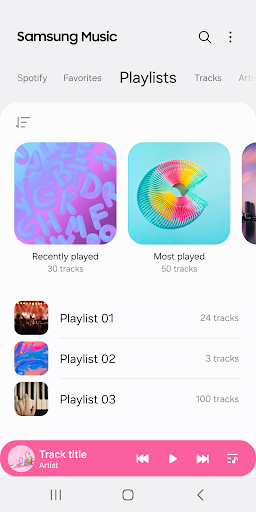
Samsung Music is optimized for Samsung android device and provides a powerful music play functionality and the best user interface.
Key Features
1. Supports playback of various sound formats such as MP3, AAC, FLAC.
(Supported file formats may vary depending on the device.)
2. Helps to effectively manage song lists by categories.(Track,Album,Artist,Genre,Folder,Composer)
3. Provides a clean and intuitive user interface.
4. The Samsung music shows recommendation of playlists from Spotify. You can find Spotify recommendation music by Spotify tab and search Spotify music you’ll love.
(The Spotify tab is only available in countries where Spotify is on service.)
For further inquiries about Samsung Music, please contact us via the following methods.
* Samsung Music App > More (3 dot) > Settings > Contact US
(In order to use the "Contact us" feature, the Samsung Members app must be installed on the device.)
*** Required App Permissions ***
Below mandatory permission is required for basic features of Samsung Music.
Even if optional permission are denied, basic features may work properly.
[Mandatory Permission]
1. Music and Audio(Storage)
- Allows storing and playing music and audio files
- Allows the player to read data from SD card.
[Optional Permission]
2. Notifications
- Provide notifications related to Samsung Music.
3. Phone : Korean devices only.
- Verify your phone when using the music service.
如何下载 Samsung Music APK
- 在 APK Downloader 首页 输入应用包名
com.sec.android.app.music。 - 选择您的设备架构(现代设备推荐选择 ARM64)。
- 点击 下载 获取合并后的 APK 文件。
- 传输并安装 APK 到您的 Android 设备上。
- 保持更新: 定期访问 APK Downloader 以搜索并下载您最喜爱的应用的最新安全版本。
安全与签名验证
此 APK 下载 100% 安全。我们验证文件的加密签名与官方开发者的凭据相匹配。无任何修改或广告注入。