
下载来源
Device Configuration
Split APKs Installation Guide
某些应用以 Split APKs(打包在一起的多个 .apk 文件)形式分发以优化资源。标准的 Android 安装程序无法打开它们。
相关应用




新版变化
- RV2800/RV2900: Improved robot status reliability and consistency
- RV2800/RV2900: Improved map display and carpet detection during editing
- RV2800/RV2900: Improved Bluetooth connection stability
- RV2700: Improved mission status display and notifications
- Added Simplified Chinese language support
- General performance improvements and bug fixes
关于此应用
Meet Your Ultimate Cleaning Companion
Use the SharkClean® to schedule cleans, customize maps, set no-go zones, monitor performance, and more. Whether you're at home, at work, or on vacation, your floors will stay effortlessly clean.
Key Features:
UV Stain Detect™: Illuminates invisible stuck-on messes to see what you can't and cleans what other robots don't. After each run, the robot automatically revisits each detect spot to make sure nothing was left behind. (PowerDetect UV Reveal only)
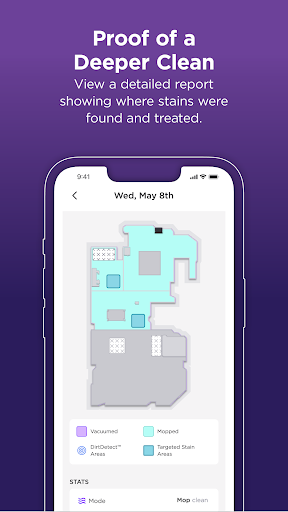
Proof of a deeper clean: View a detailed report showing where stains were found and targeted. (PowerDetect UV Reveal only)
Spot cleaning: Don't need a whole-home clean? Send your robot to directly target a specific mess.
Custom power and water flows: You can choose the power and water flow levels that work best for your home.
Live robot tracking: See exactly where your robot is cleaning whenever you want.
Schedule cleans by room: You pick when and where, then the robot handles the rest.
Smart home linking: Easily connect to Alexa or Google Home and start cleaning with voice commands.
Requirements:
Shark® Wi-Fi-Connected Robotic Vacuum
Models supported: 700, 800, 900, 1000, 2000, 2100 (Navigator), 2300 (Matrix), 2400 (Matrix 2-in-1), 2500 (AI Ultra), 2600 (Matrix Plus 2-In-1), 2700 (Stratos), 2800 (PowerDetect, PowerDetect 2-in-1), 2900 (PowerDetect ThermaCharged), 3000 (UV Reveal PowerDetect).
Wi-Fi with 2.4GHz band support.
Supported OS:
Android 8, 9, 10, 11, 12, 13, 14, 15 & 16
For U.S. support, visit SharkNinja | Home Appliances, Cleaning Solutions, Beauty & More for additional information.
For E.U. support, visit Shark Clean for additional information.
*Google is a trademark of Google LLC.
**Alexa is a trademark of Amazon LLC.
如何下载 SharkClean APK
- 在 APK Downloader 首页 输入应用包名
com.sharkninja.shark。 - 选择您的设备架构(现代设备推荐选择 ARM64)。
- 点击 下载 获取合并后的 APK 文件。
- 传输并安装 APK 到您的 Android 设备上。
- 保持更新: 定期访问 APK Downloader 以搜索并下载您最喜爱的应用的最新安全版本。
安全与签名验证
此 APK 下载 100% 安全。我们验证文件的加密签名与官方开发者的凭据相匹配。无任何修改或广告注入。