下载来源
Device Configuration
Split APKs Installation Guide
某些应用以 Split APKs(打包在一起的多个 .apk 文件)形式分发以优化资源。标准的 Android 安装程序无法打开它们。
新版变化
- Fix crashes.
- Update music player.
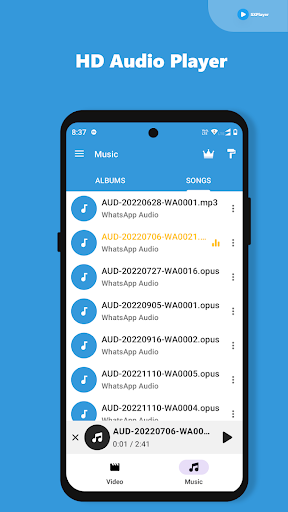
- you can listen music in offline.
- Support AVI and WEBM video formats.
- Added video swipe gestures to seek new video position.
- Added new features.
- Chrome cast support.
- Improved stability.
- Player animations added.
- Improved system stability.
- Support all video formats.
关于此应用
The ultimate Video Player, a sleek and powerful HD video player tailored for your Android device. Explore the world of high-definition and ultra-high-definition videos, as this app accommodates nearly all video formats with seamless playback. You won't need to worry about additional downloads for codecs - everything comes built-in.
Discover our all-in-one Video Player for Android!
Experience the full spectrum of your videos with support for:
✅ Subtitles,
✅ Teletext, and
✅ Closed Captions.
What's more, this player offers the convenience of handling multi-track audio and subtitles, giving you ultimate control over your viewing experience. ⭐⭐⭐⭐⭐
Fantastic All format Video Player, where original video resolutions shine without any buffering or delays. You can lock the screen and controls while your videos play to maintain focus on your content. And when you're captivated by a particular scene, sharing it with friends and on social networks is just a few taps away.
Adding subtitle files easily
Have external subtitle files (SRT) that you'd like to incorporate? No problem. This video player effortlessly recognizes both SRT and TXT files from your device's internal storage, enhancing your viewing options.
Fantastic set of features:
👍 Seamlessly cast videos to your TV using Chromecast - Screen Mirroring made easy.
👍 Immerse yourself in Ultra HD video quality, accommodating 4K and a wide range of video formats.
👍 Enhance your viewing with the integrated subtitle downloader, allowing direct subtitle downloads on your Android device.
👍 Play all video formats, including MKV, MP4, M4V, AVI, MOV, 3GP, FLV, WMV, RMVB, TS, and many more.
👍 Take full control with easy video management and sharing options.
👍 Navigate and control your video's progress during playback.
👍 Effortlessly browse through your folders and files directly within the app.
👍 Tailor your playback with multiple options, including auto-rotation, aspect-ratio, screen-lock, and more.
👍 Play videos and leverage Hardware acceleration and Extension mode(HW+) for enhanced performance.
👍 For late-night viewing, activate the Night Mode to reduce exposure to blue light, and enjoy the convenience of Quick Mute directly from the Player screen.
👍 Elevate your Android phone's video experience with the dedicated HD Video player.
👍 Immerse yourself in subtitles for videos that include them, with added support for multi-language audio switching during playback.
Your Media, Your Control: Your Go-To Media Player for Android!
That's not all, HD & UHD Video Player offers:
Volume Controls:
🌟 Fine-tune sound and volume levels to your preference.
🌟 Convenient swipe gestures provide immediate volume control.
Multi-Size Functionalities/ Screen Resize:
🌟Experience videos in their full glory with Full-size playback.
🌟 Choose your viewing perspective - Portrait, Landscape, or Automatic Mode.
Brightness Control:
🌟Effortlessly adjust video brightness with user-friendly brightness modes.
🌟Swipe gestures provide intuitive and quick brightness adjustments.
Play HD Videos and experience ultimate clarity.
-Disclaimer
Our app does not provide any preloaded video content. We don’t own, control or have any responsibility to any content uploaded shared or transmitted through the application. Subject to our EULA, the users are required to (i) refrain from adding any content that infringes upon the intellectual property rights of others, including but not limited to copyrights, trademarks, patents, or trade secrets; (ii) ensure that they have the necessary rights and permissions to use and share the content in the playlists; and (iii) avoid uploading or sharing any content that violates any applicable laws and regulations, including those related to privacy, data protection, and prohibited or restricted content; and are hosted.
用户评论

此软件有恶意自动扣费,大家千万别下载,我已经中招了一个月扣费4次累计500左右我甚至完全不知道

good
如何下载 Video Player All Format HD APK
- 在 APK Downloader 输入应用包名
com.special.videoplayer。 - 选择您的设备架构(现代设备推荐选择 ARM64)。
- 点击 下载 获取合并后的 APK 文件。
- 传输并安装 APK 到您的 Android 设备上。
- 保持更新: 定期访问 APKDER.COM 以搜索并下载您最喜爱的应用的最新安全版本。
常见问题
是的!APKDER 上托管的每个文件都经过严格的安全验证。我们验证其加密签名是否与开发者的官方签名匹配,确保应用未被修改或篡改。
要安装它,您首先需要在 Android 设备的安全设置中启用“未知来源”。从 APKDER 下载 APK 文件后,点击它开始安装,并按照屏幕提示操作。
是的!一旦开发者发布 Video Player All Format HD 的新版本,我们就会在 APKDER 上更新并发布。您只需下载并覆盖安装新的 APK,无需删除旧版本,也不会丢失应用数据。
安全与签名验证
此 APK 下载 100% 安全。我们验证文件的加密签名与官方开发者的凭据相匹配。无任何修改或广告注入。