
下载来源
Device Configuration
Split APKs Installation Guide
某些应用以 Split APKs(打包在一起的多个 .apk 文件)形式分发以优化资源。标准的 Android 安装程序无法打开它们。
相关应用




新版变化
- Bug fixes and performance improvements
关于此应用
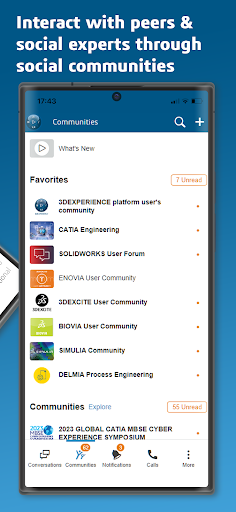
Created by Dassault Systèmes, 3DSwym app provides collaborative experiences for all Employees in Companies, connecting People, Data & Ideas, on the Cloud, from Smartphone to Tablet.
It allows anyone to discover the 3DEXPERIENCE platform :
- Connect with your 3DEXPERIENCE ID – create one for free if needed
- Access and contribute to Dassault Systèmes Brand communities social content (posts, videos, 3D and more) or to your own Communities
- Collaborate in live conversations, audio or video calls
- Receive platform related notifications on your mobile device
- Sketch your ideas, collaborate with whiteboards, become a 3D Story Teller !
- Navigate the Solutions portfolio
In addition to this, 3DEXPERIENCE platform customers can also pair their own platform and access their content.
Welcome to the 3DEXPERIENCE platform on mobile !
如何下载 3DSwym APK
- 在 APK Downloader 首页 输入应用包名
com.threeds.x3d.my3dexperience。 - 选择您的设备架构(现代设备推荐选择 ARM64)。
- 点击 下载 获取合并后的 APK 文件。
- 传输并安装 APK 到您的 Android 设备上。
- 保持更新: 定期访问 APK Downloader 以搜索并下载您最喜爱的应用的最新安全版本。
安全与签名验证
此 APK 下载 100% 安全。我们验证文件的加密签名与官方开发者的凭据相匹配。无任何修改或广告注入。