
下载来源
Device Configuration
Split APKs Installation Guide
某些应用以 Split APKs(打包在一起的多个 .apk 文件)形式分发以优化资源。标准的 Android 安装程序无法打开它们。



新版变化
⭐️ Thanks to some under-the-hood adjustments, special characters are now allowed in the names of projects, sections, and labels.
⭐️ Save yourself several taps by typing “!” in the task field to add reminders to your time-sensitive to-do’s.
⭐️ And many design updates to make the whole reminder experience clearer, faster, and more intuitive.
⭐️ Plus, the new, AI-powered Filter Assist will make creating filters a breeze.
💡 Tap What’s New in settings to learn more.
关于此应用
You have enough on your plate without fighting your productivity tools. Todoist is the planner and habit tracker that bridges personal and professional productivity, without the complexity tax.
Join 50+ million people and teams who trust Todoist as their second brain to organize work, life, and everything in between. Your notes, reminders, calendar events, and daily tasks finally have a simple planning center that's easy to use and impossible to outgrow.
–
Start a 7-day Pro trial or 14-day Business trial today
–
→ Turn chaos into clarity.
Clarity doesn't come from bloated software with a bunch of bells and whistles; it comes from getting everything out of your head and into a tool that's simple to set up and easy to use. Todoist helps you organize what matters so you can focus on doing, not configuring.
→ Capture naturally.
Your brain is for having ideas, not holding them.
› Ramble to record: Don't type, talk! Use your voice to describe your task in natural language, and watch Todoist instantly structure it in the right projects with the right due dates.
› Quick Add: The fastest way to add a new task, complete with dates, labels, reminders, and more. Just type "Submit report every Friday at 4pm #Work" and Todoist handles the rest.
→ Your personal planning center.
Build a productivity system that actually sticks. From daily tasks to habits you want to keep, Todoist gives you the professional tools you need without the "enterprise" learning curve.
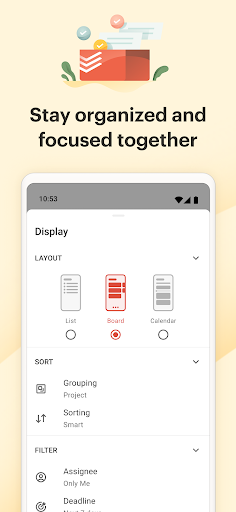
▪ Flexible views: View any project as a list for quick scanning, as a board for visual workflow, or as a calendar to plan your week. Switch between views instantly to match how you think and work.
▪ Built-in habit tracker: Recurring tasks help you build powerful habits. From "Pay rent on the 1st" to "Team Sync every Monday," never let a commitment slip.
▪ Project clarity: Organize anything from a home renovation to a product launch with sub-tasks and sections. Use labels to filter across projects, and set priorities to focus on what matters.
→ Lightweight teamwork.
Most project tools require an education to use. Todoist is intuitive and simple from day one.
+ Delegate with ease: Share projects with anyone, assign tasks, and set deadlines. Everyone sees what to do and when.
+ Stay in sync: Real-time comments and notes keep communication all in one place, not scattered across emails, docs, and DMs.
→ Built for Android.
Your planner works seamlessly with your phone, Wear OS watch, and beyond. Check your daily tasks from your home or lock screen widget, capture tasks on the go with Quick Add tile, and get reminders when you need them, right where you are.
→ Works Where You Work.
Todoist syncs instantly across Android phone, Android tablet, and every other device, browser or email add-on you use. Capture ideas on your phone, plan on your on tablet, and execute on your desktop with everything always in sync.
–
Questions? Visit our extensive help center at todoist.com/help
如何下载 Todoist: To Do List & Calendar APK
- 在 APK Downloader 首页 输入应用包名
com.todoist。 - 选择您的设备架构(现代设备推荐选择 ARM64)。
- 点击 下载 获取合并后的 APK 文件。
- 传输并安装 APK 到您的 Android 设备上。
- 保持更新: 定期访问 APK Downloader 以搜索并下载您最喜爱的应用的最新安全版本。
安全与签名验证
此 APK 下载 100% 安全。我们验证文件的加密签名与官方开发者的凭据相匹配。无任何修改或广告注入。