
下载来源
Device Configuration
Split APKs Installation Guide
某些应用以 Split APKs(打包在一起的多个 .apk 文件)形式分发以优化资源。标准的 Android 安装程序无法打开它们。




新版变化
• NEW: Sentry Actions by time — choose what your vehicle does at different times of day, from staying quiet overnight to honking during high-risk hours.
• Assorted improvements and fixes.
关于此应用
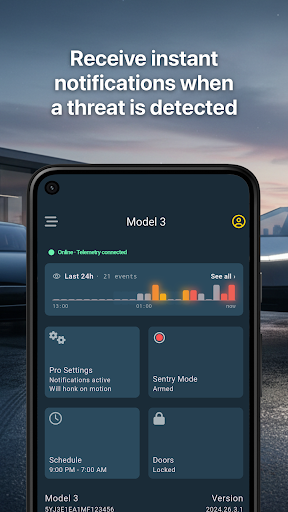
Sentry Pro keeps you informed and in control of your Tesla's security. Receive instant push notifications whenever Sentry Mode detects a threat to your vehicle.
KEY FEATURES
• Instant Notifications
Get alerted immediately when Sentry Mode is triggered. Never miss a security event, whether you're at home, at work, or traveling.
• Automatic Actions
Deter threats automatically. Configure your Tesla to flash lights, honk the horn, or play boombox sounds when a threat is detected.
• Scheduled Sentry Mode
Automatically turn Sentry Mode on and off at set times every day. Set it once to reduce battery drain during low-risk hours.
• All Tesla Models
Works with Model S, Model 3, Model X, Model Y, and Cybertruck. Supports all vehicles equipped with Sentry Mode.
• Fine-Grained Privacy Controls
You decide what data to share. Grant only the permissions you're comfortable with, and revoke them anytime.
• Per-Vehicle Settings
Customize notification sounds and automatic actions for each of your Tesla vehicles individually.
REQUIREMENTS
• Tesla vehicle with Sentry Mode capability
• Tesla account linked to your vehicle
• Active internet connection
SUBSCRIPTION
Sentry Pro offers a free trial. After the trial period, a subscription is required to continue receiving notifications and using automatic actions.
如何下载 Sentry Pro for Tesla APK
- 在 APK Downloader 首页 输入应用包名
eu.nlogn.sentrypro。 - 选择您的设备架构(现代设备推荐选择 ARM64)。
- 点击 下载 获取合并后的 APK 文件。
- 传输并安装 APK 到您的 Android 设备上。
- 保持更新: 定期访问 APK Downloader 以搜索并下载您最喜爱的应用的最新安全版本。
安全与签名验证
此 APK 下载 100% 安全。我们验证文件的加密签名与官方开发者的凭据相匹配。无任何修改或广告注入。