
下载来源
Device Configuration
Split APKs Installation Guide
某些应用以 Split APKs(打包在一起的多个 .apk 文件)形式分发以优化资源。标准的 Android 安装程序无法打开它们。
相关应用


新版变化
🪄 [Audio]: Denoise, adjust speed, and apply voice effects
🎵 [New]: 200+ new sounds effects & 30+ new songs
🌷 [Filters]: 10 packs trendy filters
✨ [Text]: New fonts for more creative options
💠 [Glitch & Effects]: Stack multiple same-type effects for richer visuals
🎬 [Watermark]: Now supports free removal
- Bug fixes and smoother experience
💡 Your feedback helps us make VideoCook better
📩 [email protected]
关于此应用
VideoCook is a powerful, easy-to-use video editor and video maker that offers a wide range of features, including music, filters, glitch effects, transitions, captions, and more. Whether you’re a beginner or a creator, VideoCook lets you transform everyday moments into viral content for TikTok, YouTube, Instagram, WhatsApp, and Facebook — all with no watermark, no ads, and completely free.
From trimming clips to removing backgrounds, VideoCook gives you all the tools you need to record, edit, and share your creative vision seamlessly.
🪄 ONE-TAP AI TOOLS
* AI Body Effects: Instantly enhance images and videos with AI presets
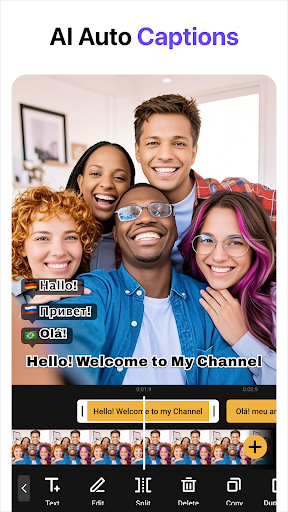
* Auto Captions: Let AI generate captions automatically
* Background Removal: Remove backgrounds in one tap
* Smart Tracking: Sync text and stickers with moving objects
* Smooth Slow-Mo: AI-powered slow-motion for smooth effects
🎥 BASIC VIDEO EDITING
* Trim, cut, and merge videos with high precision
* Adjust speed (0.2x to 100x) for smooth slow motion or time-lapse
* Crop or resize to fit any aspect ratio (1:1, 9:16, 16:9, etc.)
* Reverse, rotate, and flip clips
* Create slideshows or stop motion videos
🧠 ADVANCED VIDEO EDITOR
* Add keyframe animations to text, stickers, and video layers
* Picture-in-Picture (PIP) support for multi-layer edits and video collages
* Chroma key to remove backgrounds and create green screen effects
* Mask and blend modes for creative overlays
* Color picker to match your visual style perfectly
🎶 MUSIC, SOUND & VOICE
* Add built-in or custom music to your videos
* Extract audio from video clips
* Add voiceovers with fade-in/out and volume control
* Use sound effects for vlogs, memes, and more
✨ FILTERS, EFFECTS & GLITCH
* 100+ filters and trending glitch effects: VHS, RGB, X-ray, Retro, etc.
* Smooth video transitions: blur, zoom, fade, slide, etc.
* Customize video brightness, contrast, saturation, and more
📝 TEXT, STICKERS & MEMES
* Add text with 1000+ fonts and animated styles
* Subtitle your vlogs with auto-caption support
* Decorate with animated stickers, emojis, and trending GIFs
* Create memes and overlays with your own images
🔁 SOCIAL MEDIA EXPORT & SHARING
* Export videos in HD, up to 4K 60fps
* No watermark, no ads – just your content
* Share directly to TikTok, YouTube Shorts, Instagram Reels, WhatsApp & more
📸 MORE THAN A VIDEO EDITOR
Create eye-catching TikTok covers & social posts with powerful AI photo tools.
* AI Photo Enhancer: Turn blurry photos into HD & refine facial details
* AI Background Remover: Cut out subjects & export clean PNGs
🎉 WHY CHOOSE VIDEOCOOK?
Whether you're a casual user or aspiring content creator, VideoCook gives you all the tools you need to edit like a pro — glitch effects, music sync, auto captions, slow motion, collages, and more — without paying a dime.
Create viral clips in minutes. Download VideoCook now – free and watermark-free.
💌 Questions? Contact us
[email protected]
如何下载 Video Editor & Video Maker APK
- 在 APK Downloader 首页 输入应用包名
glitchvideoeditor.videoeffects.glitchvideoeffect。 - 选择您的设备架构(现代设备推荐选择 ARM64)。
- 点击 下载 获取合并后的 APK 文件。
- 传输并安装 APK 到您的 Android 设备上。
- 保持更新: 定期访问 APK Downloader 以搜索并下载您最喜爱的应用的最新安全版本。
安全与签名验证
此 APK 下载 100% 安全。我们验证文件的加密签名与官方开发者的凭据相匹配。无任何修改或广告注入。