
下载来源
Device Configuration
Split APKs Installation Guide
某些应用以 Split APKs(打包在一起的多个 .apk 文件)形式分发以优化资源。标准的 Android 安装程序无法打开它们。
相关应用


新版变化
General improvements
关于此应用
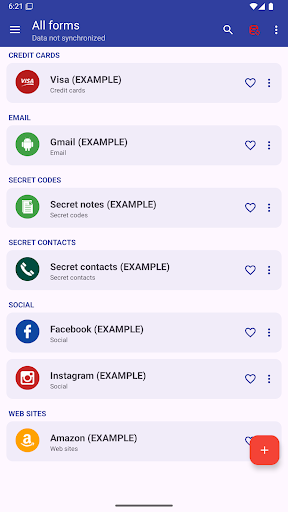
This app allows you to manage everything you need to keep secret: Password, Codes, Contacts, etc.
AES 256-bit encryption method was used, this is the most modern technology .
By automatic sync, you'll have all your passwords on all your Android devices and computer Windows, Linux and Mac.
MAIN FEATURES
➤ Access with fingerprint
➤ Sync with Google Drive and DropBox
➤ Desktop App (Windows, Mac & Linux)
➤ Password security analysis
➤ Password Generator
➤ Advanced search function
➤ Change app colors
➤ Automatic restore
➤ Auto lock
➤ Add your own custom icons
➤ Attach pictures and photographs, they will be encrypted and will be visible only within the application
➤ Add new categories
➤ Add new fields
➤ Creates PDF files with stored data to print on paper
➤ Material design
➤ Wear OS version
..and many more
AUTOMATIC SYNC:
Automatic synchronization lets you always have a backup of your passwords on a Cloud (
Also, with the same account, you can see your passwords in real time on all of your Android devices and Windows, Mac & Linux
ACCESS WITH FINGERPRINT:
Fingerprint access is an additional security method if you have a fingerprint and if your phone is compatible.
PASSWORD GENERATOR AND SECURITY ANALYSIS:
Within the app, a password generator is available, indicating the password security level. Also with the password generator you can check the password security you already have.
CUSTOM ICONS:
When you save a new password or other, you have the choice of over 110 icons, or easily insert your custom icon, which you can select from your phone's gallery or take a photo directly.
---------------------------------------------------------
Link to download the desktop version: https://www.2clab.it/passwordcloud
如何下载 Password Manager APK
- 在 APK Downloader 首页 输入应用包名
password.cloud。 - 选择您的设备架构(现代设备推荐选择 ARM64)。
- 点击 下载 获取合并后的 APK 文件。
- 传输并安装 APK 到您的 Android 设备上。
- 保持更新: 定期访问 APK Downloader 以搜索并下载您最喜爱的应用的最新安全版本。
安全与签名验证
此 APK 下载 100% 安全。我们验证文件的加密签名与官方开发者的凭据相匹配。无任何修改或广告注入。